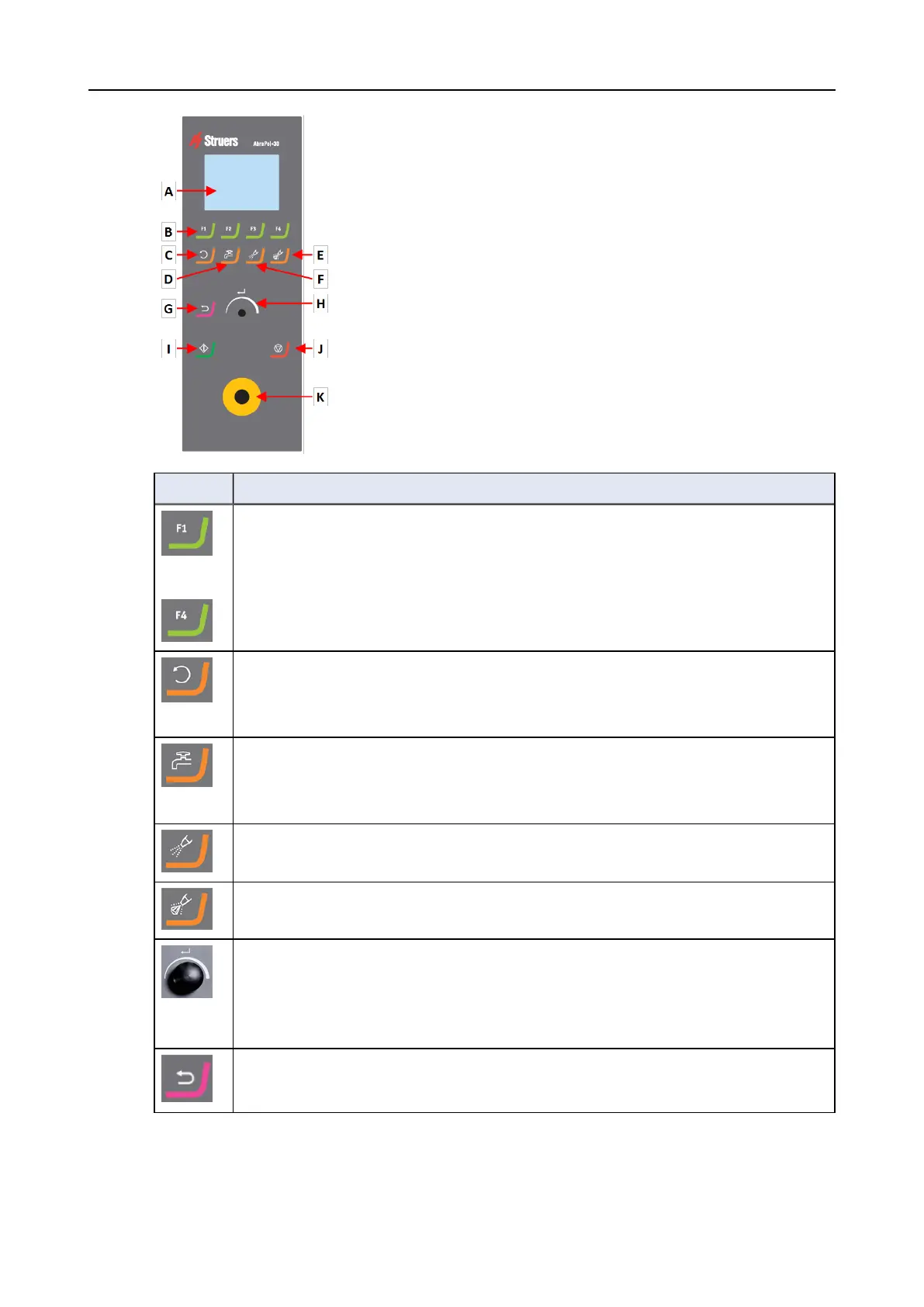
A Display
B Function keys - F1 to F4
C Disc rotation function
D Water function
E Flush function
F Lubricant function
G Abrasive function
H Back function
I Turn/Push knob
J Start button
K Stop button
L Emergency stop button
Button Function
to
Function key
• Press this button to activate controls for various purposes. See the bottom line of
the individual screens.
Disc rotation
• Starts rotation of the disc (Spin function).
• Press this button again to stop the rotation.
Water
• Activates the water flow.
• Remember to adjust the flow on the water tap.
Lubricant
• For manual dosing of lubricant.
Abrasive
• For manual dosing of abrasive.
The Turn/Push knob
• Turn the Turn/Push knob to move the focus on the screen and change steps and
setting. Press to toggle when only 2 options are available.
• Press the Turn/Push knob to select a function or save a selected setting.
Back
• Press this button to return to the previous screen or to cancel functions/changes.
22 AbraPol-30
6 Operating the device











 To Next Page