6.6.2 Starting the preparation process
1. Make sure that the splash ring is in place.
2. If needed, press Back until the Main menu screen is shown.
3. Select Struers methods in the Main menu.
4. Select Automatic preparation.
5. Select the Struers Methods menu.
6. Select the method you wish to use.
7. Place the required preparation surface on the MD-Disc.
8. Insert the specimen holder into the coupling.
9. Close the cover of the machine.
10. Press the Start button.
Recirculation (option)
The recirculation pump starts automatically when the process is started.
The preparation process
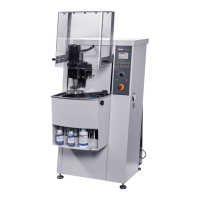
The display shows the status of the process as shown in
this example.
The green bar denotes the step currently running.
A Surface
B Suspension
C Lubricant
D Time/µ. The time shown in the green bar is the time
remaining.
6.6.3 Stopping the preparation process
The process stops automatically when the set time has elapsed.
If needed, you can stop the process earlier.
Stopping the machine
• Press the Stop button.
The process is paused.
To stop the process completely:
• Press the Stop button again
38 AbraPol-30
6 Operating the device











 To Next Page