OBD-II GENERAL SCAN TOOL
ENGINE (DIAGNOSTICS)
01
I
Number
of
emission-related Dowertrain trouble codes and
MIL
status
9.
OBD-Il
General Scan
Tool
A:
OPERATION
ONIOFF
1.
HOW TO USE OBD-II GENERAL SCAN
TOOL
04
I
Calculated engine load value
1) Prepare a general scan tool (OBD-II general
scan
tool) required by
SAE
J1978.
2)
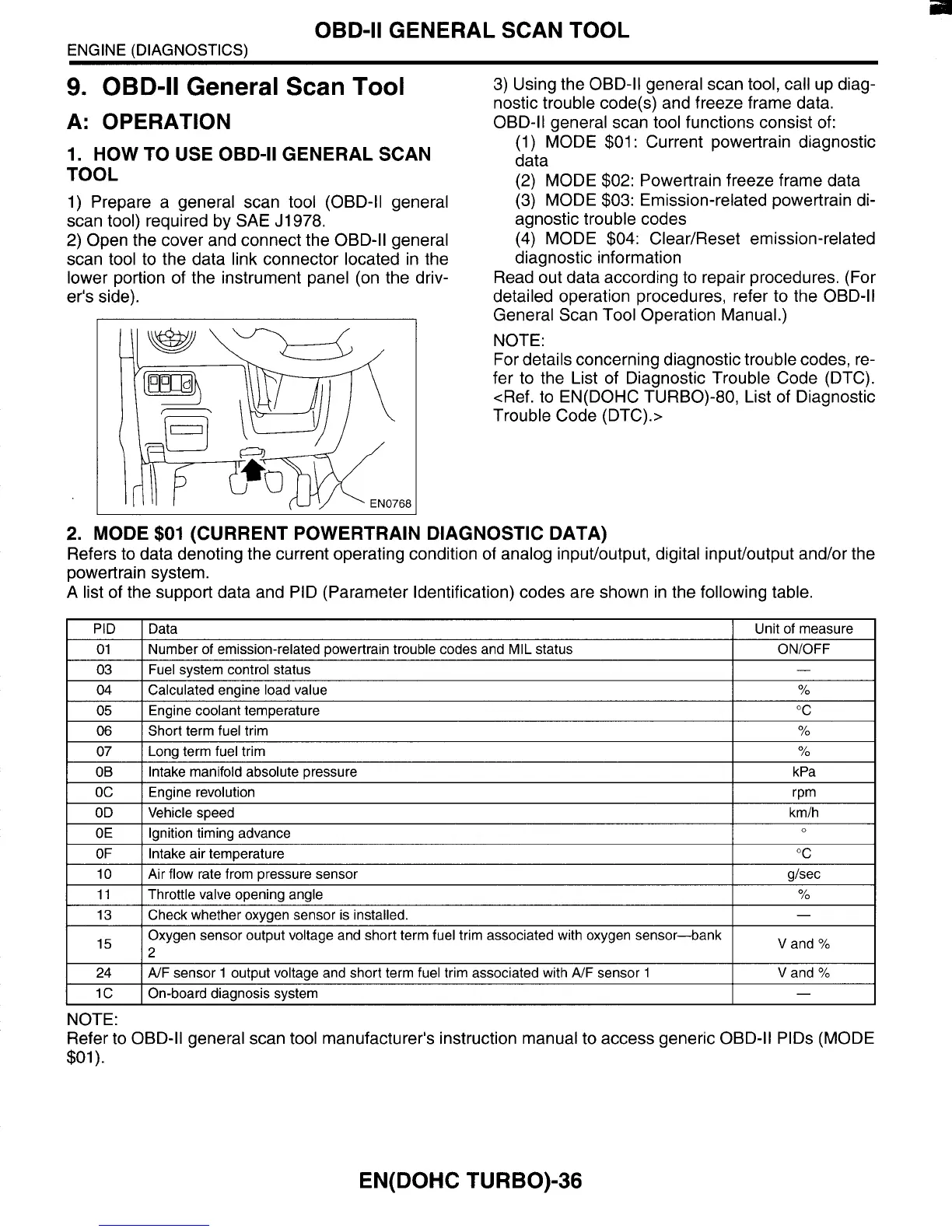
Open the cover and connect the OBD-II general
scan tool to the data link connector located in the
lower portion of the instrument panel (on the driv-
er's side).
YO
3)
Using the OBD-II general scan tool, call up diag-
nostic trouble code(s) and freeze frame data.
OBD-II general scan tool functions consist of:
(1)
MODE
$01
:
Current powertrain diagnostic
data
(2)
MODE
$02:
Powertrain freeze frame data
(3)
MODE
$03:
Emission-related powertrain di-
agnostic trouble codes
(4)
MODE
$04:
Clear/Reset emission-related
diagnostic information
Read out data according to repair procedures. (For
detailed operation procedures, refer to the OBD-II
General Scan Tool Operation Manual.)
NOTE:
For details concerning diagnostic trouble codes, re-
fer to the List of Diagnostic Trouble Code (DTC).
<Ref. to EN(D0HC TURBO)-80, List of Diagnostic
Trouble Code (DTC).>
05
I
Engine coolant temperature
2.
MODE
$01
(CURRENT POWERTRAIN
"C
DIAGNOSTIC DATA)
07
I
Long term fuel trim
%
I
-
I
03
I
Fuel svstem control status
I
OB
I
Intake manifold absolute Dressure
kPa
I
06
I
Short term fuel trim
I
%
I
OE
OF
10
11
13
Ignition timing advance
Intake air temperature "C
Air flow rate from pressure sensor
Throttle valve opening angle
%
Check whether oxvaen sensor is installed.
0
glsec
-
I
OC
I
Enaine revolution
I
rDm
I
l5
24
I
OD
I
Vehicle speed
I
kmlh
I
V
and
Yo
V
and
Yo
Oxygen sensor output voltage and short term fuel trim associated with oxygen sensor-bank
2
A/F sensor
1
output voltage and short term fuel trim associated with A/F sensor
1
1
C
I
On-board diagnosis system
-
NOTE:
Refer
to
OBD-II general scan tool manufacturer's instruction manual to access generic OBD-II PlDs (MODE
$01
).
EN(D0HC TURBO)-36














 To Next Page