User Manual 2 System Solution
7
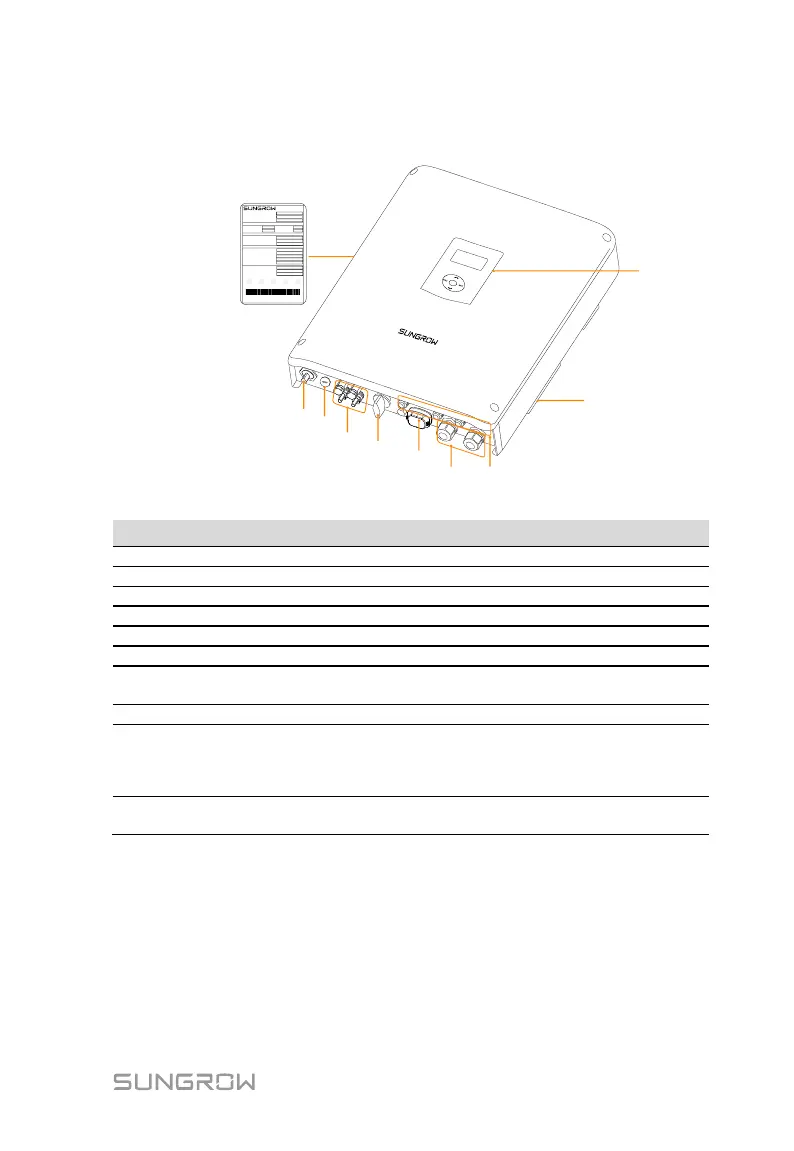
The following figure shows the inverter appearance, which is for reference only.
The actual product that you receive may differ.
10
Type
S/N
A**********
SH3K6
PV Input
AC Input and output
WWW.SUNGROWPOWER.COM MADE IN CHINA
Grid Monitoring: VDE 0126-1-1 VDE-AR-N 4105
Battery
xxxxxxxxx
Password
**********
600V
xxxxxxxxx
xxxxxxxxx
xxxxxxxxx
xxxxxxxxx
xxxxxxxxx
xxxxxxxxx
xxxxxxxxx
xxxxxxxxx
xxxxxxxxx
xxxxxxxxx
xxxxxxxxx
xxxxxxxxx
xxxxxxxxx
xxxxxxxxx
xxxxxxxxx
xxxxxxxxx
xxxxxxxxx
xxxxxxxxx
xxxxxxxxx
xxxxxxxxx
xxxxxxxxx
xxxxxxxxx
xxxxxxxxx
xxxxxxxxx
xxxxxxxxx
xxxxxxxxx
xxxxxxxxx
xxxxxx
xxxxxx
SUNGROW POWER SUPPLY CO., LTD.
1
2
3
4
6 7
9
8
5
Fig. 2-1 Inverter Appearance
AC terminal to the utility grid.
Positive and negative DC input connectors.
To disconnect the DC current safely.
To connect the Wi-Fi module (optional).
RS485, Ethernet, CAN, AI, DI and DO.
The display and four buttons can be used to
access current operating data or change
inverter settings.
Clearly identify the product, including the SN,
password, technical data, certifications, etc.



 To Next Page