MC50 Integrator Guide8-16
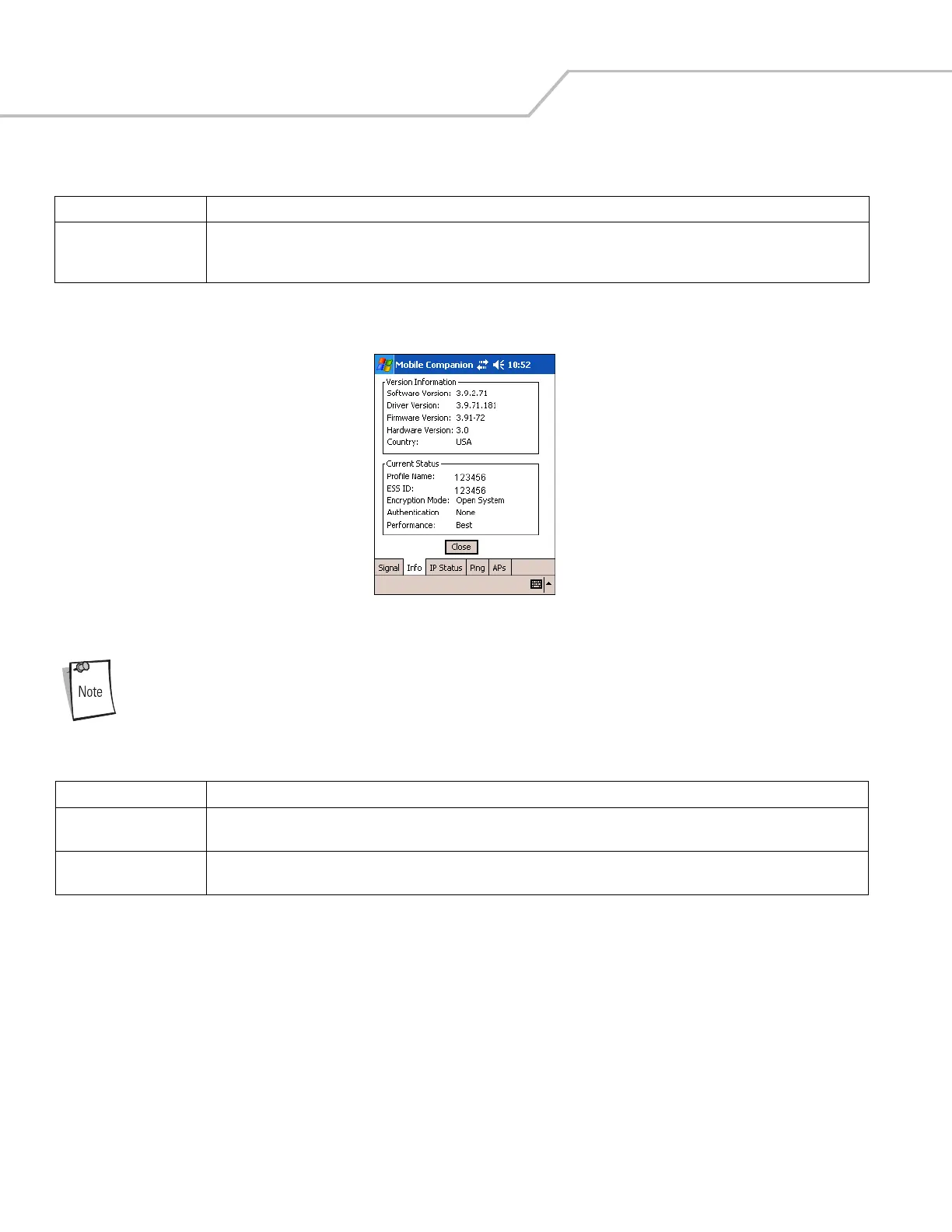
2. Select the Info tab to view the mobile computer’s current software and driver revision data as well as the operating
parameters of the current profile.
Figure 8-20. Mobile Companion - Info Tab
The Version and Current Status information on this window can vary.
Signal Displays the Relative Signal Strength Indicator (RSSI) of the signal transmitted between the AP and mobile computer. As long as
the LED to the right of the graph is green the AP association is not jeopardized. If the LED is red, an association with a different AP
could be warranted to improve the signal.
Table 8-10. Info Fields
Field Description
Version Information Displays Mobile Companion software, driver, firmware, and hardware versions as well as country information. This data is
consistent for the mobile computer regardless of the current profile.
Current Status Displays the mobile computer’s current Profile Name, ESSID, and Encryption mode. Mobile computer performance is displayed
using a verbal indicator of signal strength. Mobile computer operating information differs depending on the current profile.
Table 8-9. Signal Fields (Continued)
Field Description



 To Next Page