Creating and Loading Hex Images 6-9
Building the Image
After creating the script, build the hex image defined by the script.
As part of the build, TCM checks the script to verify that all files referenced in the script exist. This check is important for previously
created scripts to ensure that files referenced in the script are still in the designated locations.
To build scripts:
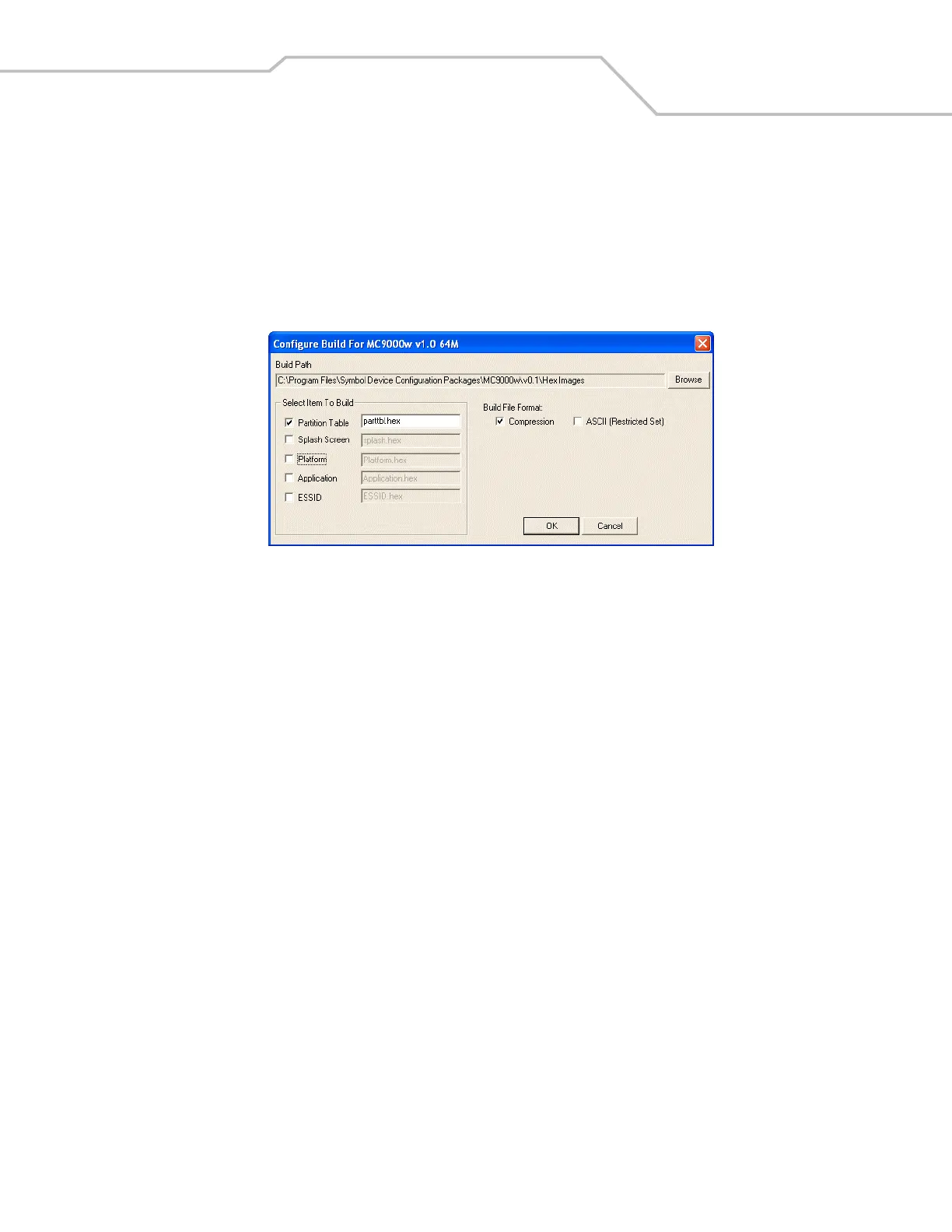
1. Click Build on the TCM toolbar. The Configure Build window appears.
Figure 6-5. Sample Configure Build Window
2. Select the items (partitions) to build using the check box(es) to the left of each partition.
The Build Path defines where to store all built partitions.
3. Select (hex image) Compression to reduce the size and speed up the download.
4. Click OK and follow the on-screen instructions.
5. TCM performs a check and, if there are no errors, creates the partition hex files.
If the build fails, TCM does not create the hex files and displays an error message. Two of the most common reasons for a build failure
are:
• Files defined in the script cannot be found. This error can occur when the files referenced by the script are no longer stored
on the development computer or the folders where they are stored were renamed.
• The total amount of flash memory space required by the script exceeds the image size. To correct this, reduce the number
of files in the partition or increase the size of the partition. See Defining Script Properties on page 6-7 for more information
about setting the image size appropriately.



 To Next Page