Getting Started 1-5
Installing and Removing the Main Battery
Installing the Main Battery
Before using the mobile computer, install the battery:
1. If the Battery Lock Switch is not unlocked, use the stylus to slide the switch to the left to unlock it. A red dot appears on the
switch.
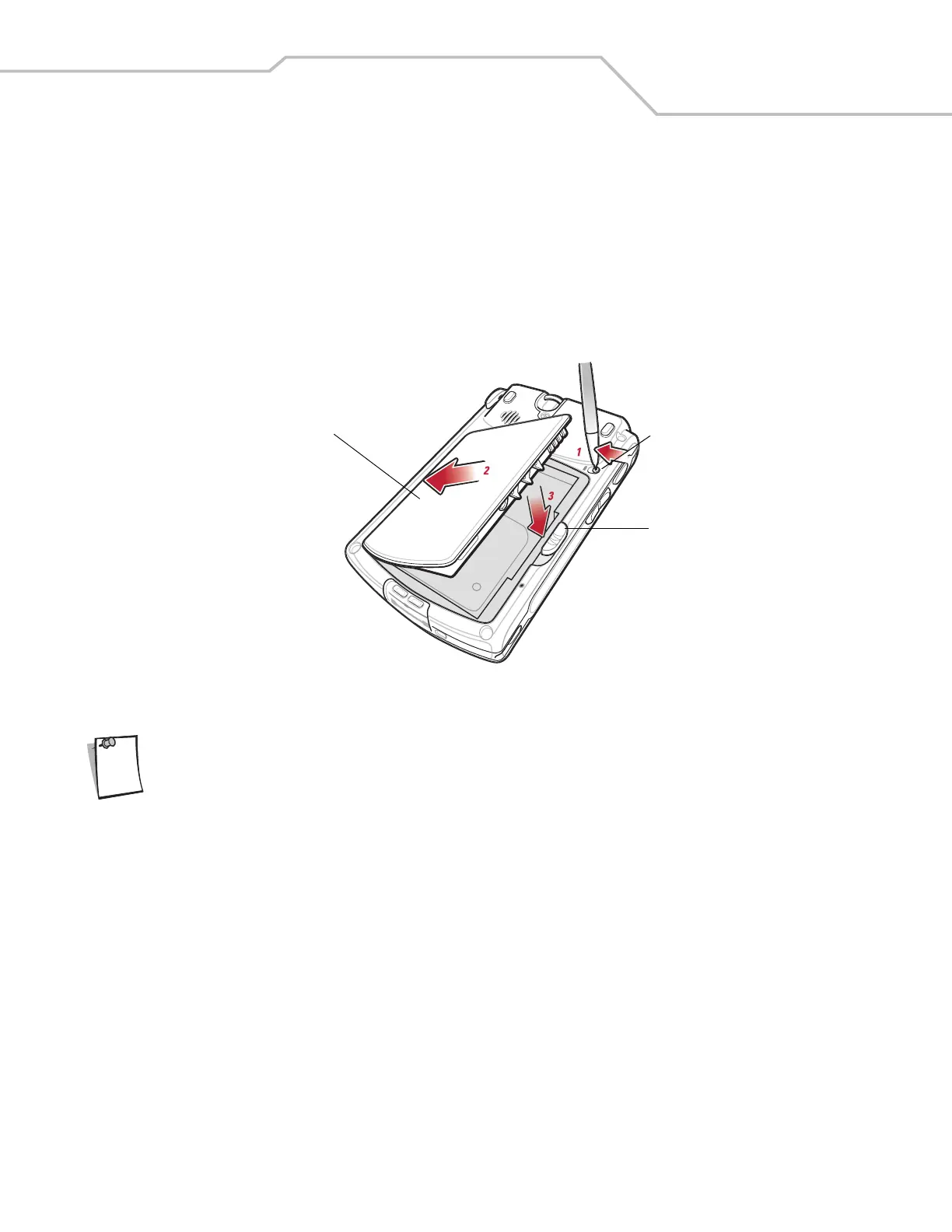
2. Insert the main battery into the back of the mobile computer as show in Figure 1-1.
3. Press the battery down into the battery compartment until the battery release slides into place.
Figure 1-1. Inserting the Battery
Ensure the battery is positioned correctly, placing the battery charging contacts on top of the charging contacts
in the battery compartment.
4. Using the stylus, slide the Battery Lock Switch to the right to lock it.
Removing the Main Battery
To remove the main battery:
1. Press the power button to suspend the mobile computer.
2. Using the stylus, slide the Battery Lock Switch to the left to unlock it. A red dot appears on the switch.
3. Slide the battery release down, and pull the battery up and out of the mobile computer.
Battery
Battery Release
Battery Lock Switch
Note



 To Next Page