34
4. Settings
4-3-1-6. LINEARIZE CALIB.
The linearity of load measurements is improved by increasing
the calibration points.
After equivalent input calibration, input the linearization
calibration.
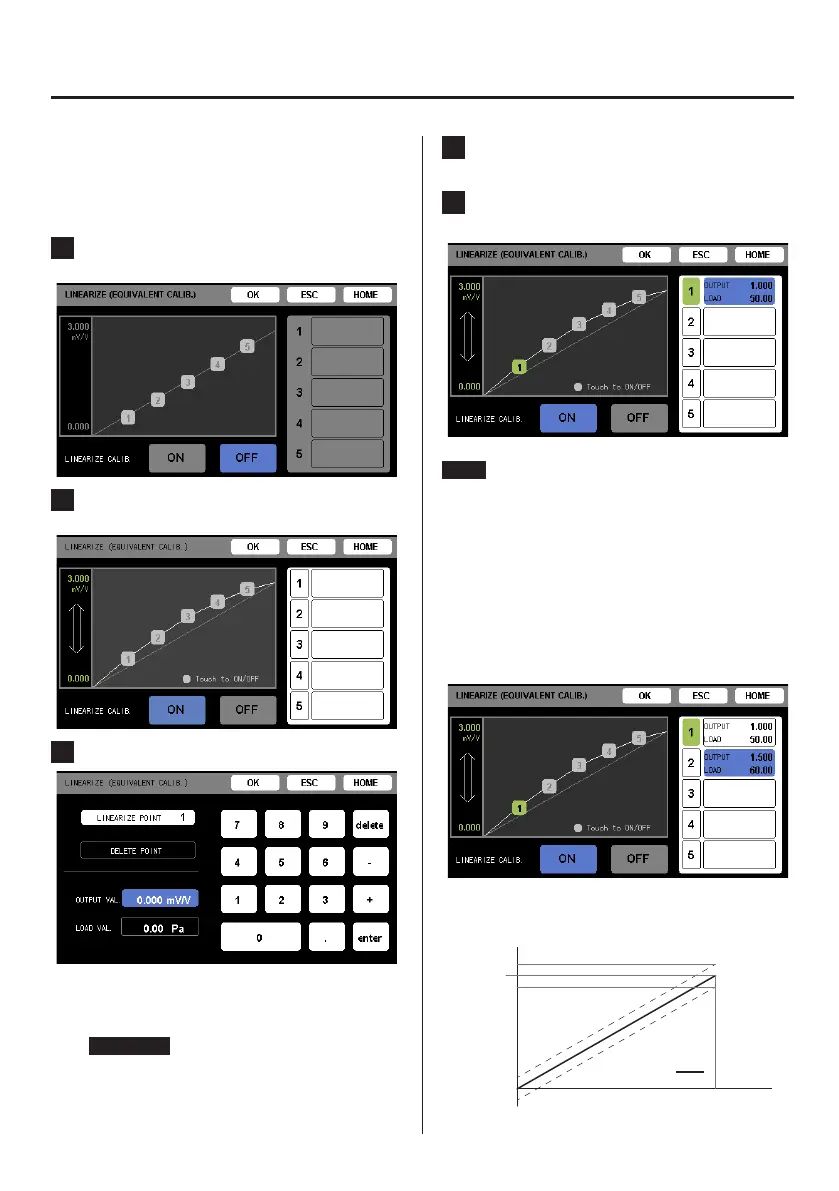
1 Touch the ON button to enable linearization
calibration.
2 Touch the number of the calibration point to input
on the right side of the screen.
3 Input the calibration value and touch OK.
The “LOAD VAL.” cannot be set to a value that would be
5% or more relative to the straight-line (reference curve)
that connects the no load and rated load outputs.
ATTENTION
The following conditions must always be met.
o 0 < calibration value < maximum rated output
o Value of lower-numbered calibration point
< value of higher-numbered calibration point
4 Conrm the input value. Then, touch ESC to return
to the previous screen.
5 Repeat steps 2–4 to input necessary calibration
values, and touch the OK button.
NOTE
o The calibration waveform shown on the LINEARIZE
(EQUIVALENT CALIB.) screen is an illustration, not the actual
calibration curve.
o After linearization calibration value input, touch the OFF
button to disable linearization calibration. Since input cal-
ibration values are saved, touching the ON button will
enable linearization calibration.
o To disable a specific calibration point, touch its number so
that its background color disappears
In the illustration below, calibration point 2 is disabled.
o The possible range of linearization is shown by the dashed
lines in the illustration below.
Rated
output
Rated
capacity
Rated output + 5%
Rated output − 5%
Output
Capacity
0
Reference
curve



 To Next Page
 Loading...