6. TERMINAL FILE PROGRAMMING
EO3-11106
6.23 PLU Table Programming
6-115
3) Example
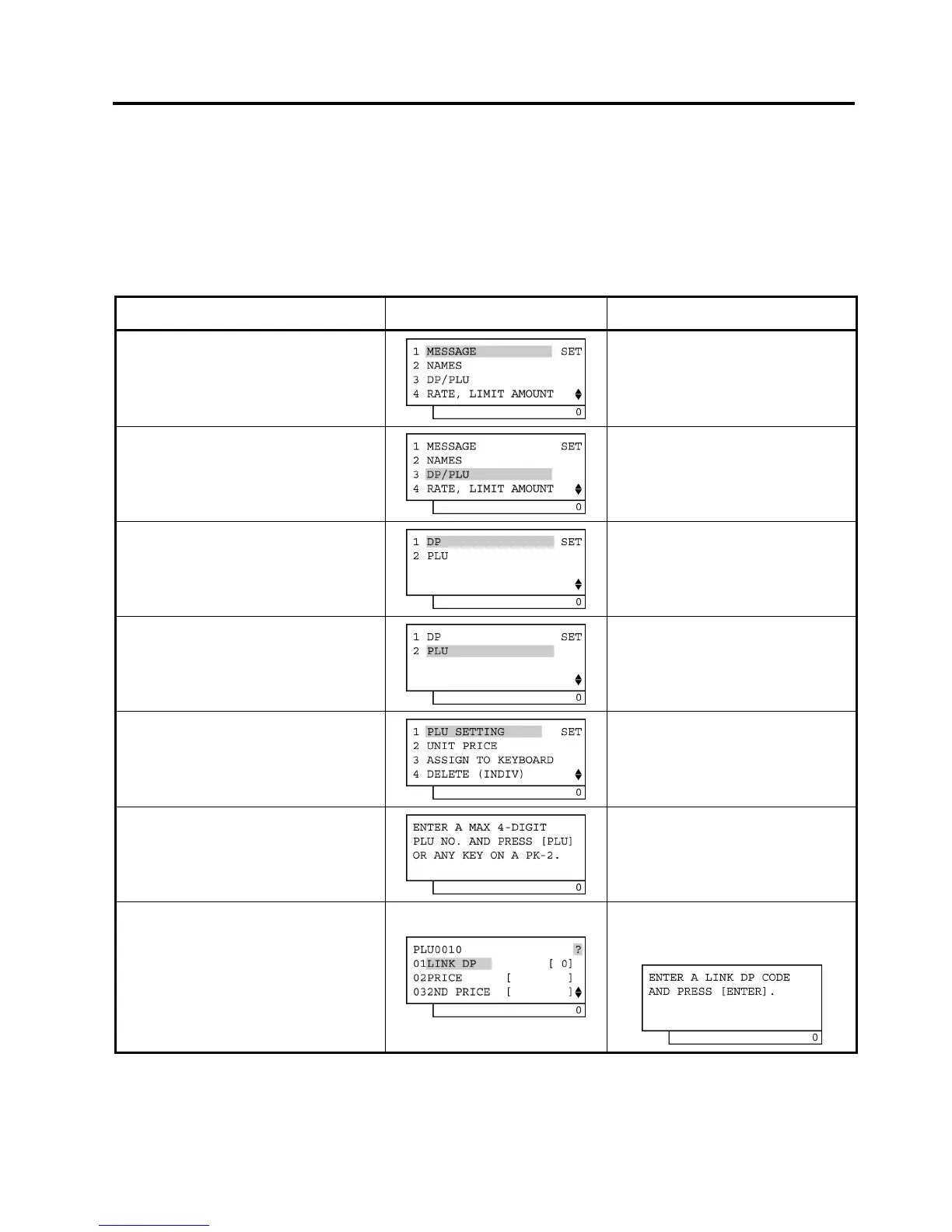
To program the following PLU data:
PLU Code: 0010
Linked Department: Department 1
Preset Price: €1,00
2nd Preset Price: €1,20
3rd Preset Price: €1,50
Tax Status: 12 (VAT 1 and VAT 2)
Operation LCD Display Remarks
When the ECR is being outside a sale
and in SET mode, depress the [↓] key
twice.
The cursor is moved on to “3 DP/PLU”.
Depress the [3] or [Enter] key.
“3 DP/PLU” is selected.
Depress the [↓] key.
The cursor is moved on to “2 PLU”.
Depress the [2] or [Enter] key.
“2 PLU” is selected.
Depress the [1] or [Enter] key.
“1 PLU SETTING” is selected.
Input 0010 (or 10), then depress the
[PLU] key.
(PLU Code 0010 is set.)
PLU Code: Max. 4 digits (1 to 9999)
Input 01 (or 1), then depress the
[Enter] key.
(Linked Department 1 is set.)
The [?] key depression results in that the
following guidance message appears on the
LCD display.
(continued on the next page)


 To Next Page
 Loading...







