6. TERMINAL FILE PROGRAMMING
EO3-11106
6.36 Key Status Programming
6-154
(continued from the previous page)
Operation LCD Display Remarks
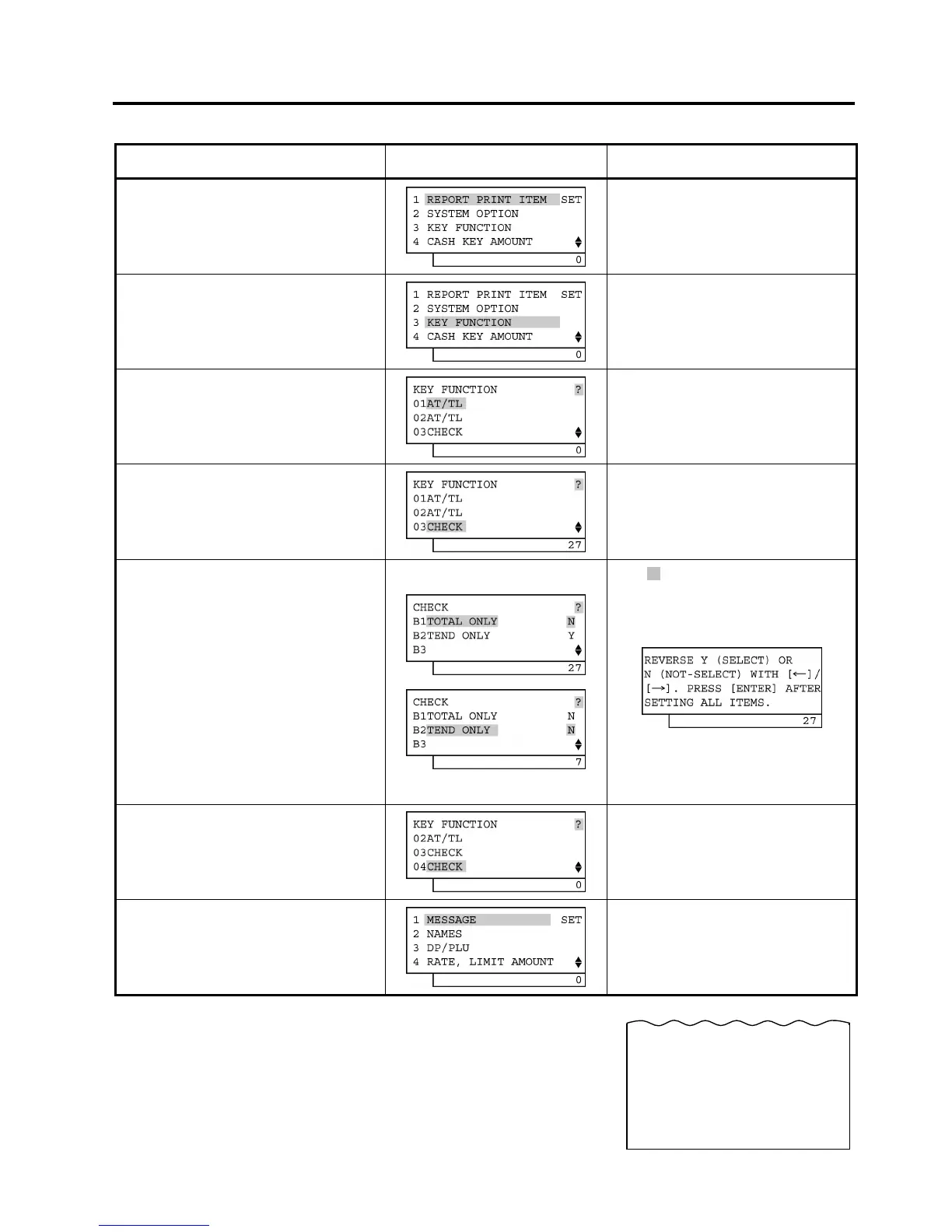
Depress the [↓] key twice.
The cursor is moved on to “3 KEY
FUNCTION”.
Depress the [3] or [Enter] key.
“3 KEY FUNCTION” is selected.
Depress the [↓] key twice.
The cursor is moved on to “03 CHECK”.
Depress the [Enter] key.
(Key Code 3 “CHECK” is selected.)
“03 CHECK” is selected.
Depress the [↓] key, then depress the
[→] key.
While ? is shown on the upper-right corner
of the LCD display screen, the [?] key
depression results in that the following
guidance message appears on the LCD
display.
The Bit Nos. currently programmed are
displayed on the 7-segment numeric display.
By the [→] key depression, Bit No. 2 status
is changed from “Y” to “N”.
Depress the [Enter] key.
The [End] key depression allows the
ECR to end this programming.
A long receipt is issued and the display
returns to Main Menu screen.
31-10-2005 MON #3001
KEY STATUS
#03----------------------------7
0033 13:27TM


 To Next Page
 Loading...







