44 1670 001-GB-I
HDA eco
29
4 First steps – HDA eco
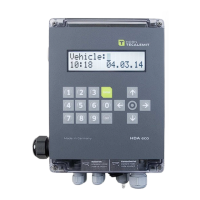
The HAD eco is equipped with an autonomously working refuelling data acquisition
system, which permits the recording and subsequent processing of all refuelling pro-
cesses.
For this, following entries are possible for every refuelling:
Driver
Vehicle
Mileage
Order
In the factory setting of the Wonder Box, only the vehicle will be queried.
Vehicle
no.
1
was already created with the code
“
123
”
so that a trial refuelling is possible.
Display (e.g.):
Refuelling can proceed after entering the numbers ‘1’, ‘2’, ‘3’, confirming with ‘
ENTER
’
and drawing the nozzle.
All specific settings for the extraction point or an optional available interface can be-
set after the first power-up in the management mode (see section 5.3).
Special aspects when using the LAN/WiFi or CMR socket modem:
The login data for an unconfigured WiFi/LAN or CMR socket modem (optional) can
be conveniently loaded by inserting a USB memory stick containing a configuration
file.
This file will need to be created beforehand using the HD Manager program or
via the corresponding website of mytecalemit Cloud (see chapter 5.3.4.3.12.4).
Vehicle:***
10:29 24.03.12


 To Next Page