SYNCHRO EXCITE Class & Trend: Service & maintenance manual - rev. 2.0
Page 9.13
9.3. USER MENU CONFIGURATION FOR 700 WTV MODELS
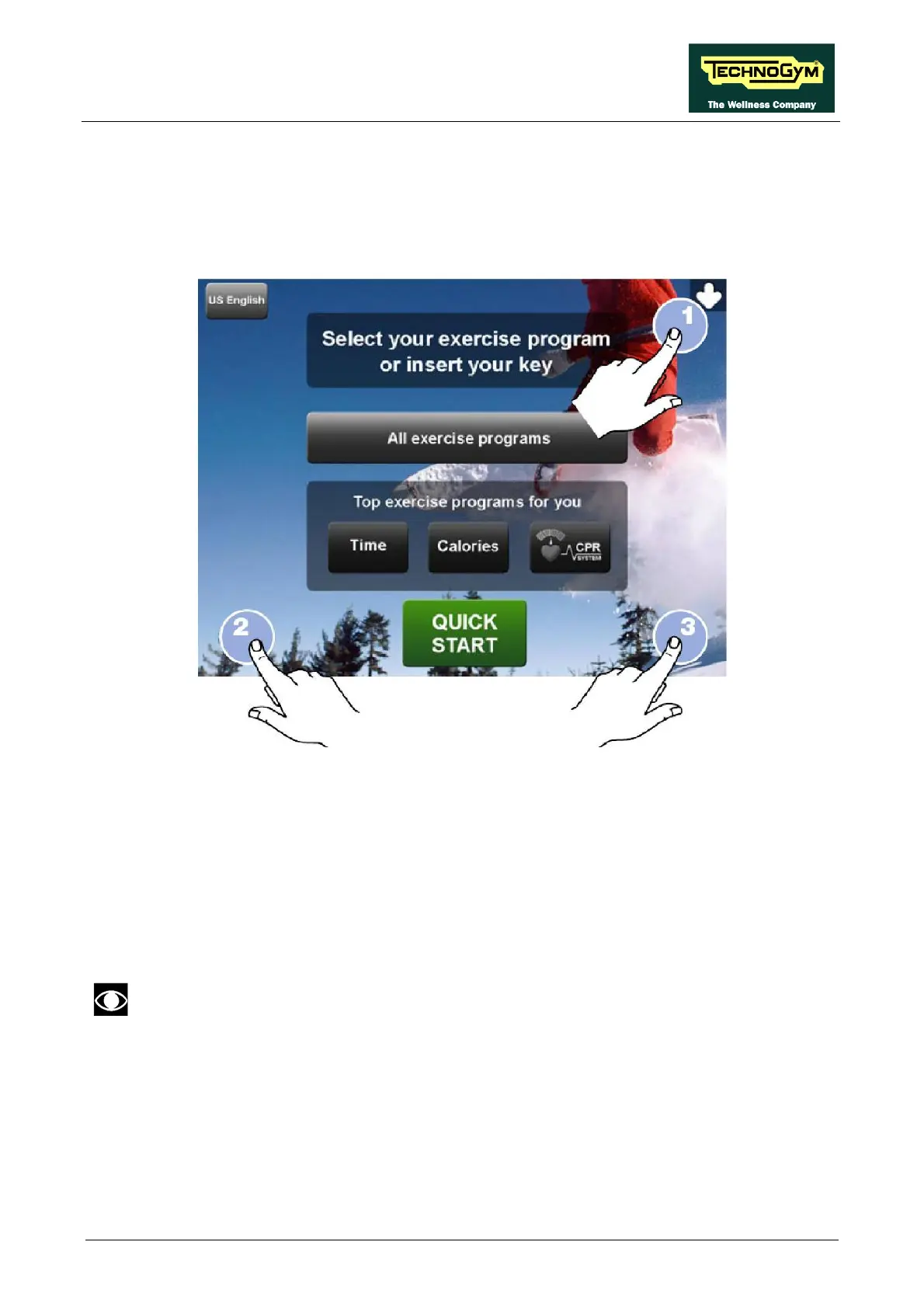
The machine configuration procedure is invoked, when the machine is in standby mode, by pressing
the top right hand, the bottom left hand and the bottom right hand corner in sequence, as shown in
the picture below.
The machine display will shows a window from where you can access the different configuration
menus, using the proper password.
To access the menu, type in the password 2406 and press ENTER key to confirm or BACK key to
back forward.
At this point the machine display will shows the different parameters of the menu, collected in
different pages, which can be scrolled with the FORWARD and BACK keys.
To exit the configuration press HOME key.
Pressing “HOME” in any page, all changes made up to that moment are saved; you cannot exit
without saving. In case of errors the initial Technogym settings can be restored using the
“DEFAULT CONFIG.” parameter.




 To Next Page