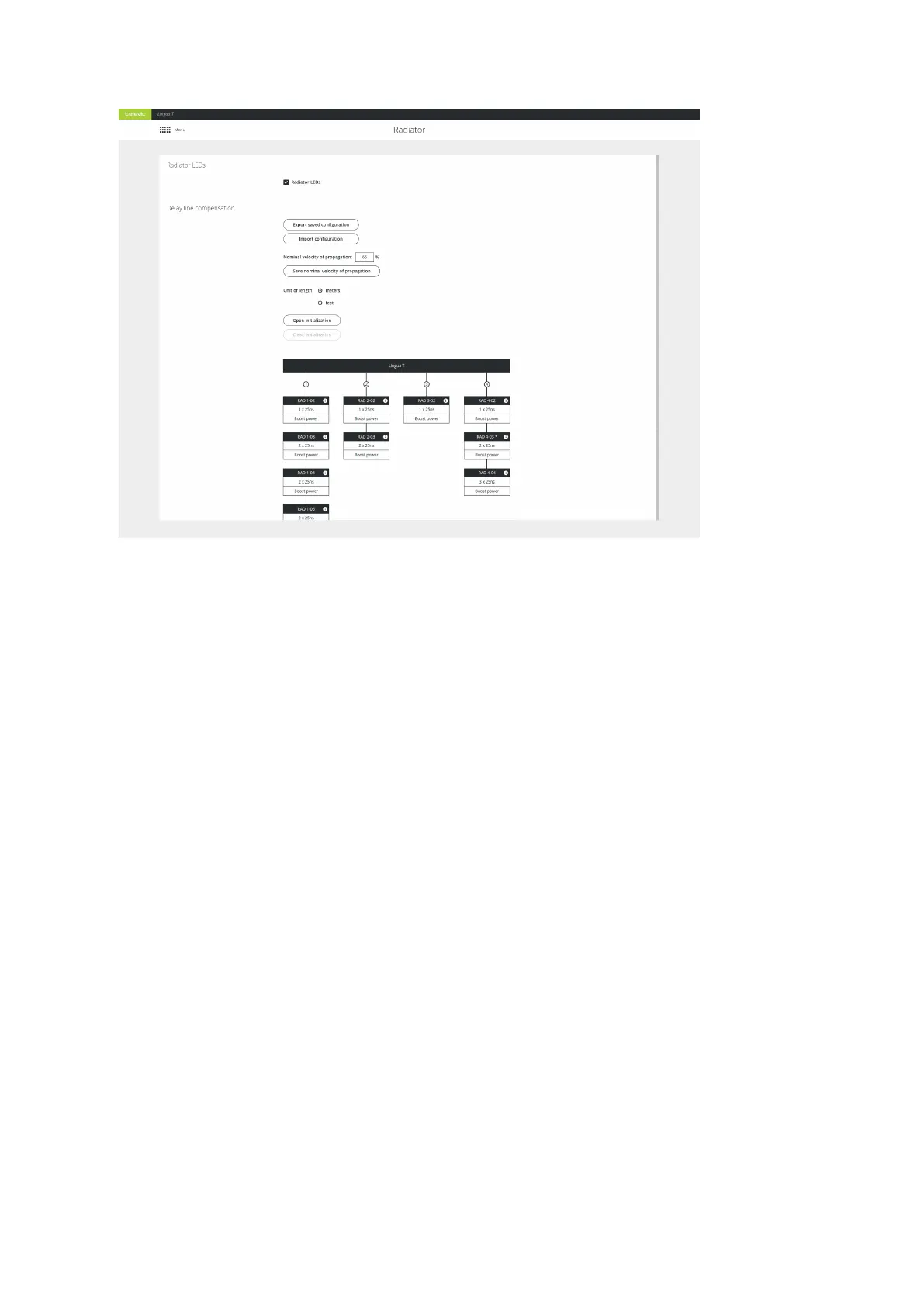
Figure 6-4 Automatic delay line compensation calibration using the Lingua IR web server
START AUTOMATIC DELAY LINE CALIBRATION
1.
Define the Nominal velocity of propagation, this is the speed at which data signals travel down
the cable expressed as a percentage of the speed of light in a vacuum. This value should be
indicated on the datasheet of the cables you are using. A typical value for this type of cable is 65%.
If no detailed value can be found it is save to use this value.
2.
Click Save nominal velocity of propagation.
3.
Click Open initialization to configure the delay line compensation.
4.
To start the calibration click Start automatic calibration. A progress icon will show that the
calibration process is ongoing. Select the check box below the port number to enable this port.
5. Once calibration is ready the web server will show a visual representation of the setup and its
transferred values. Older versions of the radiator are indicated by an asterisk (71.98.0223).
6.
Click Close initialization.
7. Test the audio reception in the room using the Lingua IR receiver and check whether there is full
coverage.
CONFIG URE RADIATO R SETTING S 78


 To Next Page