IM-LYOQUEST-EN-2101 22 / 58
10.2. Freeze-drying
utton, placed at the main
drying window.
It consists of:
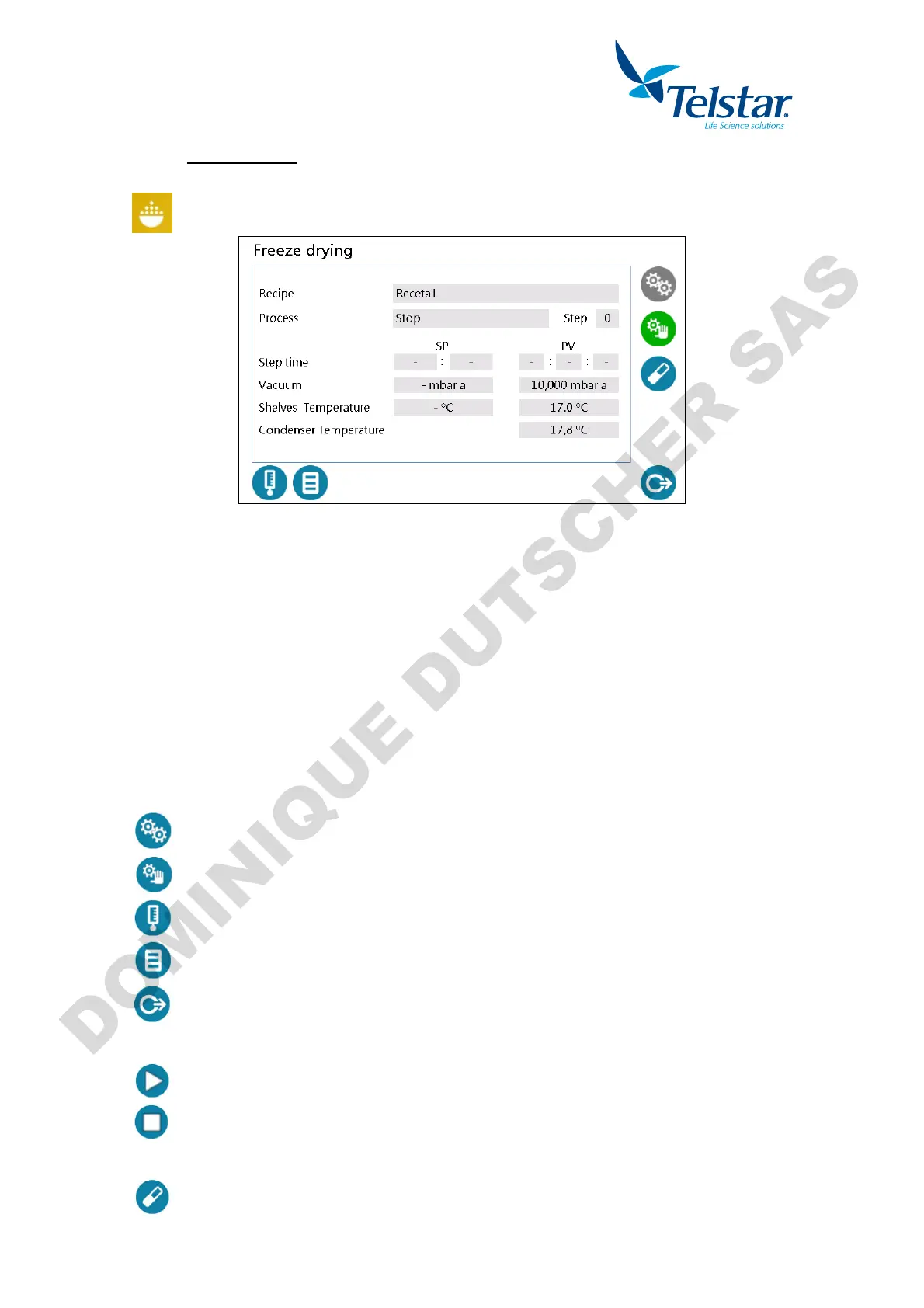
- info of the recipe in execution in automatic mode, shown in the central part:
Recipe: Name of the loaded recipe.
Process: Process under execution.
Step: Step number of the executing recipe.
Step time (SP): Time Set point for recipe step.
Step time (PV): Current elapsed time.
Vacuum (SP): Vacuum Set point of the recipe.
Vacuum (PV): Current vacuum value.
Shelves temperature (SP): Recipe temperature setpoint.
Shelves temperature (PV): Current shelves temperature value.
Condenser temperature: Current condenser temperature value.
- Buttons located at the lower and right part of the screen. Depending on level Access,
user will visualize some of them:
Automatic cycle activation.
Semiautomatic cycle activation.
Window to visualize the values of the probes.
Window to select and visualize the required recipe to be executed.
Return to the previous window.
The following buttons appear when Automatic cycle is on:
By pressing this button, the PLC loaded recipe will start.
By pressing this button, current recipe stops and Automatic mode turns off.
The following button appears when Semiautomatic cycle is on:
By pressing this button, the window to execute processes in semiautomatic mode will
appear.


 To Next Page