IM-LYOQUEST-EN-2101 34 / 58
10.6. Recipe edition
this button, placed at the main window, the us
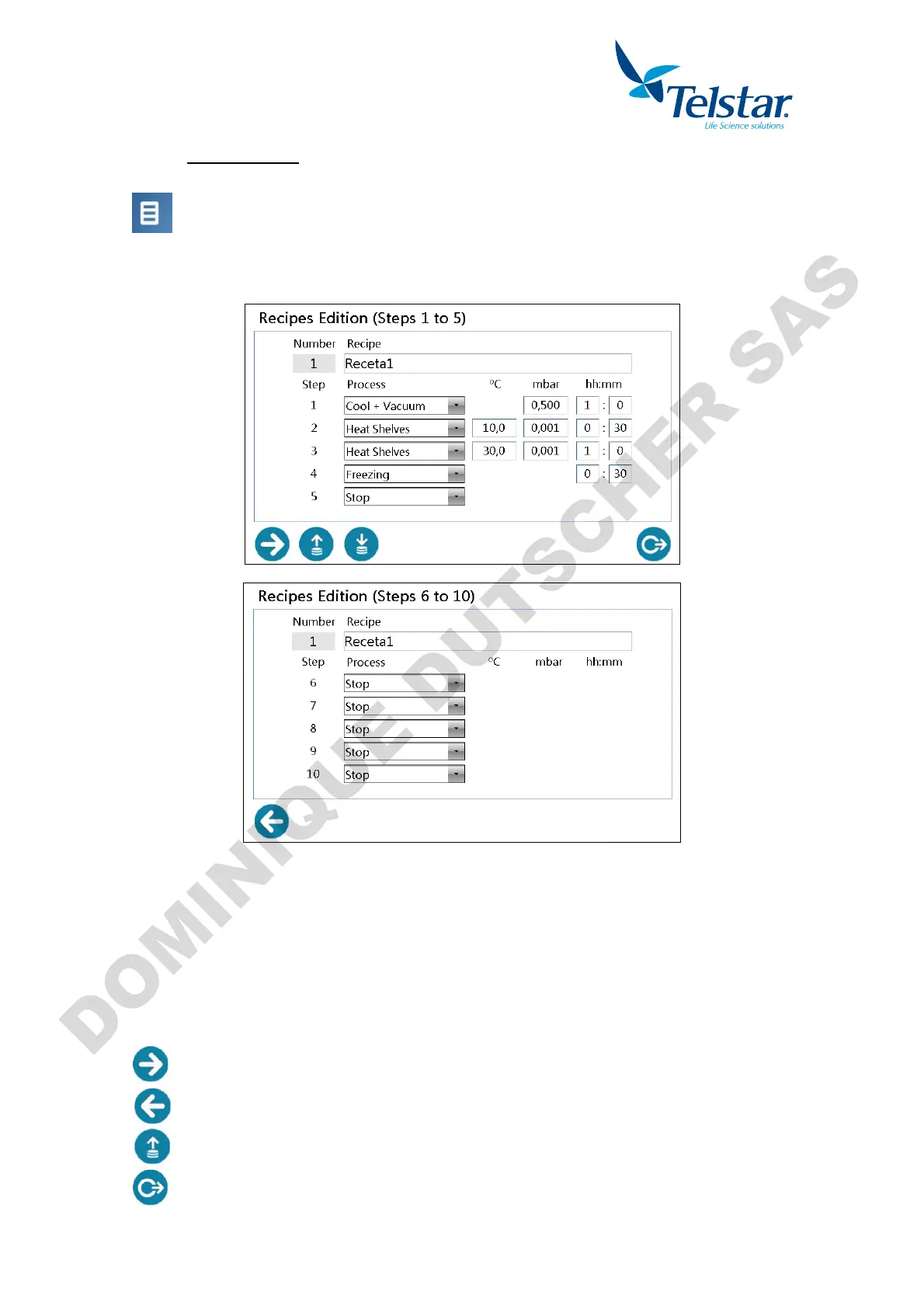
Edition (steps 01 to 05) window to create and edit the recipes of the equipment.
Recipe can be edited in the central part. Other function icons are found in the lower part of
the window. Each recipe consists of 10 steps.
Number: Recipe number to be edited. (Non-editable)
Recipe: Recipe name. (Editable)
Step: Recipe step number.
Process: 4 selectable process types (see chapter 8.4): Stop, Freezing, Cool + vacuum
and Heat Shelves
ºC: Shelves temperature set point. (Editable)
mbar: Condenser vacuum set point. (Editable)
hh:mm: Hours and minutes that this step selected process will last. (Editable)
ºC, mbar y hh:mm only appear when the selected process requires such parameters.
Access to the steps 6 to 10 of the recipe edition.
Return to the steps 1 to 5 of the recipe edition.
Access the load recipe edition in order to select the recipe to be edited.
Return to main menu.


 To Next Page