IM-LYOQUEST-EN-2101 29 / 58
10.4. Synoptic
window.
The value and status of the equipment components will be displayed.
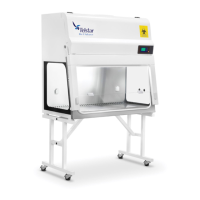
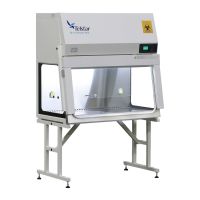
Depending on the versions of the equipment (with heated shelves or not), the screen will be
displayed as follows:
Without shelves:
With heated shelves:
The following values will be displayed:
Condenser temperature
Condenser vacuum
Product probe temperature (only if shelves option is enabled)
Shelves probe temperature (only if shelves option is enabled)
By pressing over the base unit in the middle of the picture, it will be displayed the equipment
cooling system synoptic.


 To Next Page