2-6 Uson 628 Operator’s Manual
2.3 Front Panel Overview
2.3.1 Front Panel
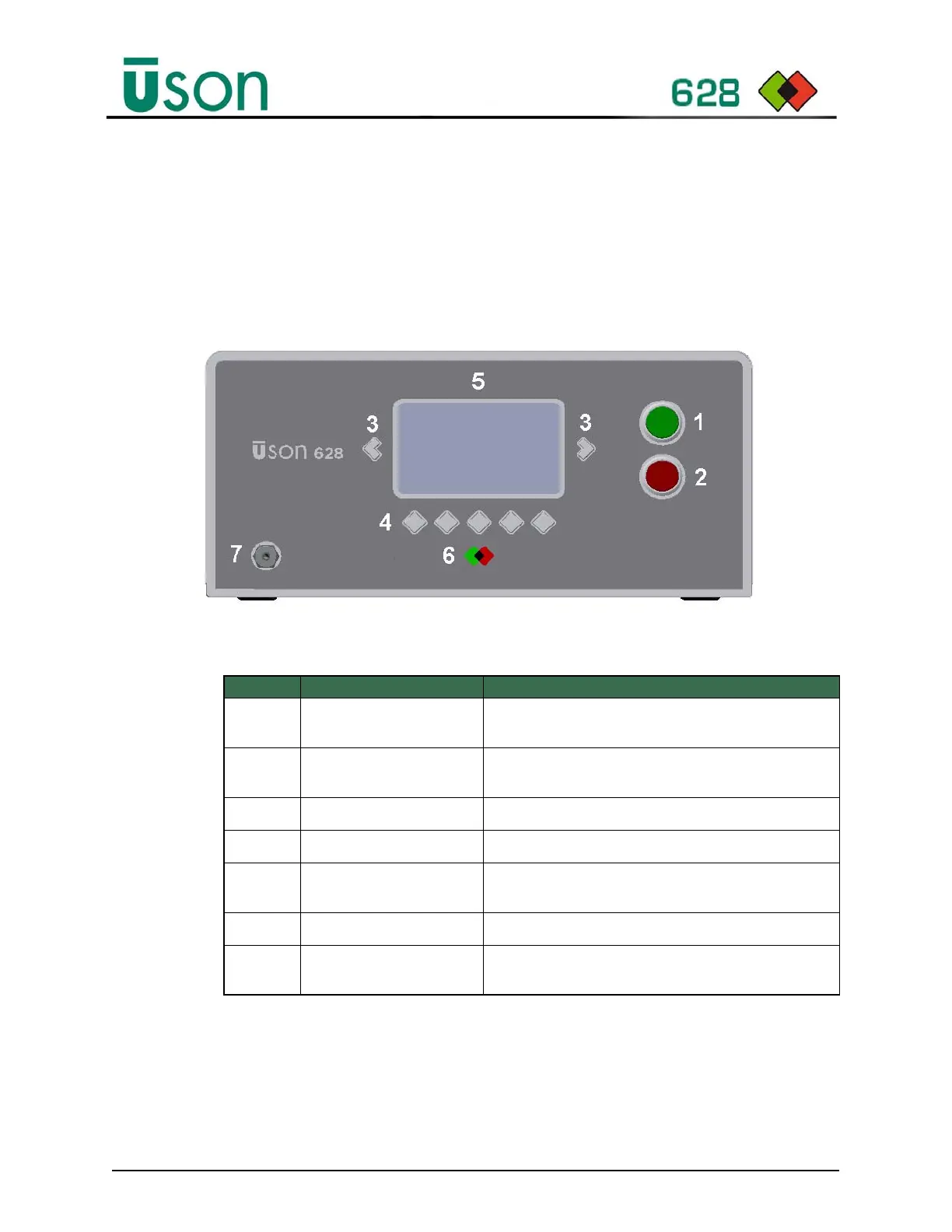
Figure 2–2 shows the Uson 628’s front panel controls/connections, while
Table 2–1 describes their functions.
Figure 2–2: Uson 628 Front Panel Overview
Table 2–1: Uson 628 Front Panel Descriptions
Item# Connection/Control Description
1Start Button
Starts a test cycle or updates the selected value when
editing parameters.
2 Abort Button
Resets or aborts a test cycle or reverts the selected value
when editing parameters.
3 Left/Right Keys
Selects the next or previous displayed parameter.
4 Function Keys
Functions available for the displayed menu or parameter.
5Display
A character Liquid Crystal Display (LCD) that displays the
tester’s state, function, mode, and parameter settings.
6 Result Indicator
Test cycle pass and reject indicators, On or Off.
7 Calibration Port
Used to connect a standard leak or calibration instrument
to the test circuit for calibration.



 To Next Page