4-4 Uson 628 Operator’s Manual
4.3.3 Menu Toolbars
The Uson 628 has the following modes of operation:
Run Mode: Allows the user to perform a test.
Program Mode: Allows the user to configure the instrument and to set the
operating parameters for a test.
See Charts 1-1 to 1-3 for the menu visual hierarchy.
4.3.4 Data
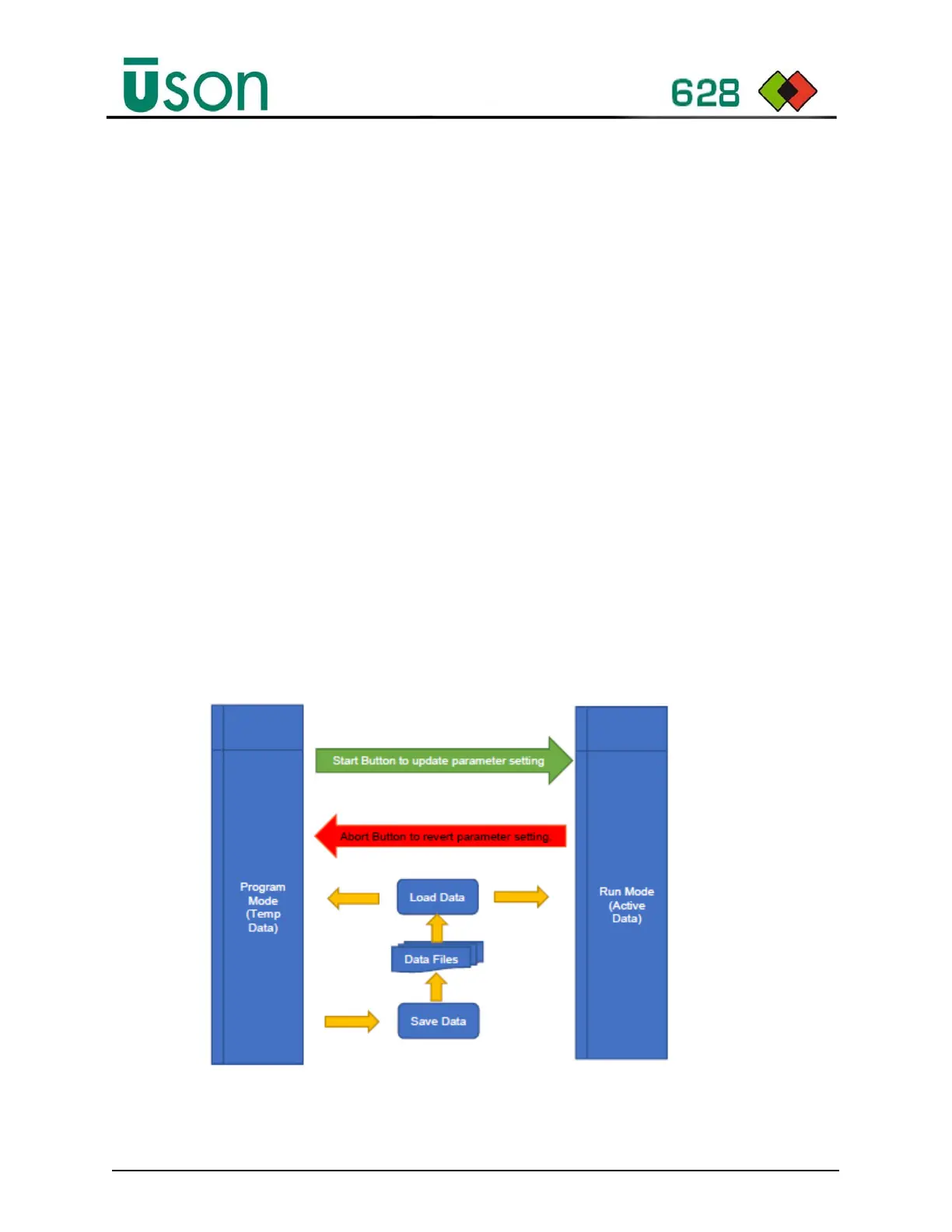
The diagram below shows the data flow for loading and saving data to memory.
Program and Run mode have separate copies of parameters called temp and active
data respectively.
The parameters are loaded into both data areas on power up (note only one
program is held in memory and currently defaults to program 1).
The program data is updated when changing the program selection (i.e., via the
front panel, program mode, or remote, depending upon setup selection).
In program mode, all changes are applied to temp data. The Start (green) and Abort
(red) buttons update the active data or reverts the temp data back to the active data
settings. All changes are automatically saved to the file system on selecting Run
Mode.



 To Next Page