7-8 Uson 628 Operator’s Manual
7.2.2 Lamp Outputs
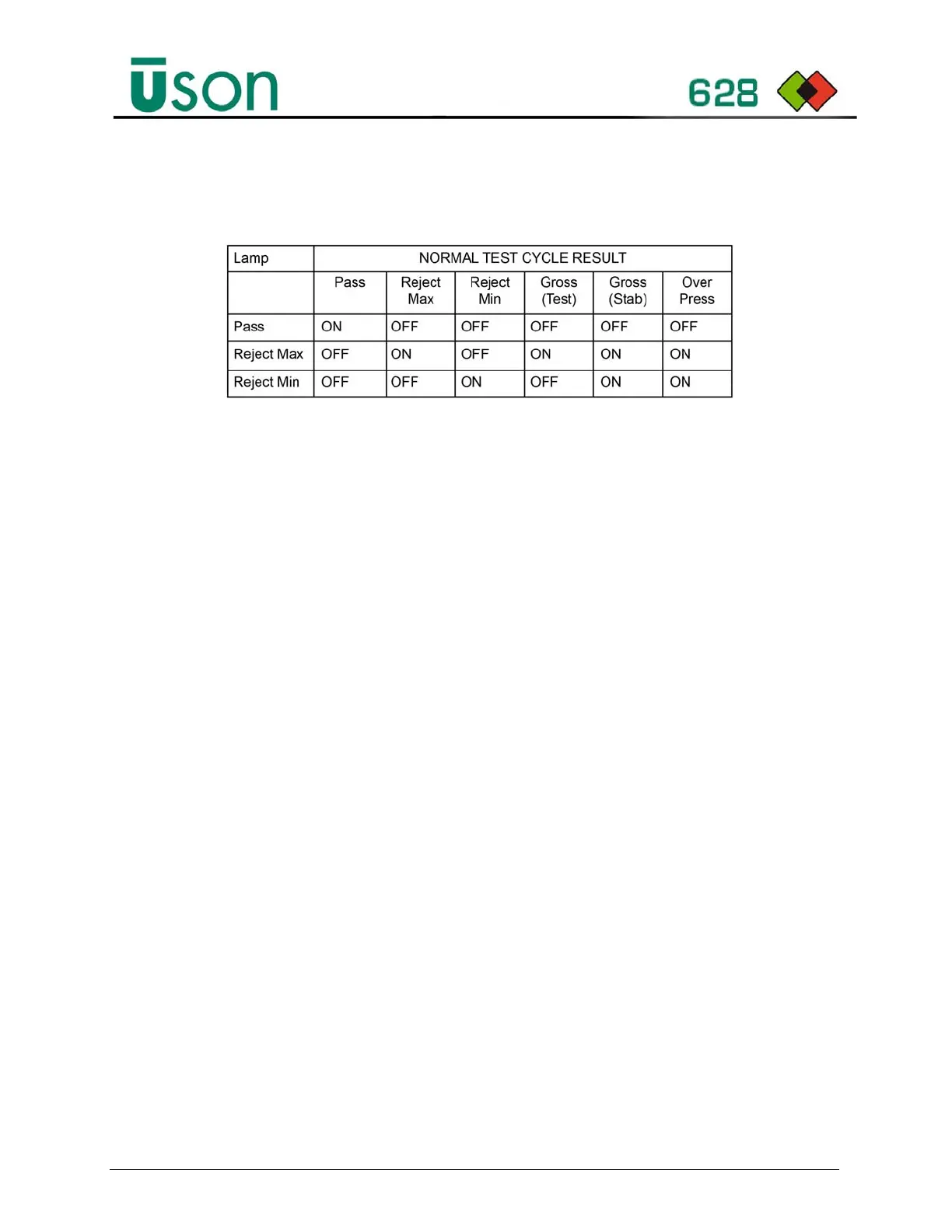
The following table describes the lamp outputs for the corresponding result:
7.2.3 Audit Results Output
To log results at the end of each test, select Program Mode > Setup > Audit
Output option and set the required output destination to Serial, USB or File (i.e.,
internal memory which can exported at a later date).
The USB and File options log results to a file created daily with the naming
convention ResultsYYYYMMDD.log (i.e. Results20170703.log). The USB
option creates the file on the USB in location \uson\Uson 628\<Serial
Number>\Audit. The export option will save the file to location \uson\Uson
628\<Serial Number>\Logs.
The results format is:
• <Cycle number> <Tester serial number> <date> <Time> <Fill step Pressure>
<Stab step pressure>
• <Gauge sensor pressure unit> <Equal Step Differential Reading> <Differential
sensor pressure unit>
• < Result value> < Result unit> < Result > <Result Reason>
Examples:
0126 000000-000U8 1 13.09.2017 11:00:30 3000 2996 mmHg 00.46 mBar -000.04 sccm Pass
0127 000000-000U8 1 13.09.2017 11:03:22 2999 2999 mmHg 00.00 mBar 000.00 sccm Abort
Operator
0128 000000-000U8 1 13.09.2017 11:12:34 0000 0000 mmHg 00.00 mBar 000.00 sccm Abort Air
Supply Error
0129 000000-000U8 1 13.09.2017 11:13:26 3005 2820 mmHg 03.44 mBar 002.00 sccm Fail Max
Limit



 To Next Page