UVITEC – Cambridge
30/225
Darkroom control board driver installation
Darkroom connection
The USB port electrically supplies the motorized lens and the darkroom. To this extent, only the
USB zoom should be connected to the computer rear side USB hub.
The USB cable should be connected to the rear side USB port of the computer.
In case the electrical supply of the zoom is deficient, we suggest the use of an external USB hub
with a separate independent power supply.
USB motorized zoom driver & filter wheel
The motorized zoom USB driver is installed at the same time that the FireReader 1D software. No
specific installation is required. If the FireReader 1D software does not detect the motorized zoom
lens, we recommend checking first if the zoom is properly connected to the USB port. If the problem
is not resolved, we recommend to re-install the motorized zoom control board driver.
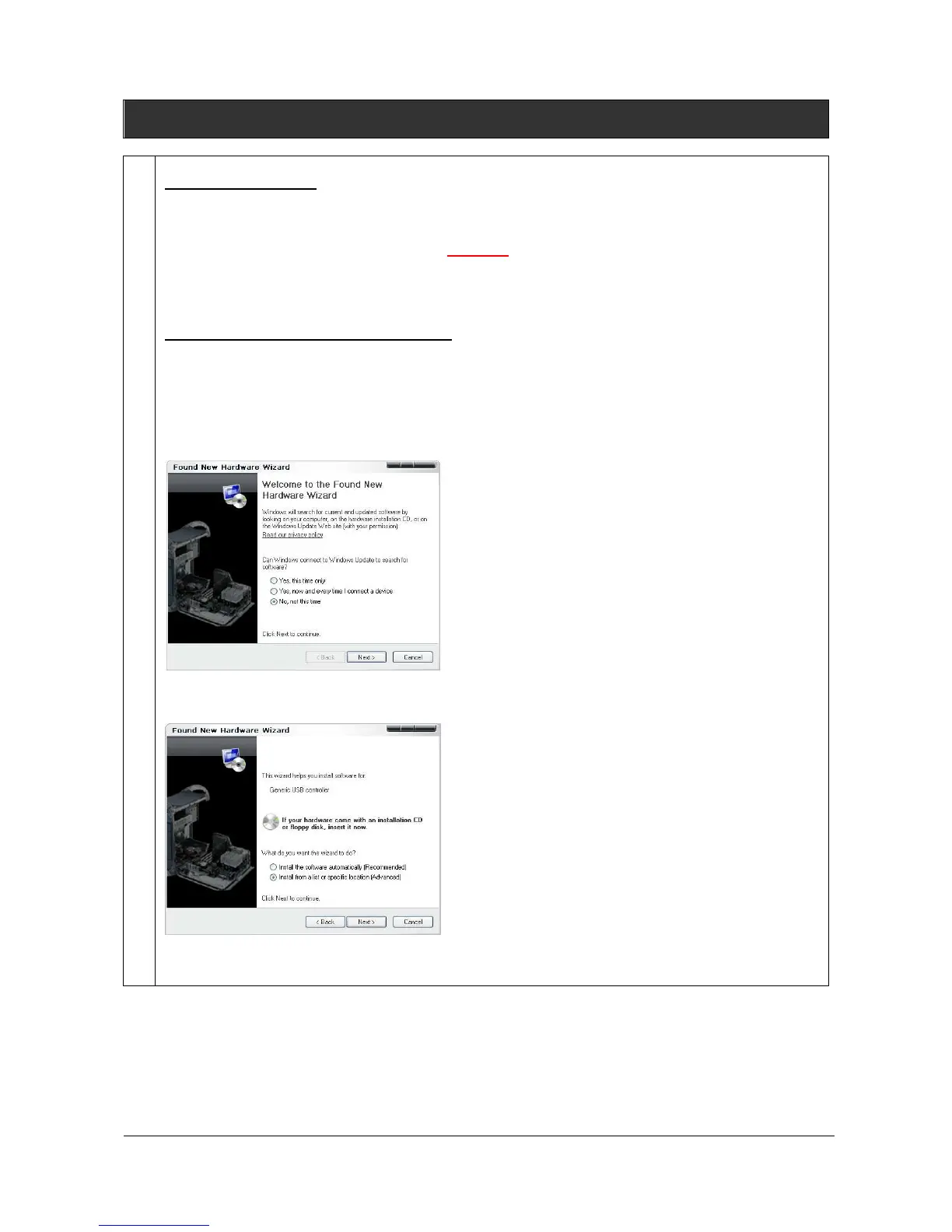
Switching the computer on, Windows® detects a new device and launch the installation wizard:
Select “Not this time” and click on Next:
Select install from a “List of specific location” and click on Next:



 To Next Page