DE35-ST Operating Instructions
D292469I 31
• The frame rate of the live video image is displayed for the user’s
reference in the Toolbar (1 Hz = 1 frame per second).
• The user can minimize the program and return to the Windows desktop
by pressing the Windows key + D.
• The user can close the program, automatically saving any changes to
the recipe, by clicking the Close button.
• Pressing the Power button on the PC front panel (Figure 2), will close the
program and safely shutdown Windows. When the Power button is next
pressed, the system will resume its state prior to shutdown.
Multiple Cameras
(For use with Underside or Facet Inspection options):
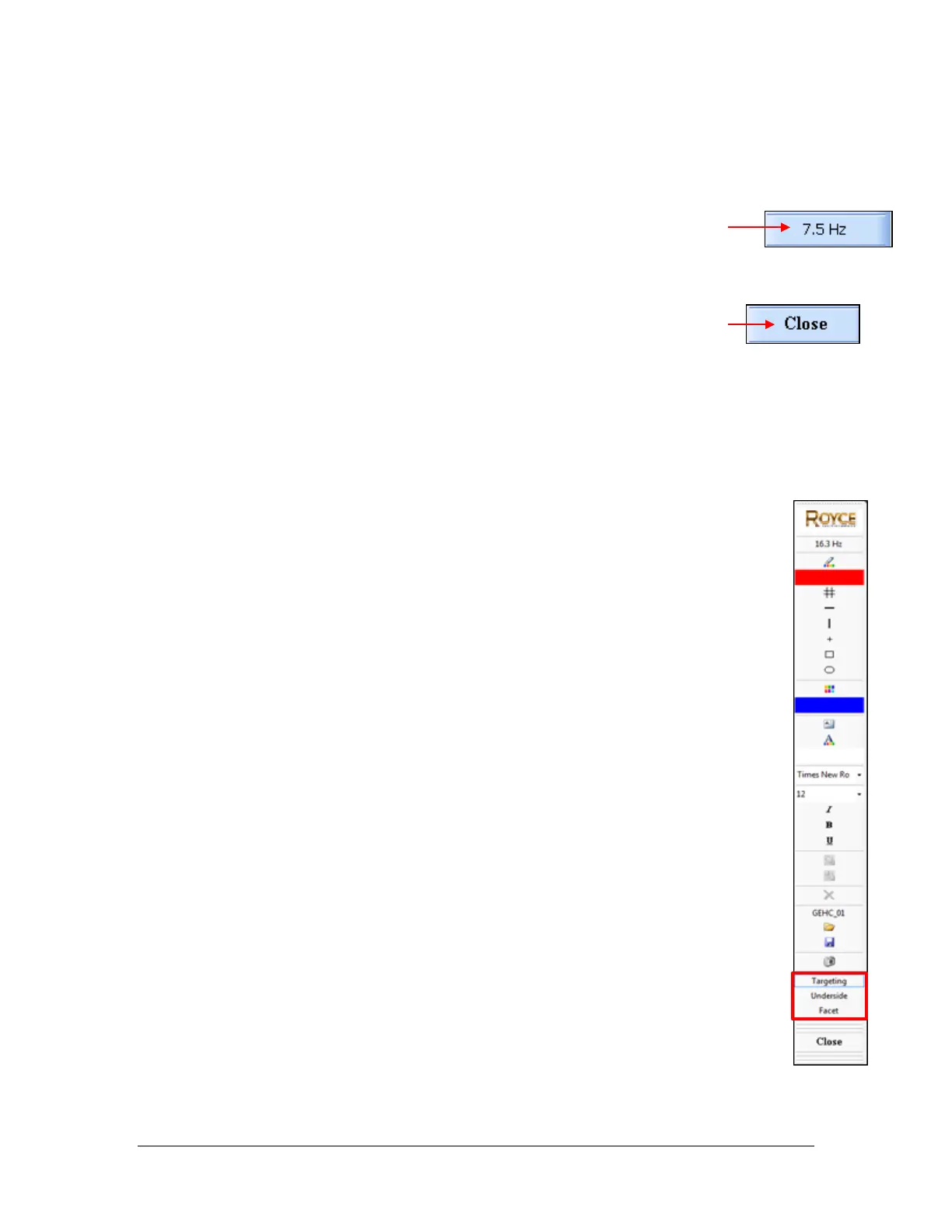
• When multiple cameras are installed, a button for each camera will appear
in the toolbar. For example, in the illustration on the right the Targeting,
Underside and Facet camera buttons are displayed and the Targeting button
is selected.
The user can switch between cameras for pressing on the appropriate
camera button in the toolbar.
• A separate recipe file for each camera is not necessary. The onscreen
shapes/dimensions for each camera are stored together in one recipe.
• The Image Capture button will capture the image for just the active camera.
To capture an image of one of the other cameras, click on the appropriate
camera and then click the image capture button.



 To Next Page