34 D292469I
Connect to the DE35 with the Royce Firmware Utility
1. Verify that the USB to Serial converter is connected to the DB9 RS-232 cable. Connect
the USB side to USB port#3 as defined in Figure 1 (page 1).
2. Connect the other end of the DB9 to the mainframe COM2 port on the back panel of the
DE35.
3. Press Windows key + X
4. Select Device Manager from the list of options.
5. Navigate to the Ports (COM & LPT) section.
6. Expand it and find the Prolific USB-to-Serial Comm Port (COM
X
)
7. Make note of the COM number and close Device Manager.
8.
Double click the Royce Firmware Management icon on the Desktop.
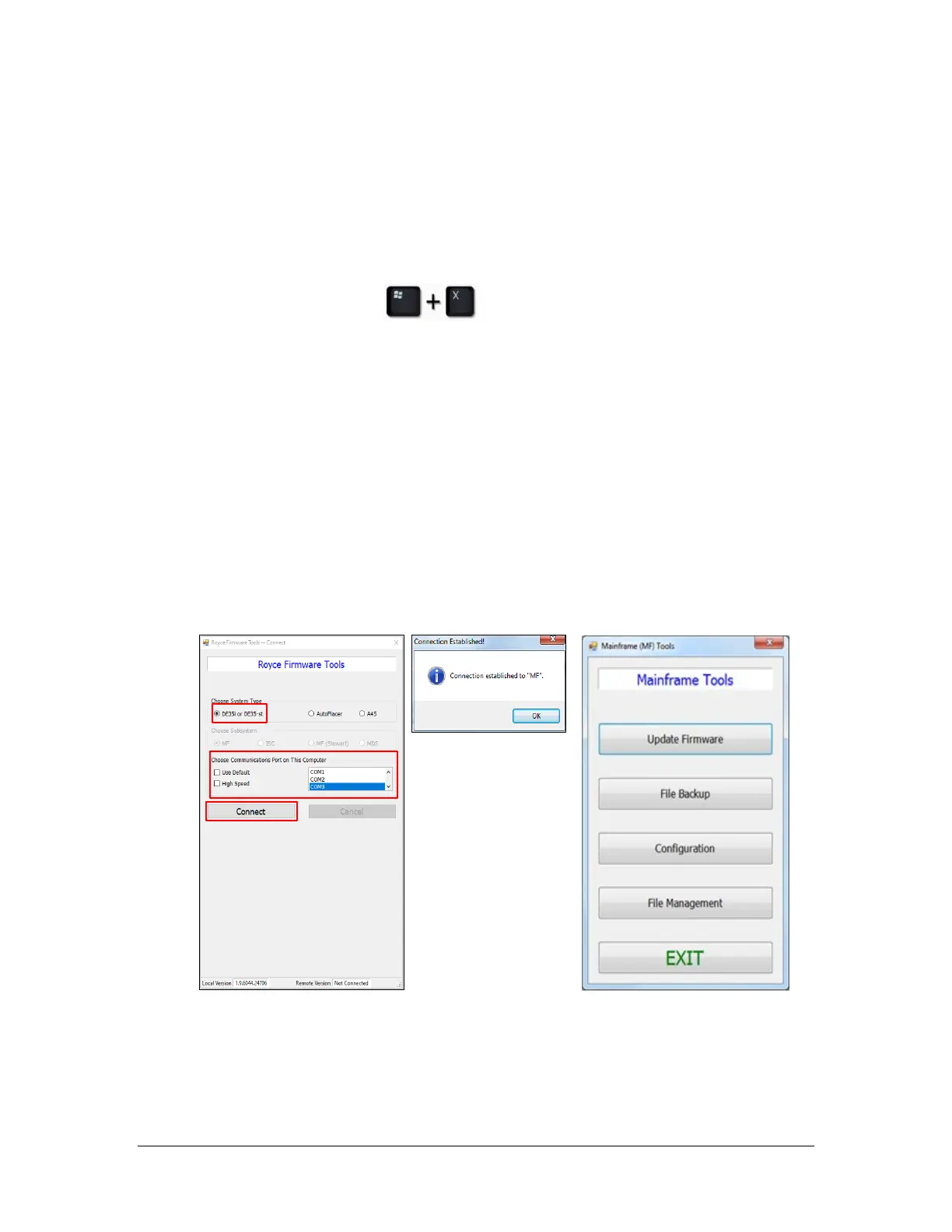
9. When the application opens do the following:
a. Choose the system type of DE35i or DE35-st.
b. Uncheck Use Default.
c. Use the vertical scroll bar to select the COM port identified in step 6.
d. Turn the DE35’s power off for a duration of approximately 45 – 90 seconds.
e. Click the connect button and toggle the DE35’s power switch to the ON position.
f. Once the connection has been made the prompt below will appear.
g. Clicking Ok will display the Mainframe Tools window.



 To Next Page