4 Machine overview
With your Z4 you can process blanks of different mater-
ials to create high quality objects for the dental sector.
You can find a list of the materials which you can
process with the machine in the manufacturing soft-
ware.
The machine is designed for wet machining.
During wet machining, the tools and blanks are
constantly being cooled by cooling liquid.
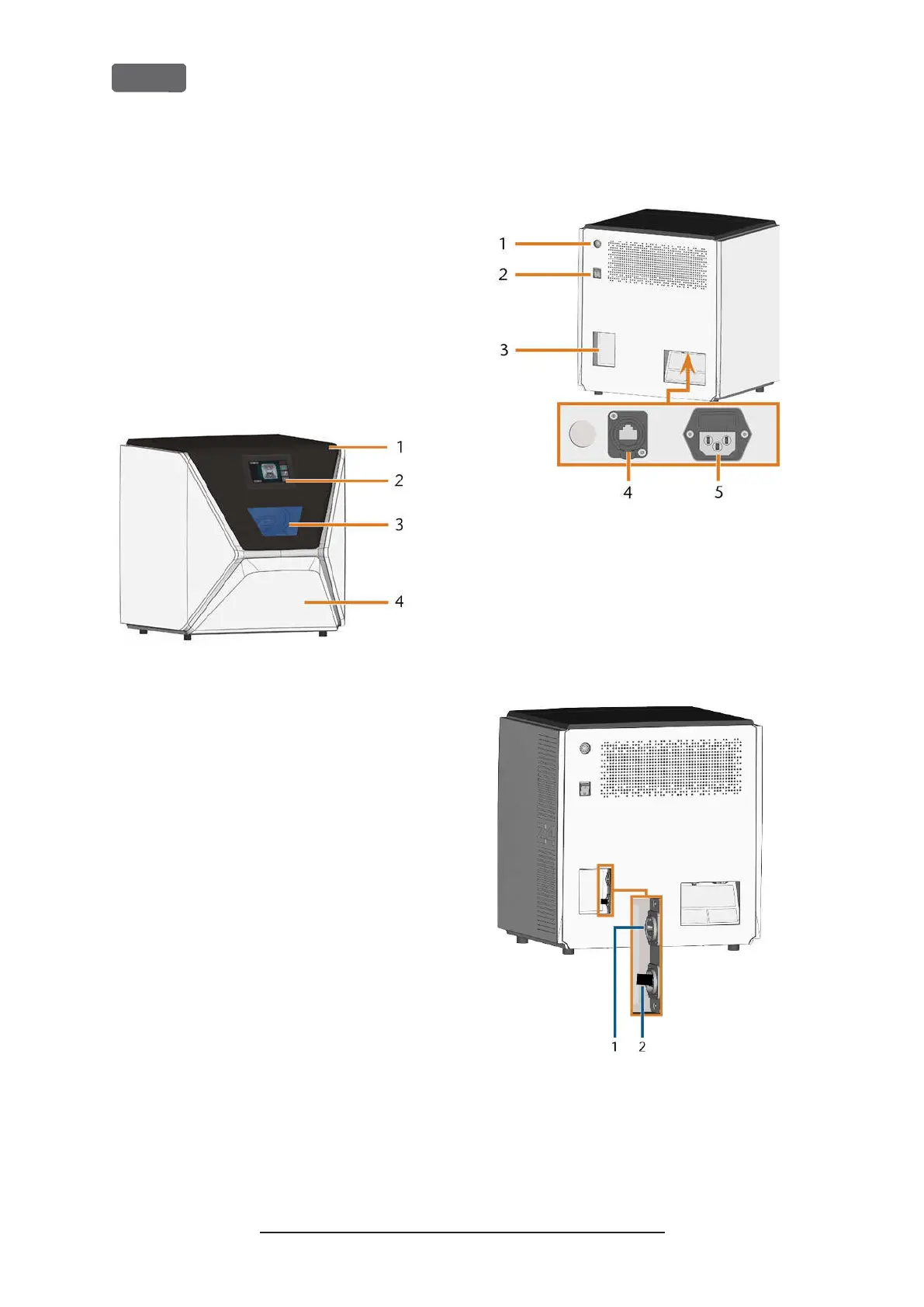
Front side of the machine
F
IG
. 1 – F
RONT SIDE OF THE MACHINE
1.
Working chamber door
2.
Touchscreen for controlling the machine
3.
View window to the working chamber
4.
Multi-purpose drawer
Rear side of the machine
F
IG
. 2 – R
EAR SIDE OF THE MACHINE
1.
Start button
2.
Main power switch
3.
CAM computer panel
4.
Network port (Ethernet RJ-45)
5.
Power connection
F
IG
. 3 – CAM
COMPUTER PANEL
1.
HDMI 1.4b port
2.
USB 2.0 port with WiFi device
Original Operating Instructions:Z4
Version: 12/5/2018
Z4 – Machine overview
EN 10



 To Next Page