Cleaning the working chamber
Cleaning the working chamber includes the following
components:
n
Measuring key
n
Blank holder
n
View window
n
Webcam
n
Tool magazines
n
Tool magazine holder
These components have different maintenance inter-
vals according to the maintenance table. Therefore,
you should perform a daily and a weekly cleaning of
the working chamber and clean the components
which need cleaning.
When performing the weekly cleaning, also per-
form the daily cleaning.
We recommend cleaning the working
chamber after all other required maintenance
tasks.
NOTICE
Damaging of the linear guides or the
spindle when cleaning with compressed air
or ultrasound
If you clean the working chamber with compressed air
or ultrasound, material chips can reach the linear
guides or the spindle bearings.
Never
clean the working chamber with com-
pressed air or ultrasound.
Do not pour additional water into the working
chamber. The cooling liquid tank may over-
flow.
1.
Have ready:
n
A wet cloth
n
A mild cleaning agent(optional)
n
Cleaning brush for the blank holder
n
A wet brush for the measuring key
2.
Open the working chamber door.
3.
Clean all surfaces and cracks in the working cham-
ber thoroughly with a wet cloth. Use a mild clean-
ing agent if necessary.
4.
Clean the measuring key with the wet brush.
Performing the weekly cleaning
1.
Have ready: The cleaning brush for the blank
holder.
2.
Remove the tool magazine from the working
chamber. Clean it with the cloth and the brush.
3.
Open the multi-purpose drawer. Clean the other
tool magazines.
4.
Clean the blank holder with its respective brush.
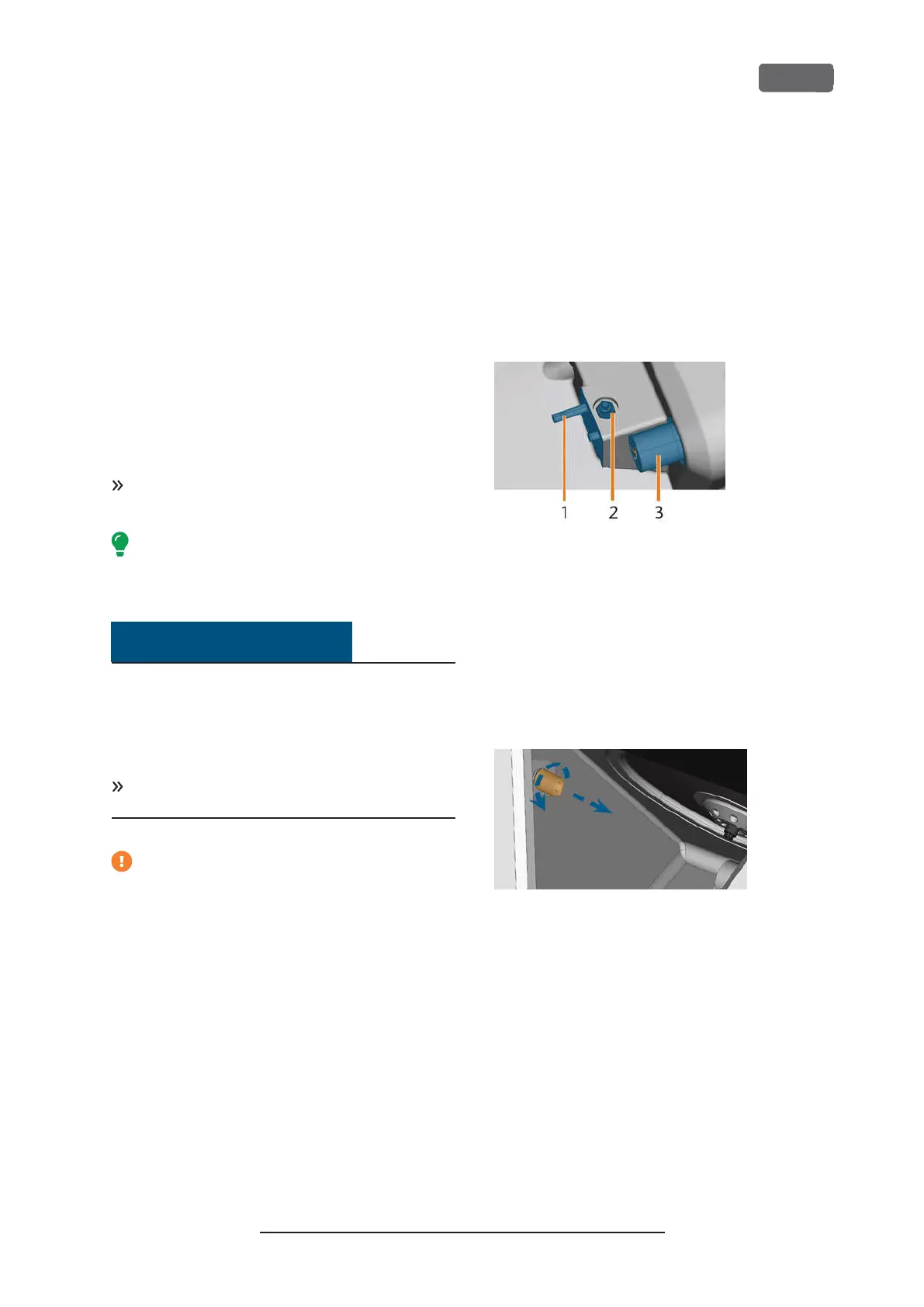
F
IG
. 67 – T
OOL MAGAZINE HOLDER
, M
EASURING KEY
, B
LOCK
HOLDER
(
IN BLUE
)
1.
Tool magazine holder
2.
Measuring key
3.
Blank holder
5.
Screw the protective cap off the webcam and
clean the inside of the cap with a dry cloth.
F
IG
. 68 – S
CREWING THE PROTECTIVE CAP OFF THE WEBCAM
6.
Clean the webcam with a wet cloth. Screw on the
protective cap.
7.
Clean the tool magazine holder thoroughly.
8.
Apply a bit of collet grease to the bolts of the tool
magazine holder.
9.
To apply the collet grease to the holes of all tool
magazines, mount all tool magazines once.
Z4 – Maintenance and do-it-yourself
EN 57
Original Operating Instructions:Z4
Version: 12/5/2018



 To Next Page