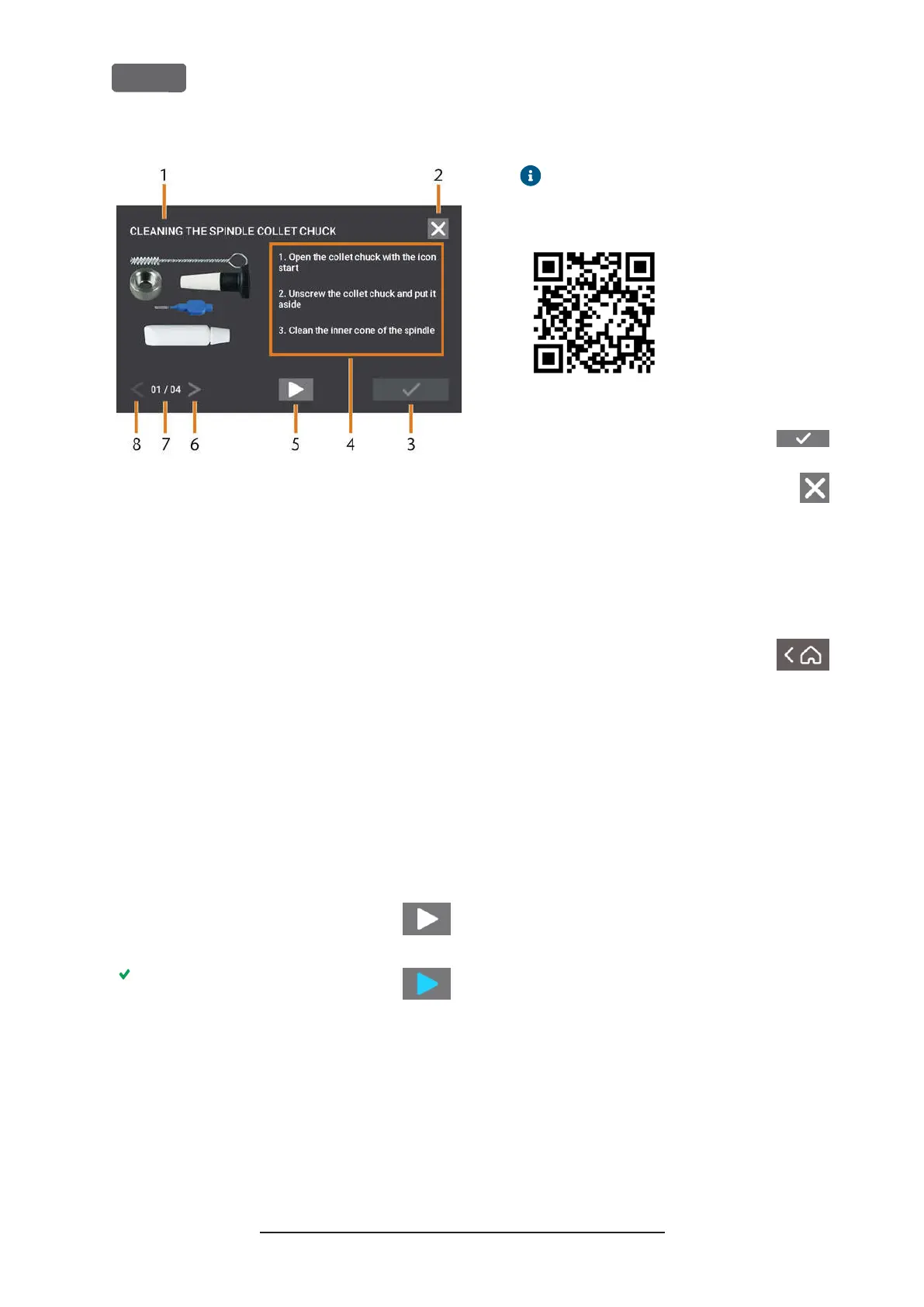
F
IG
. 65 – I
NTERACTIVE ON
-
SCREEN GUIDE FOR MAINTENANCE TASK
1.
Title of the on-screen guide
2.
Icon to close the guide without marking the task as
complete
3.
Icon to mark the task as complete
4.
Numbered instructions
5.
Icon for a required machine operation (e. g. open col-
let chuck – only for some tasks)
6.
Go to next page
7.
Current and maximum page of the guide
8.
Go to previous page
You can use the on-screen guides as follows:
1.
Select the arrows [6/8] to navigate through the
guide.
2.
Follow the instructions [4] on every page of the
guide.
3.
Perform the maintenance task as required.
4.
If the depicted icon displays, select it
to execute the required machine func-
tion for the maintenance task.
The icon changes its color as depicted
and the the machine function is
executed.
5.
If you want to open the internet version of the
detailed maintenance instructions, use the QR
code. Alternatively, visit the following website
and search for
Z4
and
maintenance
:
dentalportal.info
The internet version may contain newer
information than this document.
F
IG
. 66 – QR
CODE
6.
To mark the task as complete, select
the depicted icon.
7.
To close the guide without marking the
task as complete, select the depicted
icon.
Leaving the Maintenance section
To close the
Maintenance
section, do as follows:
1.
Ensure that the list with maintenance tasks dis-
plays.
2.
To go back to the
Home
section,
select the depicted icon.
Original Operating Instructions:Z4
Version: 12/5/2018
Z4 – Maintenance and do-it-yourself
EN 56



 To Next Page