Using the maintenance section
For your convenience, the machine lists all basic main-
tenance tasks in the
Maintenance
section on the touch-
screen. In the
Maintenance
section, you can see when
the individual tasks are due.
When you have marked a maintenance task as
complete, its time interval is reset and the list is
updated accordingly.
You can open the maintenance section as follows:
1.
To open the
Home
section, select the
depicted icon.
2.
To open the
Maintenance
section,
select the depicted icon.
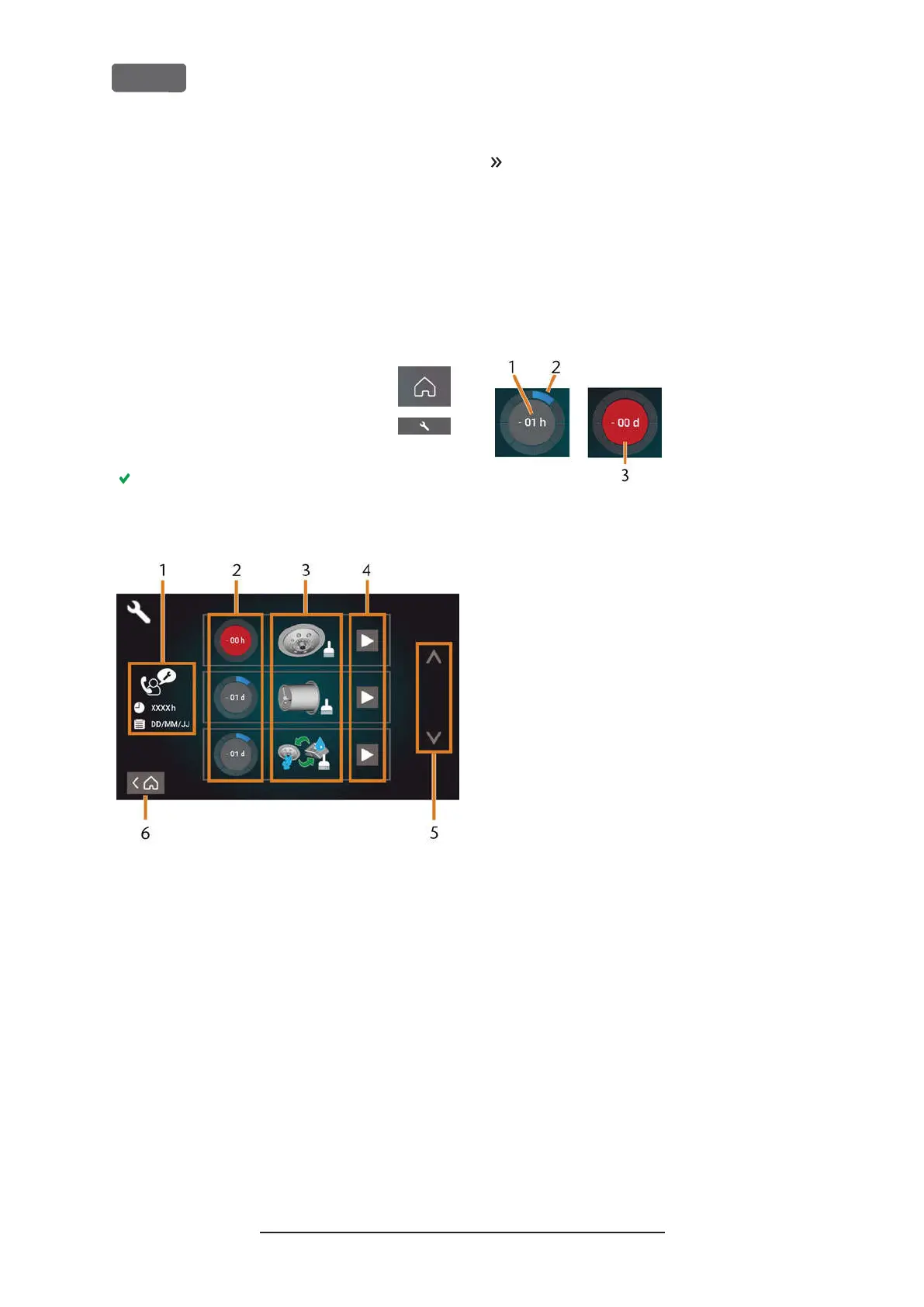
The
Maintenance
section displays. The touch-
screen lists all required maintenance tasks in
order of their urgency.
F
IG
. 63 – T
HE MAINTENANCE SECTION WITH THE LIST OF MAINTENANCE
TASKS
1.
Preventive maintenance: remaining operating hours/
due date
2.
Circles showing the urgency of the task
3.
Illustrations depicting the individual tasks
4.
Start icons to begin the individual tasks
5.
Arrows to scroll through the list
6.
Icon to go back to the
Home
section
In the center of the screen the list with all main-
tenance tasks displays. The higher a task is listed, the
more urgent it is.
Use the circles in the first column to determine
how much time remains until the task is due:
n
The numbers in the circles show how many oper-
ating hours (h) or days (d) are left before the
task must be performed.
n
The number of blue segments decreases over
time.
n
If a circle is red, the corresponding task is due.
F
IG
. 64 – C
IRCLES INDICATING WHEN A TASK IS DUE
1.
The remaining time (here: 1 operating hour)
2.
Only 1 segment remains because the task is due soon
3.
The red circle indicates that this task is due
Original Operating Instructions:Z4
Version: 12/5/2018
Z4 – Maintenance and do-it-yourself
EN 54



 To Next Page