The maximum tool life values that you can actu-
ally achieve with your tools depend on many
factors, such as the quality of the tools, the
quality of the blanks, how well the machine is
maintained and cleaned etc. Therefore, the
tool life values that your machine is shipped
with are default values. Due to a self-learning
function, they will become more precise over
time.
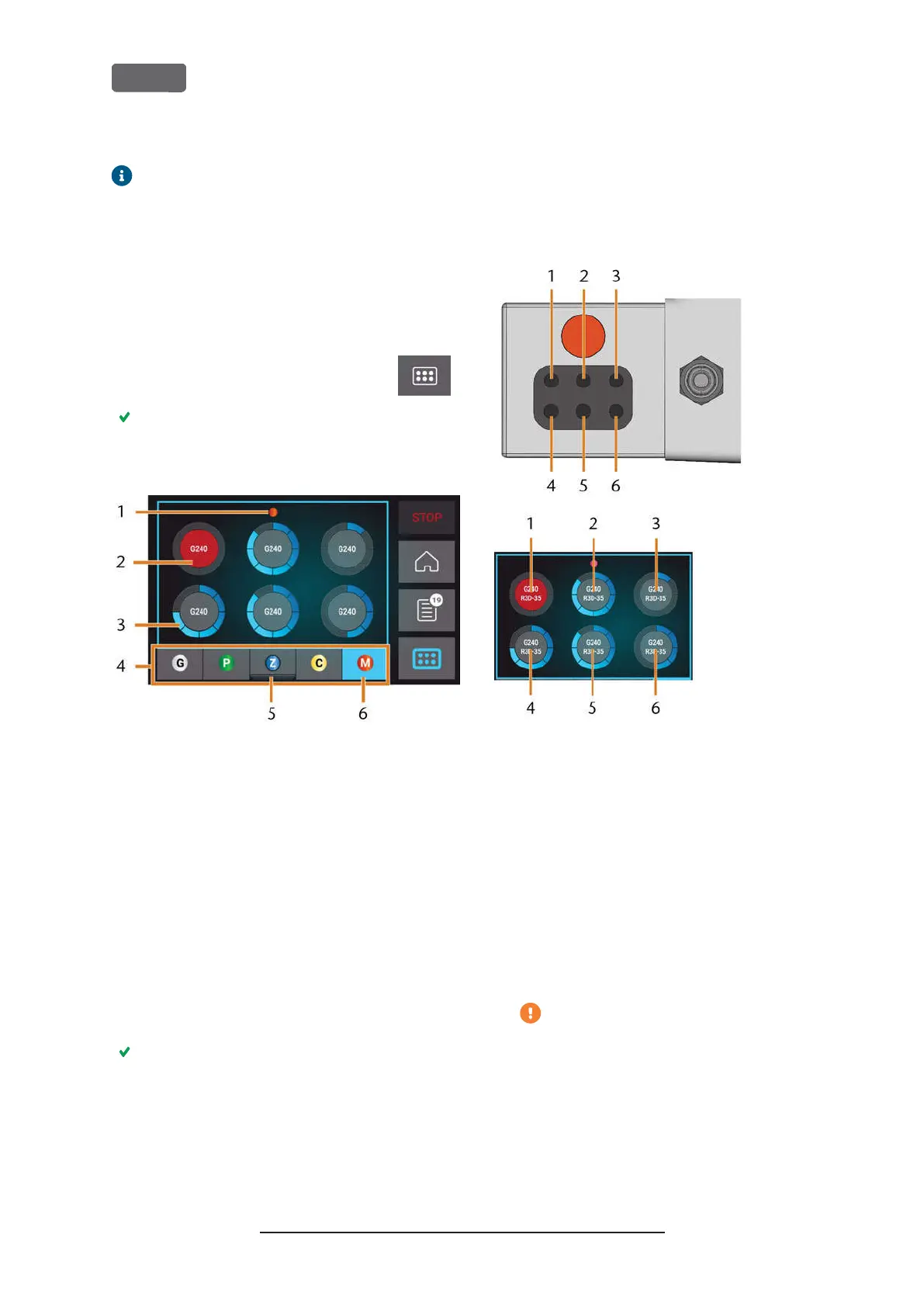
1.
To open the
Tools
section, select the
depicted icon.
The
Tools
section displays. One of the magazines
is selected and the corresponding information dis-
plays.
F
IG
. 42 – T
OOLS SECTION
1.
Color code of the currently selected tool
magazine
2.
Tool with expired tool life (red circle)
3.
Tool life value indicator (blue outer circle)
4.
Menu for selecting the tool magazine
5.
Marking for the tool magazine currently inserted
in the working chamber
6.
Marking for the tool magazine currently shown
on the touchscreen
2.
Select the desired tool magazine from the menu
at the bottom display border.
The tools of the corresponding tool magazine dis-
play as circles.
a.
In the middle of each circle, the tool match
code displays.
b.
Tools with expired tool life values display in
red.
c.
Each circle is assigned to a specific position of
the corresponding magazine.
F
IG
. 43 – T
OP
: T
OOL POSITION
1 – 6
IN THE TOOL MAGAZINE
B
OTTOM
: T
OOL POSITIONS
1 – 6
ON THE TOUCHSCREEN
3.
If tool life values have expired, remove the cor-
responding tools from the tool magazine.
4.
Insert the new tools:
a.
Ensure that the positions of the tools in the
tool magazine match the tool positions on
the touchscreen.
b.
Insert the tools straight into the tool pos-
itions with the cutting edge pointing down-
wards. Push them in until the ring touches
the rubber.
If the positions of the tools in the tool
magazine do not match the tool positions
on the touchscreen, the machine will use
the wrong tool(s) during job execution
and the job result will become unusable.
Original Operating Instructions:Z4
Version: 12/5/2018
Z4 – Operation: Preparing jobs
EN 42



 To Next Page