Visionix EyeRefract User Guide
49
Overview of the Software
Optotype Chart Controls
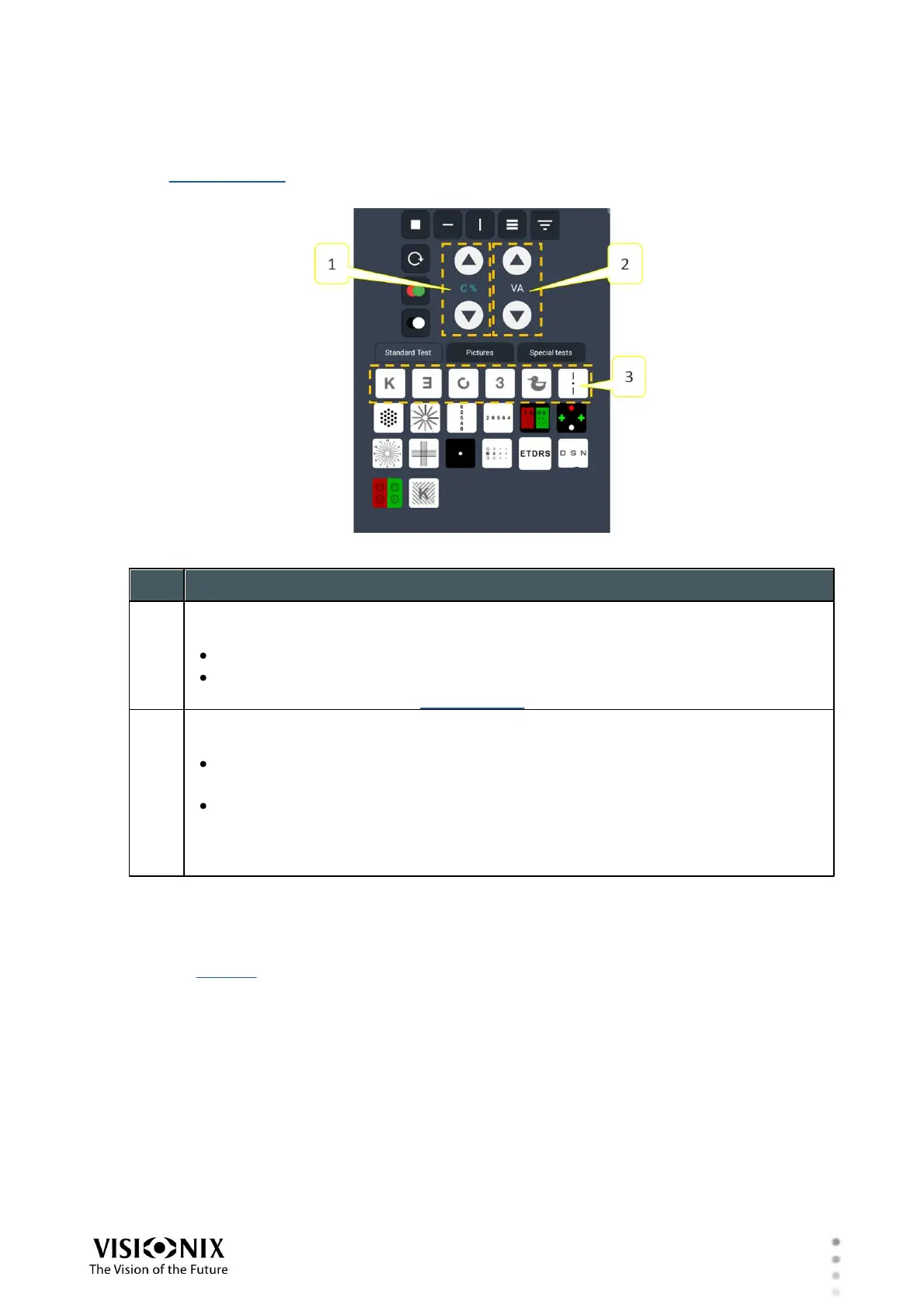
When optotype charts are selected (any of the options in #3 in the illustration below), contrast
(#1 below) and visual-acuity controls (#2 below) are added to the chart-control area.
Optotype contrast and VA controls
C%
Contrast controls:
Tap the up and down arrows to increase or decrease the contrast.
Tap and hold the up arrow to set the contrast to 100%.
Note: Not available when the polarized filter is selected.
VA
Visual-acuity measurement controls:
Tap the up and down arrows to increase or decrease the size of the optotypes by
one step.
Tap and hold the up and down arrows to increase or decrease the size of the
optotypes by three steps.
The visual acuity values are automatically inserted into the exam results and saved
in the Exam File.
ETDRS Patient-Response Controls
When the ETDRS test is selected (#2 in the illustration below), the system expects you to
report on whether the patient read the letter or line correctly. For this purpose, controls are
added to the chart-control area (#1 below):



 To Next Page