wallPen E2 | User Manual
50
Software
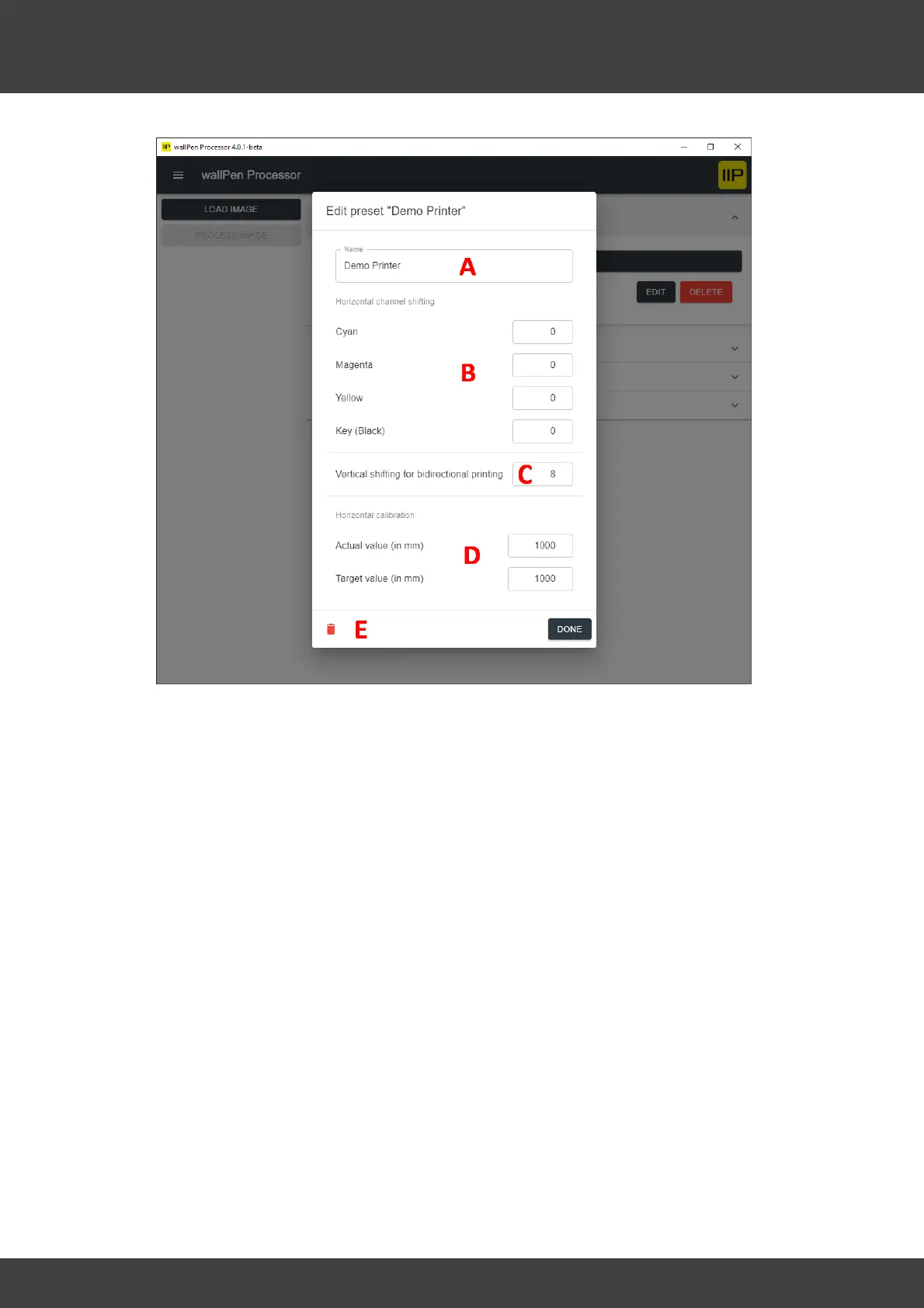
A - Name - Shows the current name of this profile and allows to change it.
B - Lateral Channel Shifting - The Lateral Channel Shifting is explained in the chapter
"Service / Calibration"
C - Vertical Shifting for bidirectional printing - This setting is obsolete and can be
ignored for the wallPen E2 model.
D - Horizontal Calibration - This setting is obsolete and can be ignored for the
wallPen E2 model. You can find a better procedure to calibrate the printer in the
chapter "Software | wallPen Control". This section explains how to calibrate the machine
by respecting the exact wheel diameter, so that both horizontal calibration settings can
be left at 1000.
If this type of calibration is still used in rare exceptional cases, it is explained here how
to use it:
The wallPen moves forward horizontally over the wheels during printing. This is done
by a high-precision stepper motor, which repeatedly performs a certain number of
motor steps in order to position itself for the next printing web. If the movement
forward is not absolutely precise and only deviates, for example, by 0.05 mm per
swath, even such a tiny error adds up more and more. For an image with, for example,
2,000 swaths, it would already be an inaccuracy of 1 cm!



 To Next Page