50 Making Electrical Connections to the 600 Controller
• Eluent composition (A%, B%, C%, or D%), flow rate, or column-heater
temperature (from Chart terminals)
Note: When plotting eluent composition, the output signal reflects the composition
at the gradient proportioning valve. This composition is different from the
composition within the column or at the detector. This difference is the delay caused
by the system volume.
The full scale range of the Pressure and Chart outputs is 0 to +10 mV. You select the Chart
output function to monitor using the controller Pump Setup screen (as described in the
Waters 600E Multisolvent Delivery System User’s Guide).
Connections
To monitor the analog output signal from either the Pressure or Chart terminals, connect
the event cable (provided in the 600E Startup Kit) as described below:
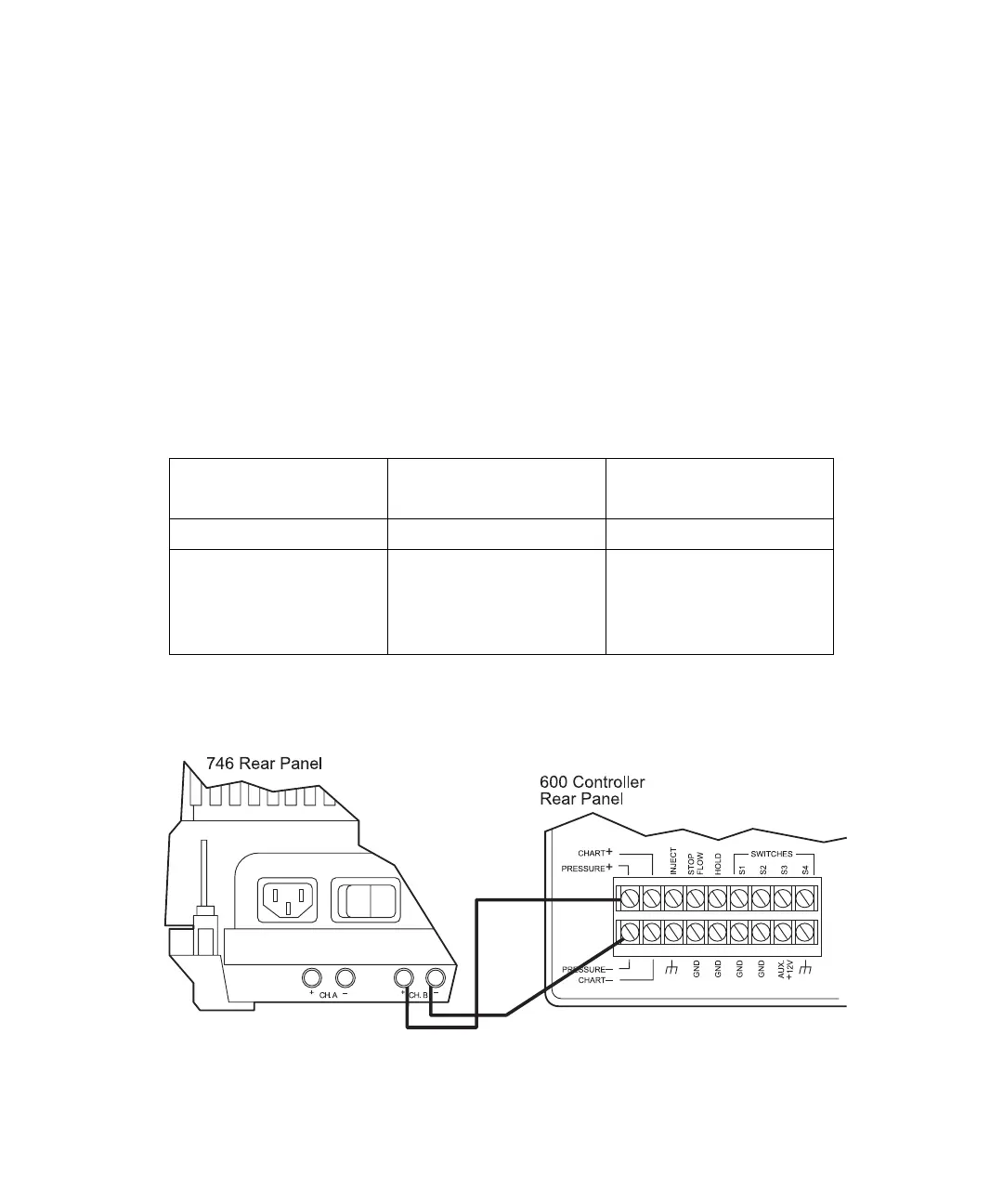
Figure 3-11 shows the Waters 746 connected to the 600 controller Pressure terminals.
Figure 3-12 shows the Waters 746 connected to the 600 controller Chart terminals.
Figure 3-11 Connecting the Waters 746 to the 600 Controller Pressure Terminals
Monitor Function
600 Controller
Connection
Waters 746
Pump pressure Pressure + and – Channel B + and –
Eluent composition
(A%, B%, C%, or D%),
flow rate, or column
heater temperature
Chart + and – Channel B + and –



 To Next Page