9. Coolant system
285
9.7.6 Troubleshooting
Refer to the following countermeasures for difficulties that arise.
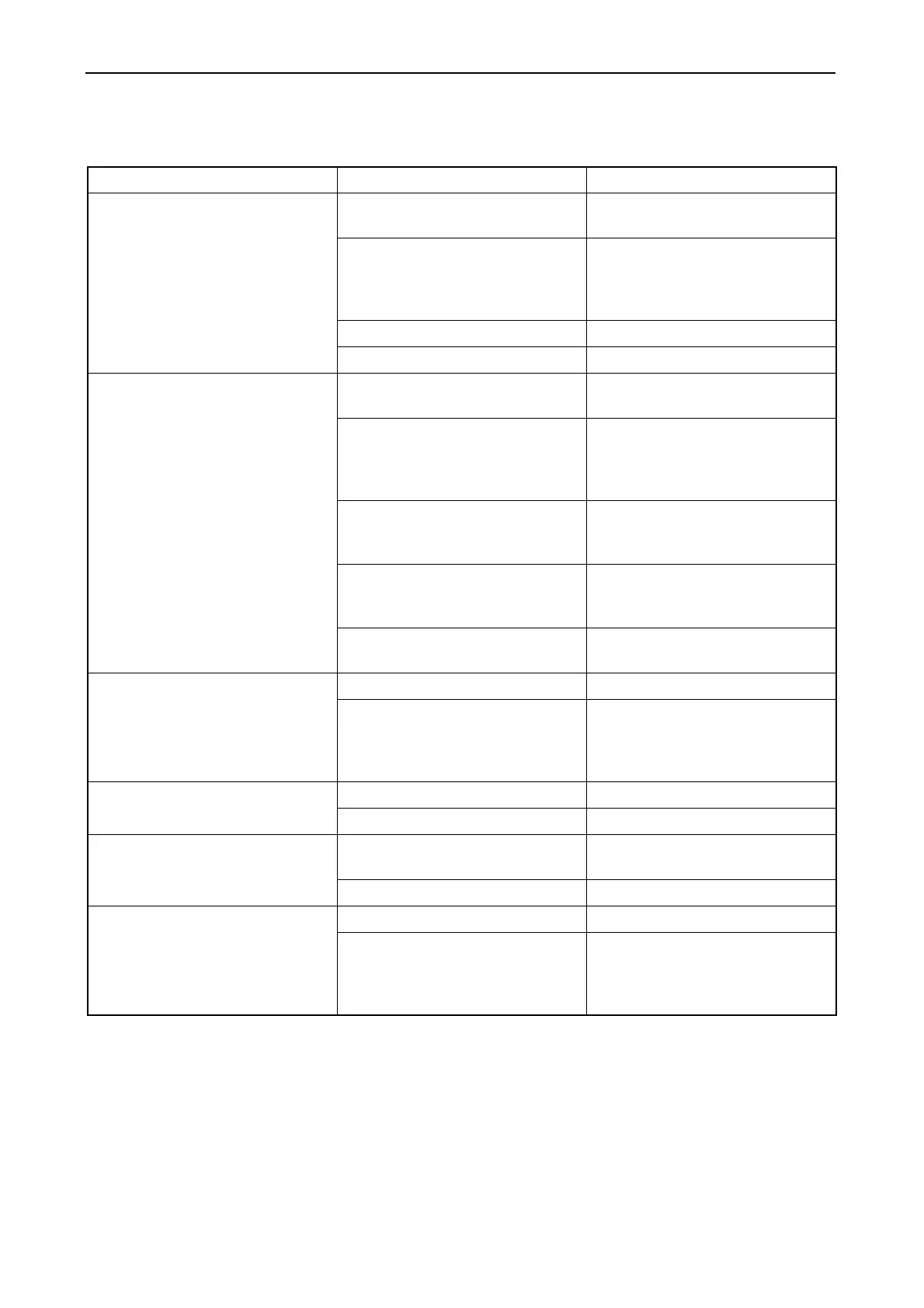
Problem Cause Countermeasure
1. Pump does not turn Faulty wiring Check the wiring between the
motor and battery.
Faulty battery Check to see if the specific gravity
of the battery fluid is greater than
1.25.
Recharge or replace the battery.
Faulty starter switch Consult your local dealer.
Faulty pump Consult your local dealer.
2. Pump turns but does not draw
up water.
Draws up air. Check hose connections.
Retighten pump screws.
Low voltage in battery. Check to see if the specific gravity
of the battery fluid is greater than
1.25.
Recharge or replace the battery.
The distance between the pump
and the surface of the water is too
great.
Lower the pump. (Position the
pump so that it is closer to the
surface of the water.)
The pump is too high. Lower the pump. (Position the
pump so that it is 50-70 cm above
the bottom of the boat.)
Pump intake is weak. If intake is still faulty after priming,
consult your local dealer.
3. Pump turns, but the amount of
discharge is low.
Clogged strainer Clean strainer.
Hose is broken or damaged. Check for damage and repair. If
incorrect hose has been used,
replace with the regulation type of
hose.
4. Water leakage from pump Water leakage from packing Retighten pump screws.
Faulty pump seal Consult your local dealer.
5. Pump draws up bilge, but motor
stops when hand is removed
from starter switch.
Faulty diaphragm switch Check for loose wiring in
diaphragm switch and correct.
Damaged diaphragm switch Consult your local dealer.
6. Motor does not stop, when
there is no bilge water left
Clogged strainer or hose Clean strainer or hose.
Damaged diaphragm switch Check for continuity of diaphragm
switch terminal.
Consult your local dealer if there is
continuity.



 To Next Page