Yuneec Electric Aviation
H520 Start Guide
10
A
CCELEROMETER
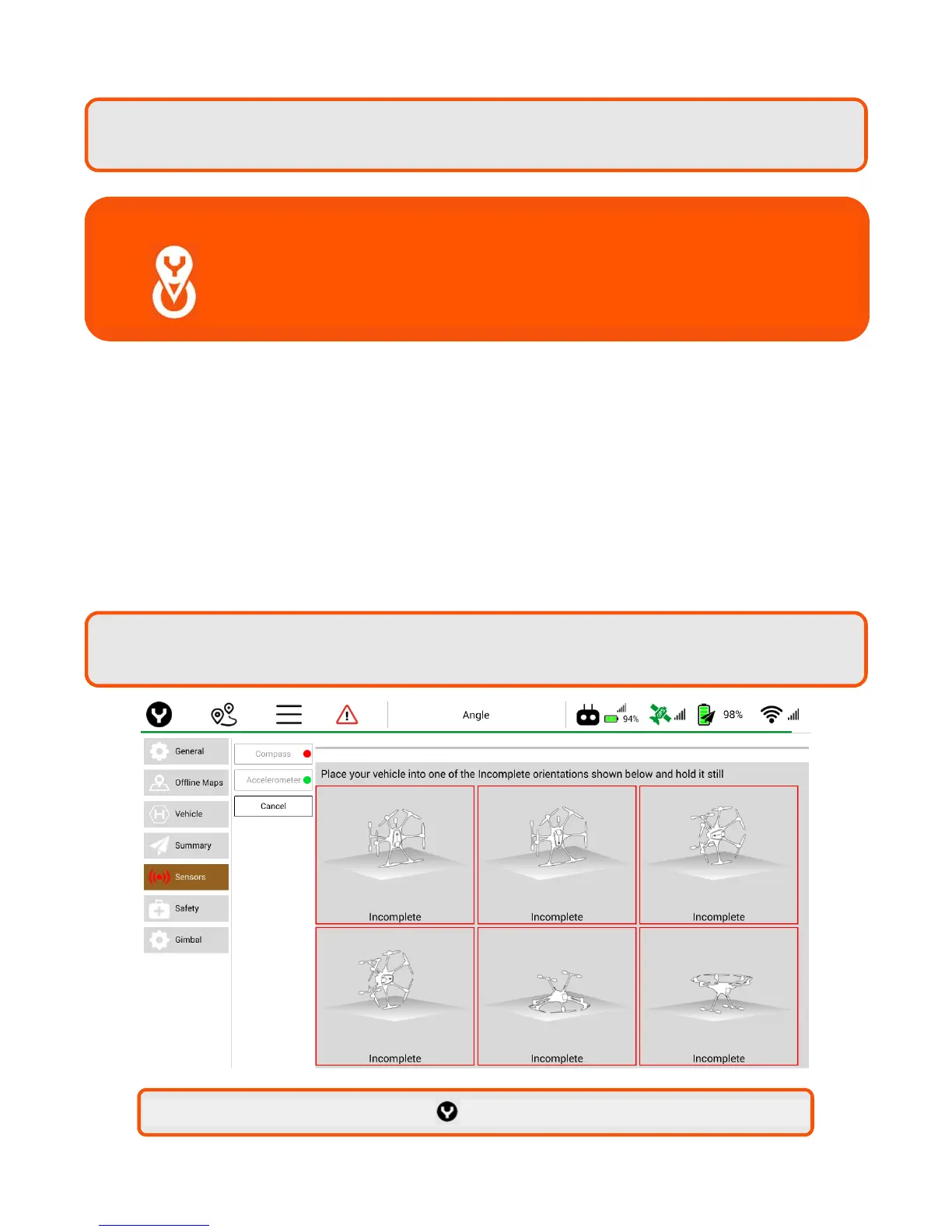
In the Settings Menu, select Sensors | Accelerometer. Follow the onscreen display and instructions. During
Accelerometer calibration, aircraft must be set on level ground as instructed.
When placing the aircraft on level ground, the aircraft does not need to be at a 90-degree angle and may be
rested against the arms and/or landing gear. Place the aircraft in the position as shown on the display. Do
not move the aircraft until instructed by the ST16S.
These positions can be conducted out of order. Each box will turn yellow to indicate which position has
been detected. A green box indicates the position has been calibrated. Once all six positions have been
calibrated place aircraft upright.
Note:
Removing the propellers prior to calibration will assist in preventing damage to the
propellers, motors and the pilot’s arms.
Note: If all six led lights flash Red rapidly, the Compass calibration has failed. Restart the
procedure. If the issue persists, move the H520 to a different location.
Important Note: Recalibrate the Compass anytime the H520 aircraft has
moved more than five miles from the last Compass
calibration. Recalibrating allows for magnetic differences
to be calculated prior to launch.
Note: After calibration press the
icon to return to the map/camera menu.



 To Next Page