Yuneec Electric Aviation
H520 Start Guide
54
WAYPOINT MODE VS SURVEY MODE
Waypoint mode allows the Pilot to establish a non-gridded flight plan over an area with control points for
location, camera, altitude, speed, and camera or aircraft yaw. Each waypoint is separately controlled,
enabling the aircraft to ascend, descend, point the camera at an area, speed up/slow down, etc.
SURVEY MODE
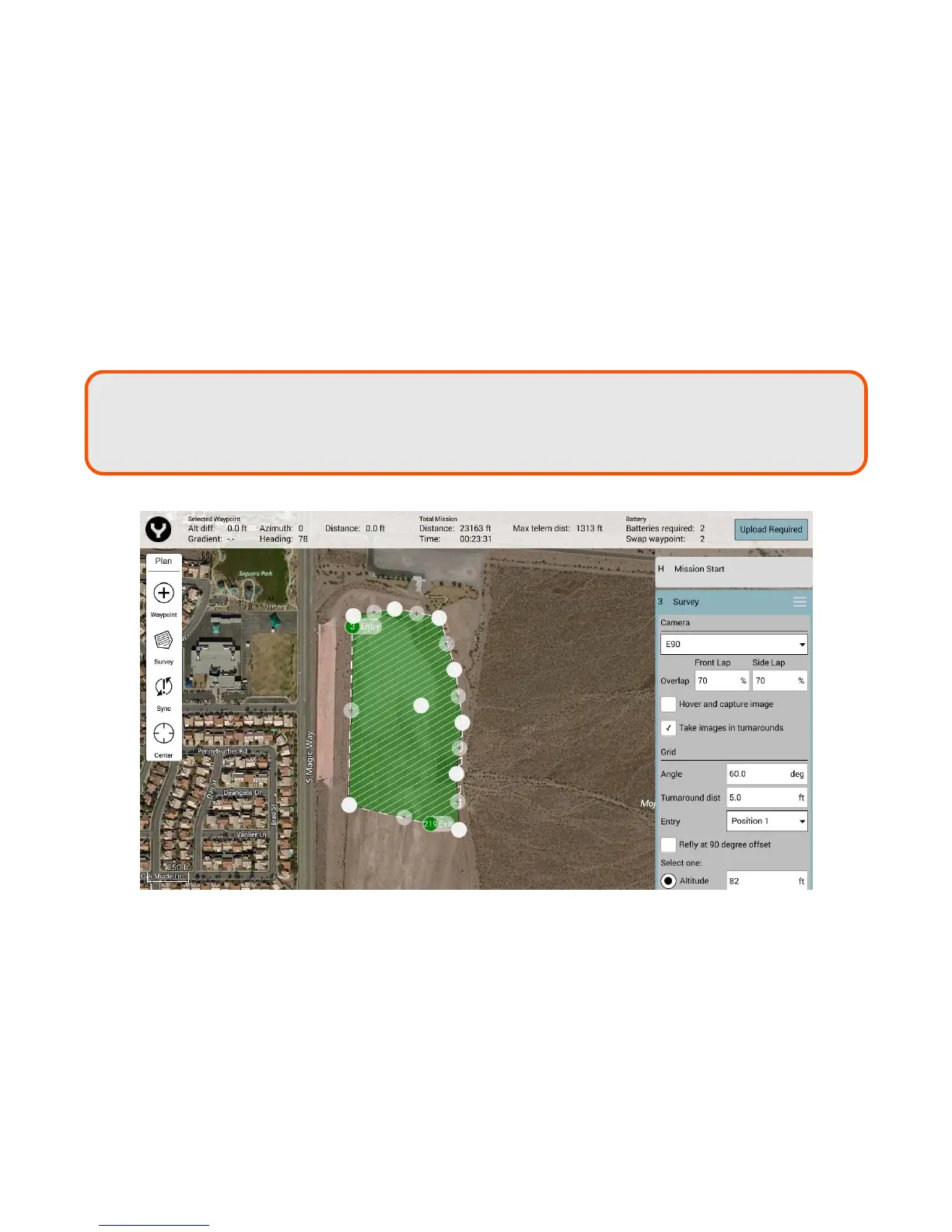
Survey mode allows the Pilot to quickly place a survey grid over a desired area. To select a survey grid
mission, tap the Survey Icon in the Plan panel. This will place a green survey grid in the middle of the screen
over the map. To move the survey grid around the map, hold and drag the white dot in the center of the
survey grid. Tapping and dragging a white dot on the outside of the survey grid allows the dimensions of
the survey grid to be adjusted. Tapping a ‘+’ dot allows the Pilot to add more white dots to the edge of the
survey grid for finer flight paths.
Note: The first placed waypoint will by default be the Takeoff point waypoint.
To place
another Waypoint, tap on another location on the map. Continue tapping on the map
until the desired mission route has been completed.



 To Next Page