Yuneec Electric Aviation
H520 Start Guide
20
M
AP AND
C
AMERA
V
IEW
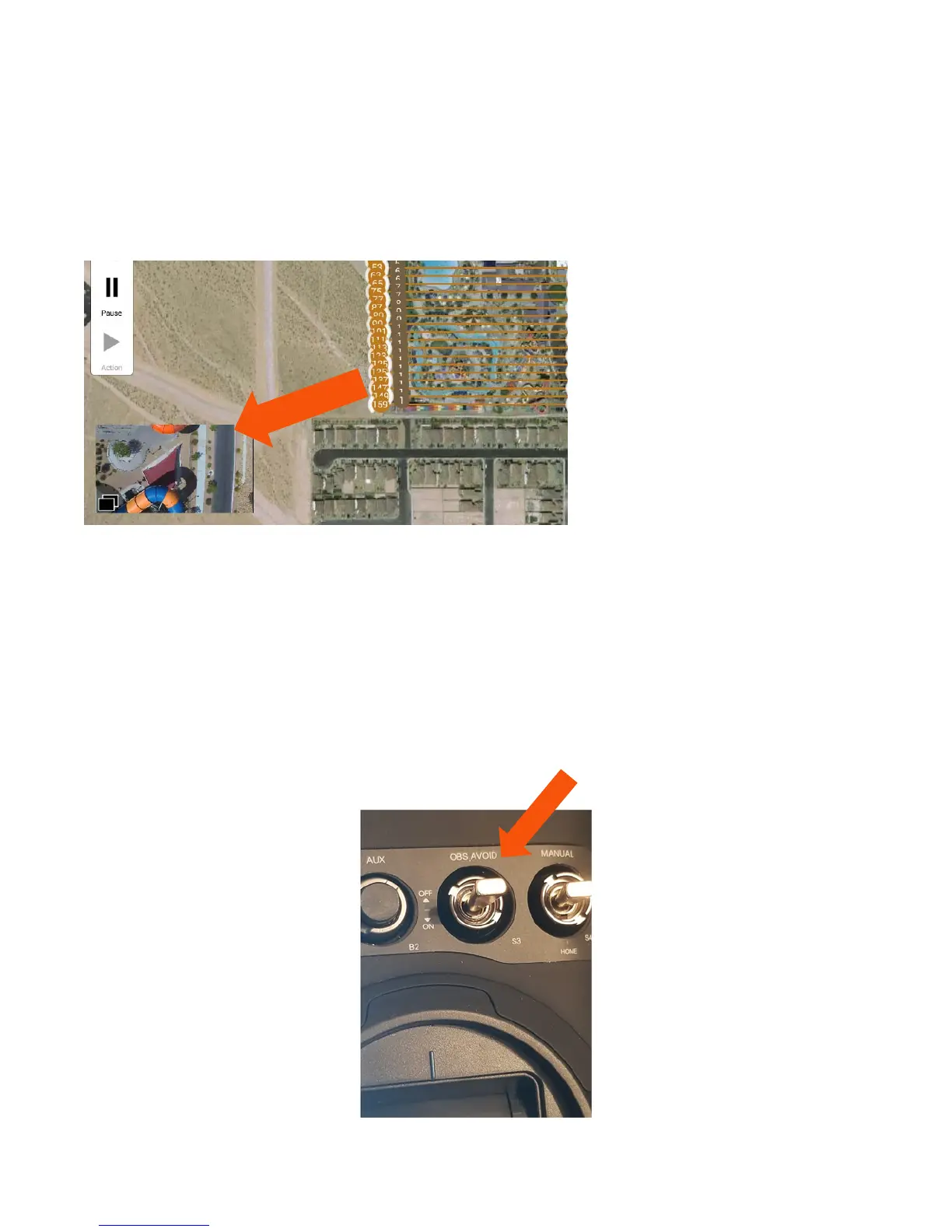
To toggle between the full screen Map and full screen live camera view, tap the rectangle box on the lower
left of the DataPilot™ Home Screen. Depending on the current screen displayed, the Pilot will see a small
map or a small camera rectangle in the lower left. To switch displays, tap the rectangle once.
The fullscreen view is valuable during photographic missions, while the Mission/Map view are vital during
survey or waypoint missions. The two screens may be alternatively tapped at any time during any flight.
OBS
I
NDICATOR
When the Obstacle Avoidance System (OBS) is activated, the H520 uses the two sonar sensors (sender and
receiver units on the front of the H520) to detect and avoid forward collisions with objects. OBS will limit
the forward speed to 4 m/s of the H520 to ensure the highest probability of avoiding a forward
collision. There are three states of the OBS using switch S3 on the top left of the ST16S.
Using switch S3 on the ST16S, the Pilot can toggle the Obstacle Avoidance System (OBS). When Switch S3
is in the top position the OBS is set to off. When switch S3 is in the center position the OBS is in standby
mode. When switch S3 is in the full down position, OBS is active.



 To Next Page