Yuneec Electric Aviation
H520 Start Guide
63
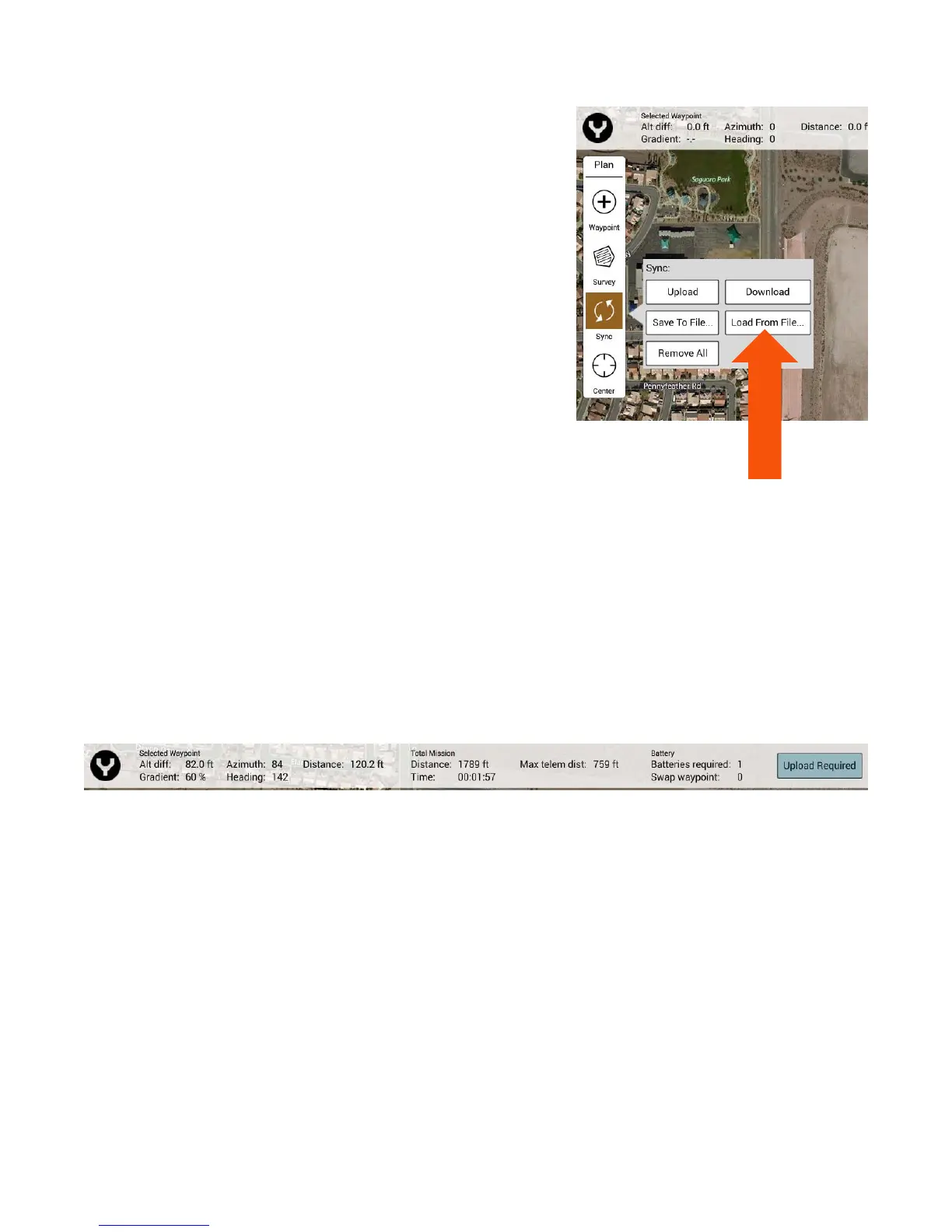
SYNC MISSIONS WITH AIRCRAFT
Upload – Upload the current planned mission from the
ST16S to the H520.
Download – Download the current mission from the
H520 to the ST16S.
Save to File – Save the current planned mission to a file
on the ST16S.
Load from File – Loads a saved mission from the ST16S
to the mission planning view.
Remove All – Remove the current mission from the
mission planning view and from the H520. If the
mission is not to be re-flown, it is recommended that
missions always be removed from aircraft following a
successful flight.
CENTER
Mission – Center the map on the center of the current mission area.
All Items – Centers the map on the center of all mission items.
Home – Centers the map on the current set home location from the H520.
Current Location – Centers the map on the current location of the ST16S. Disabled if no GPS signal
is available on the ST16S.
Aircraft – Centers the map on the current location of the H520. Disabled if no GPS signal is
available on the H520.
MISSION INFO BAR
The mission status bar is located on top of the mission planning view.
SELECTED WAYPOINT
Alt Diff – Difference in altitude between current waypoint and previous waypoint.
Azimuth – Compass heading to previous waypoint from current waypoint.
Heading – Compass heading from current waypoint to next waypoint.
Gradient – % change in absolute altitudes from previous waypoint to current waypoint.
Distance – Distance from previous waypoint to current waypoint.



 To Next Page