Yuneec Electric Aviation
H520 Start Guide
55
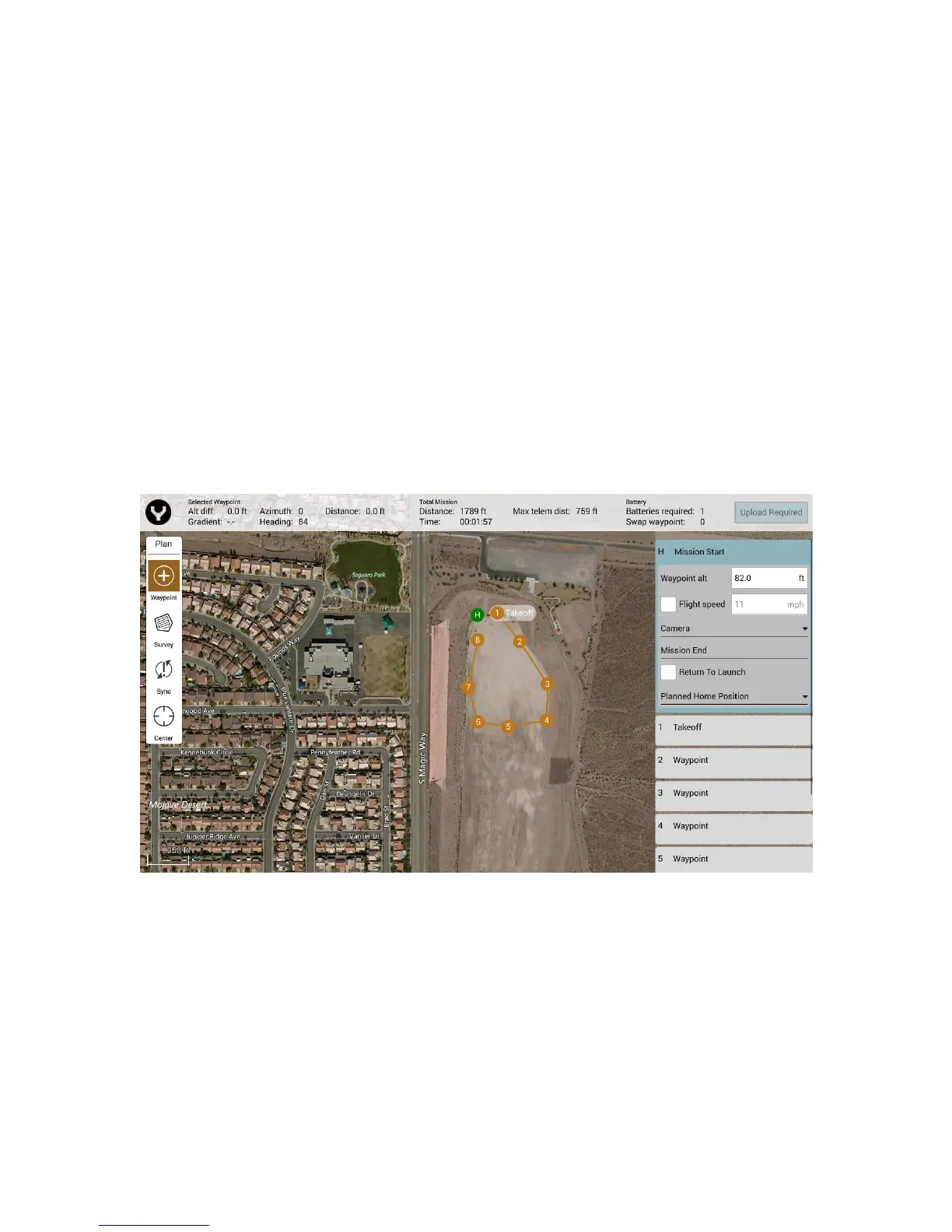
HOME LOCATION
When planning offline, i.e. no known location for the H520, the home position is automatically set to be at
an offset position from the first placed waypoint. The home position can be changed by tapping the
waypoint and dragging it to a new location. During mission takeoff, the home position gets reset to the
location of the aircraft, but will not be saved when offline.
ADJUSTING MISSION PARAMETERS
To adjust Mission level parameters, use the menu on the right side of the Mission Planning window.
MISSION START
Mission Start permits the Pilot to adjust the entire mission’s Altitude, Flight Speed, Camera Options,
Mission End, and Planned Home Position.
Waypoint Altitude – Defaults the Waypoint altitudes to custom value for all dropped
waypoints. For Survey items, only the ones with a user-defined altitude setting will be
changed. Survey items with ground resolution settings (implicit altitude value) will not be affected.
Flight Speed – Defaults the flight speed for the entire planned mission including survey items.
CAMERA
Action
No Change – Camera maintains its current mode/settings.
Take Photo – Captures a photo at the current position.
Take Photos (Time) – Captures photos over a set time interval.
Take Photos (Distance) – Captures photos over a set distance travelled.
Stop Taking Photos – Stops the camera from taking photos.
Start Recording Video – Begins video recording.
Stop Recording Video – Stops video recording.



 To Next Page