Yuneec Electric Aviation
H520 Start Guide
59
CAMERA
Action
No Change – Camera maintains its current mode/settings.
Take Photo – Captures a photo at the current position.
Take Photos (Time) – Captures photos over a set time interval.
Take Photos (Distance) – Captures photos over a set distance travelled.
Stop Taking Photos – Stops the camera from taking photos.
Start Recording Video – Begins video recording.
Stop Recording Video – Stops video recording.
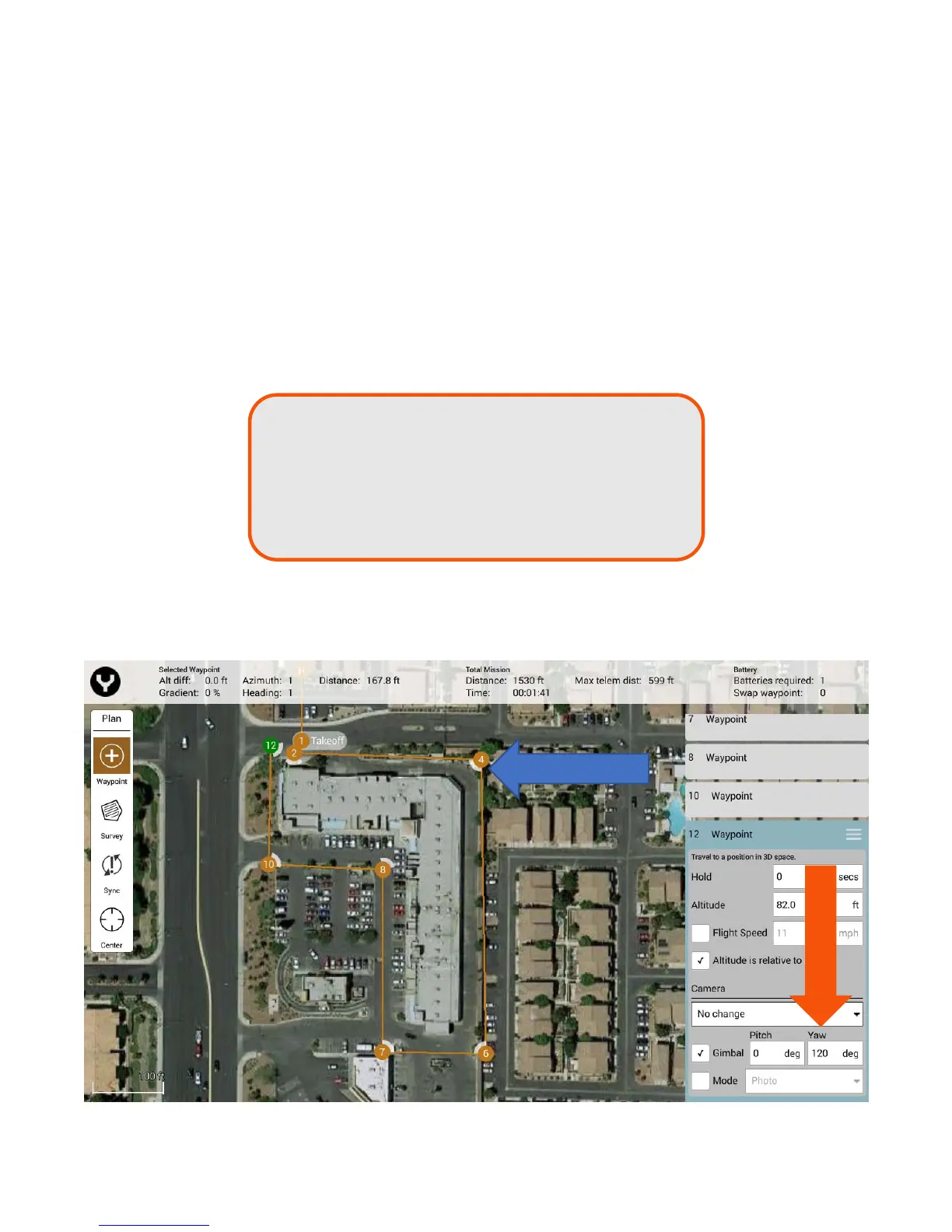
Gimbal - Adjust the camera pitch and yaw at the currently selected Waypoint. To adjust pitch select
a value between 0 (flat to the ground) and 90 (straight down). To adjust the yaw select a value
between -180 (left of the airframe centerline) and 180 (right of the airframe centerline).
Camera position/yaw is relative to the nose-forward flight direction of the H520, and is indicated by white
quarter-circle indicators, allowing the mission controller or pilot to determine what the camera will view
during a waypoint mission flight (Surveys always point straight down for nadir photos).
0 to 90 Right of H520 centerline to full right
91 to 180 Full right to full rear
0 to -90 Left of H520 centerline to full left
-91 to -180 Full left to full rear



 To Next Page