Yuneec Electric Aviation
H520 Start Guide
11
INSTALLING THE PROPELLERS
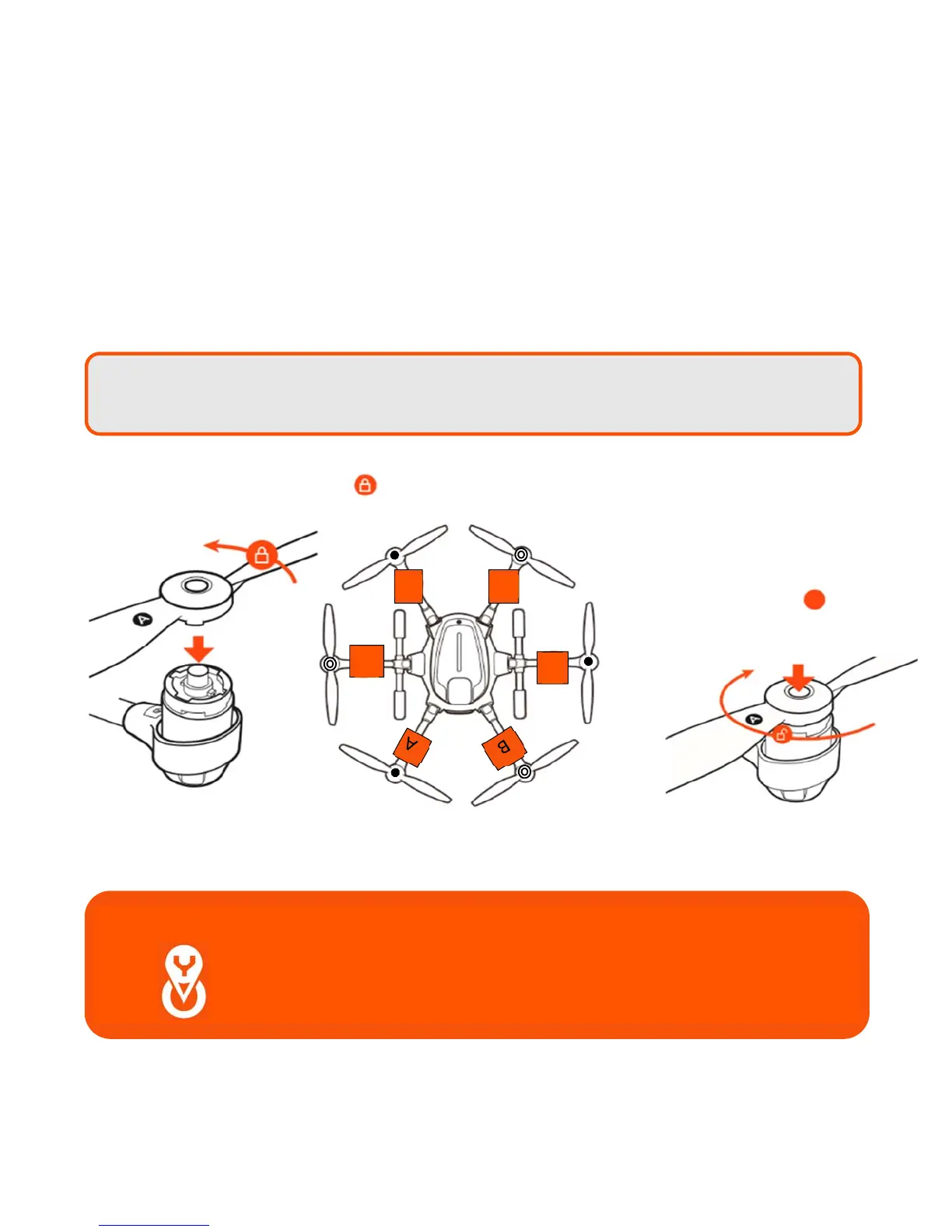
Each arm of the H520 has a letter A or letter B labeled on it. “A” arms have black center buttons; “B” arms
have white center buttons.
Each propeller has an A or B label etched into the blade. “A” propellers cannot be attached to “B” motors,
nor can “B” motors be mounted to an “A” motor.
Match the A propellers with the A arms (black center button) and the B propellers with the B arms (white
center button). Place the prop on the motor, lightly press down and while holding the motor and turn the
prop a quarter turn. A click will be heard and the center button will slightly pop up. Hold the motor and test
propeller security to assure a locked propeller.
A
B
B
A
Note: H blades will fit on the H520 motors. However,
DO NOT
attempt to fly the H520 with
H blades installed.
Important Note: Always check the props for damage and rough edges.
Damaged props may cause in flight vibrations causing
unwanted flight characteristics. Propellers should be
replaced every 20 hours
(see Maintenance Guide).



 To Next Page