Yuneec Electric Aviation
H520 Start Guide
19
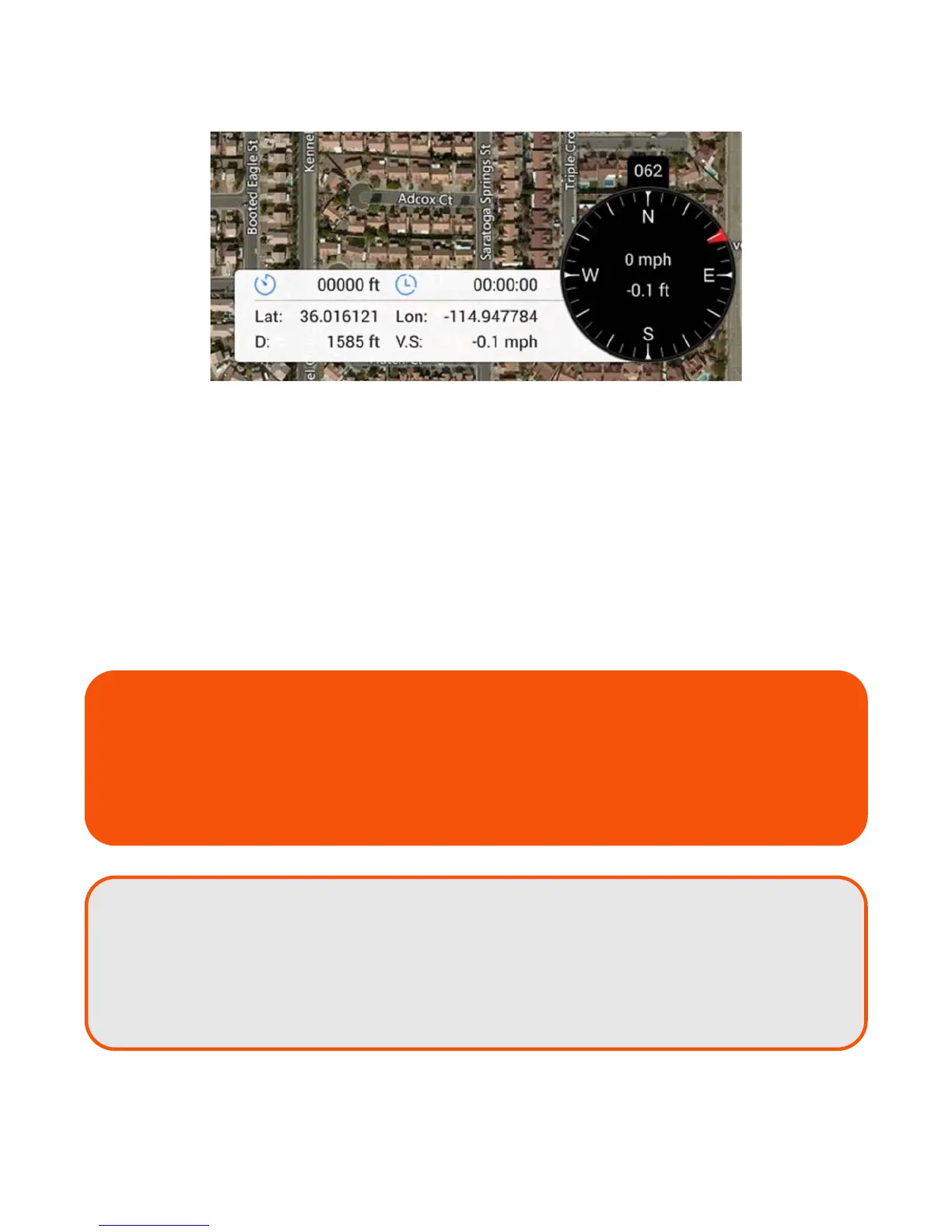
The Flight Telemetry Display on the lower right corner of the DataPilot™ Home Screen indicates:
Black Compass
Compass heading of the H520 (direction the nose of the aircraft is facing)
Current ground speed of the H520
Current altitude of the H520
Left Extension
Total flight distance
Total flight time
H520 Current Location (lat/long) - ‘NO GPS’ if no GPS lock
H520 distance from ST16S - ‘NO GPS’ if no GPS lock
H520 Vertical Speed
Airspeed is the delta/difference between the ground speed and wind speed.
On a perfectly calm day with no wind, airspeed is equal to ground speed. If the
wind is blowing in the same direction that the aircraft is moving
(tail wind), the
airspeed will be less than the ground speed. If the wind is blowing towards the
aircraft
(headwind), airspeed will be greater than ground speed.
TIP!
If immediate log information is needed for sharing, the display may be screen-captured
with current compass bearing, Lat/Lon, etc by pressing and holding the Screenshot icon
for three seconds, found at the center bottom of the multi-function display. Images are
stored in the Pictures/Screenshot folder on the ST16S. These images may be emailed
directly from the ST16S (if connected to WIFI), downloaded to a card, or stored off to a
thumbdrive.



 To Next Page