ACS550 User’s Manual 193
Embedded fieldbus
Activate drive control functions – EFB
Controlling the drive
Fieldbus control of various drive functions requires configuration to:
• tell the drive to accept fieldbus control of the function
• define as a fieldbus input, any drive data required for control
• define as a fieldbus output, any control data required by the drive.
The following sections describe, at a general level, the configuration required for
each control function. For the protocol-specific details, see the document supplied
with the FBA module.
Start/Stop Direction control
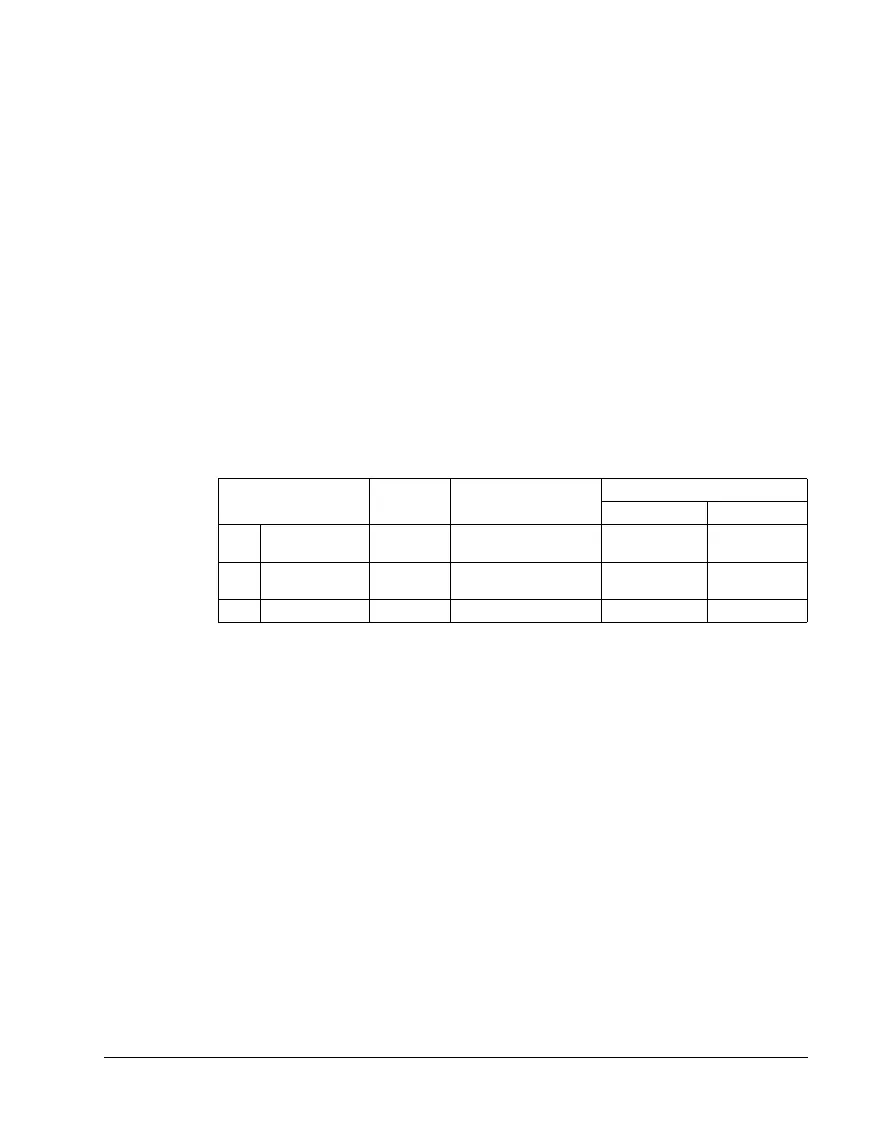
Using the fieldbus for start/stop/direction control of the drive requires:
• drive parameter values set as defined below
• fieldbus controller supplied command(s) in the appropriate location. (The location
is defined by the Protocol Reference, which is protocol dependent.)
Drive parameter Value Description
Modbus
1
protocol reference
ABB DRV DCU PROFILE
1001 EXT1 COMMANDS 10 (COMM) Start/Stop by fieldbus
with Ext1 selected.
40001 bits 0…3 40031 bits 0, 1
1002
EXT2 COMMANDS 10 (COMM) Start/Stop by fieldbus
with Ext2 selected.
40001 bits 0…3 40031 bits 0, 1
1003
DIRECTION 3 (REQUEST) Direction by fieldbus. 4002/4003
2
40031 bit 3
1
For Modbus, the protocol reference can depend on the profile used, hence two columns in these
tables. One column refers to the ABB Drives profile, selected when parameter 5305 = 0 (
ABB DRV
LIM) or 5305 = 2 (ABB DRV FULL). The other column refers to the DCU profile selected when
parameter 5305 = 1 (
DCU PROFILE). See section ABB control profiles technical data on page 209.
2
The reference provides direction control – a negative reference provides reverse rotation.



 To Next Page