ACS550 User’s Manual 59
Control panels
How to upload and download parameters
For the upload and download functions available, see above.
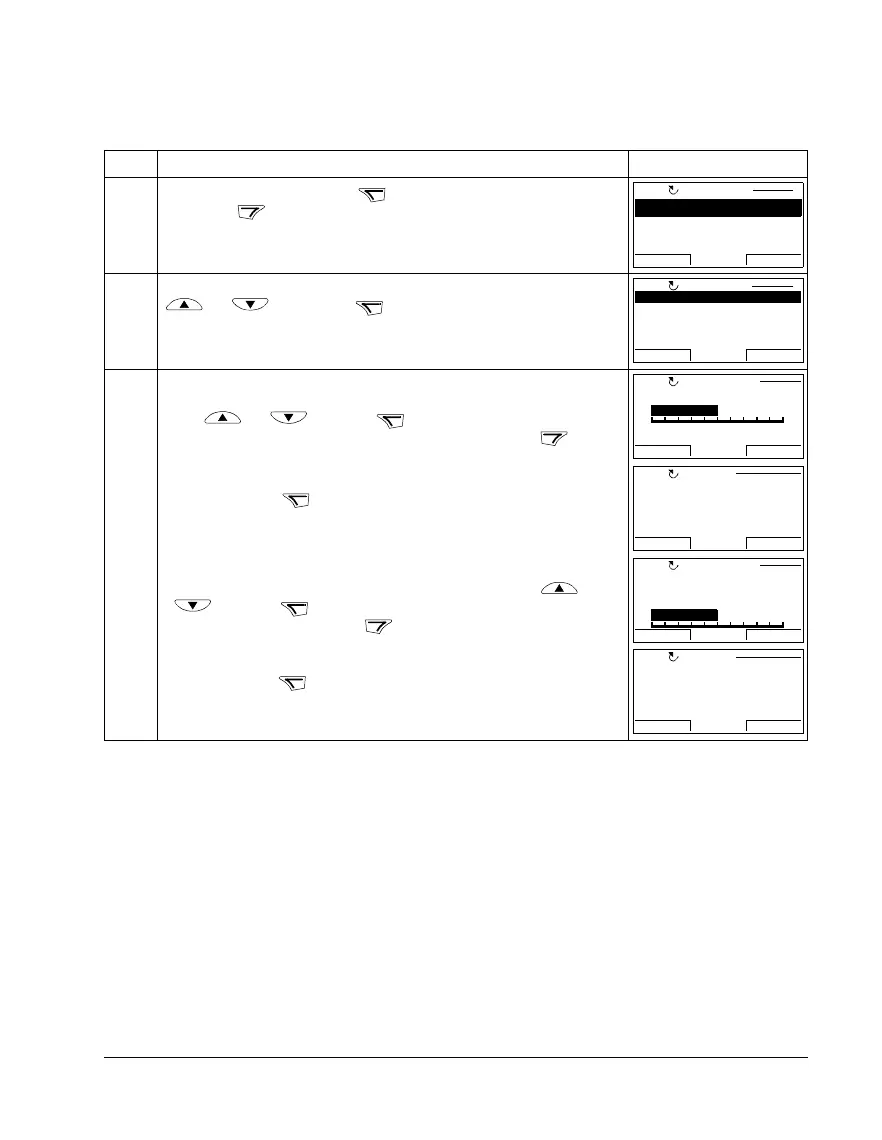
Step Action Display
1. Go to the Main menu by pressing if you are in the Output mode, otherwise
by pressing repeatedly until you get to the Main menu.
2. Go to the Par Backup mode by selecting PAR BACKUP on the menu with keys
and , and pressing .
3. • To copy all parameters (including user sets and internal parameters) from the
drive to the control panel, select UPLOAD TO PANEL on the Copy menu with
keys and , and press . During the transfer, the display
shows the transfer status as a percentage of completion. Press if you
want to stop the operation.
After the upload is completed, the display shows a message about the
completion. Press to return to the Copy menu.
• To perform downloads, select the appropriate operation
(here DOWNLOAD
FULL SET is used as an example) on the Copy menu with keys and
, and press . The display shows the transfer status as a
percentage of completion. Press if you want stop the operation.
After the download is completed, the display shows a message about the
completion. Press to return to the Copy menu.
MENU
EXIT
PARAMETERS
ASSISTANTS
CHANGED PAR
EXIT ENTER00:00
MAIN MENU 1
LOC
ENTER
UPLOAD TO PANEL
BACKUP INFO
DOWNLOAD FULL SET
DOWNLOAD APPLICATION
DOWNLOAD USER SET1
EXIT
SEL00:00
COPY MENU 1
LOC
SEL
ABORT
ABORT
00:00
PAR BACKUP
LOC
5 0 %
Copying parameters
OK
OK
00:00
Parameter upload
successful.
MESSAGE
LOC
SEL
ABORT
ABORT 00:00
PAR BACKUP
LOC
5 0 %
Downloading
parameters (full
set)
OK
OK 00:00
Parameter download
successfully
completed.
MESSAGELOC



 To Next Page