70 ACS550 User’s Manual
Control panels
How to upload and download parameters
For the upload and download functions available, see above.
Basic Control Panel alarm codes
In addition to the faults and alarms generated by the drive (see chapter Diagnostics),
the Basic Control Panel indicates control panel alarms with a code of form A5xxx.
See section Alarm codes (Basic Control Panel) on page 253 for a list of the alarm
codes and descriptions.
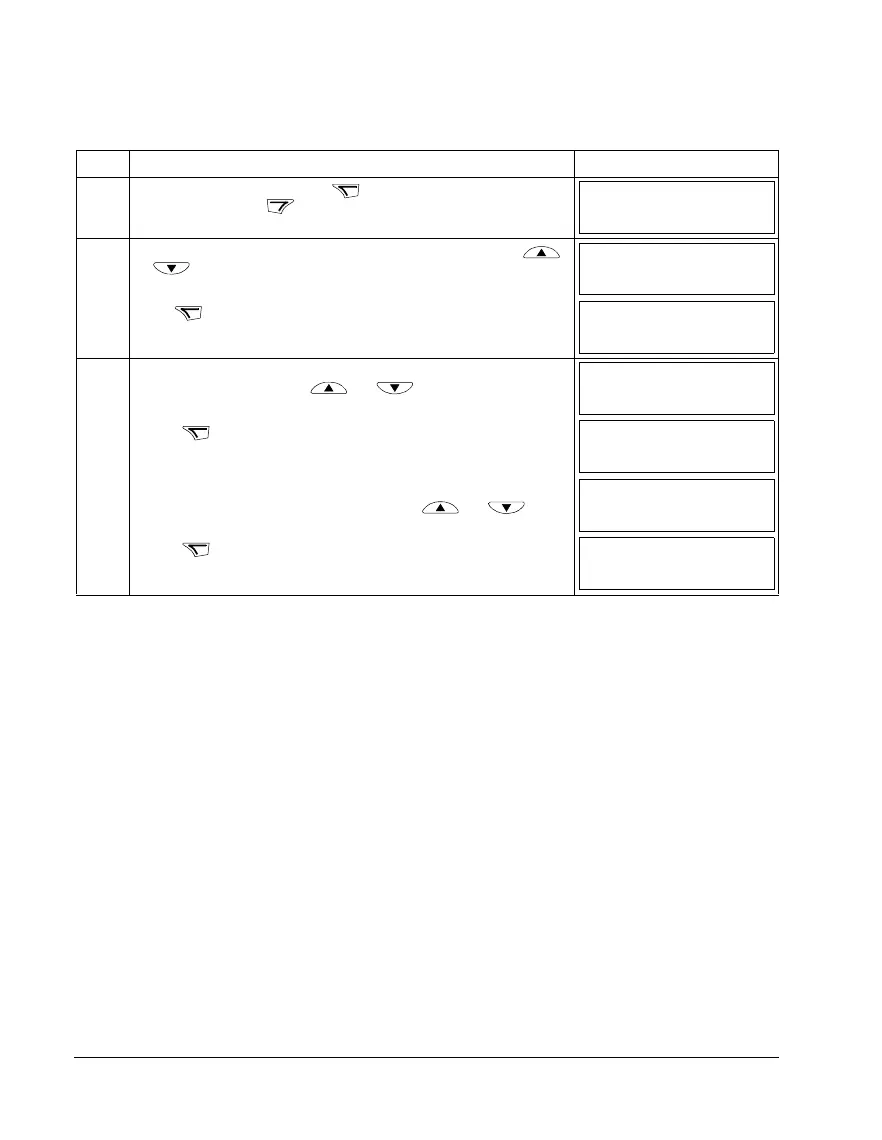
Step Action Display
1. Go to the Main menu by pressing if you are in the Output mode,
otherwise by pressing repeatedly until you see MENU at the bottom.
2. If the panel is not in the Copy mode (“CoPY” not visible), press key
or until you see “CoPY”.
Press .
3. • To upload all parameters (including user sets) from the drive to the control
panel, step to “uL” with keys and .
Press . During the transfer, the display shows the transfer status as a
percentage of completion.
• To perform downloads, step to the appropriate operation
(here “dL A”,
Download All, is used as an example) with keys and .
Press . During the transfer, the display shows the transfer status as a
percentage of completion.
LOC
MENU FWD
PAr
LOC
MENU FWD
CoPY
LOC
MENU FWD
dL u1
LOC
MENU FWD
uL
LOC
%
FWD
uL 50
LOC
MENU FWD
dL A
LOC
%
FWD
dL 50



 To Next Page