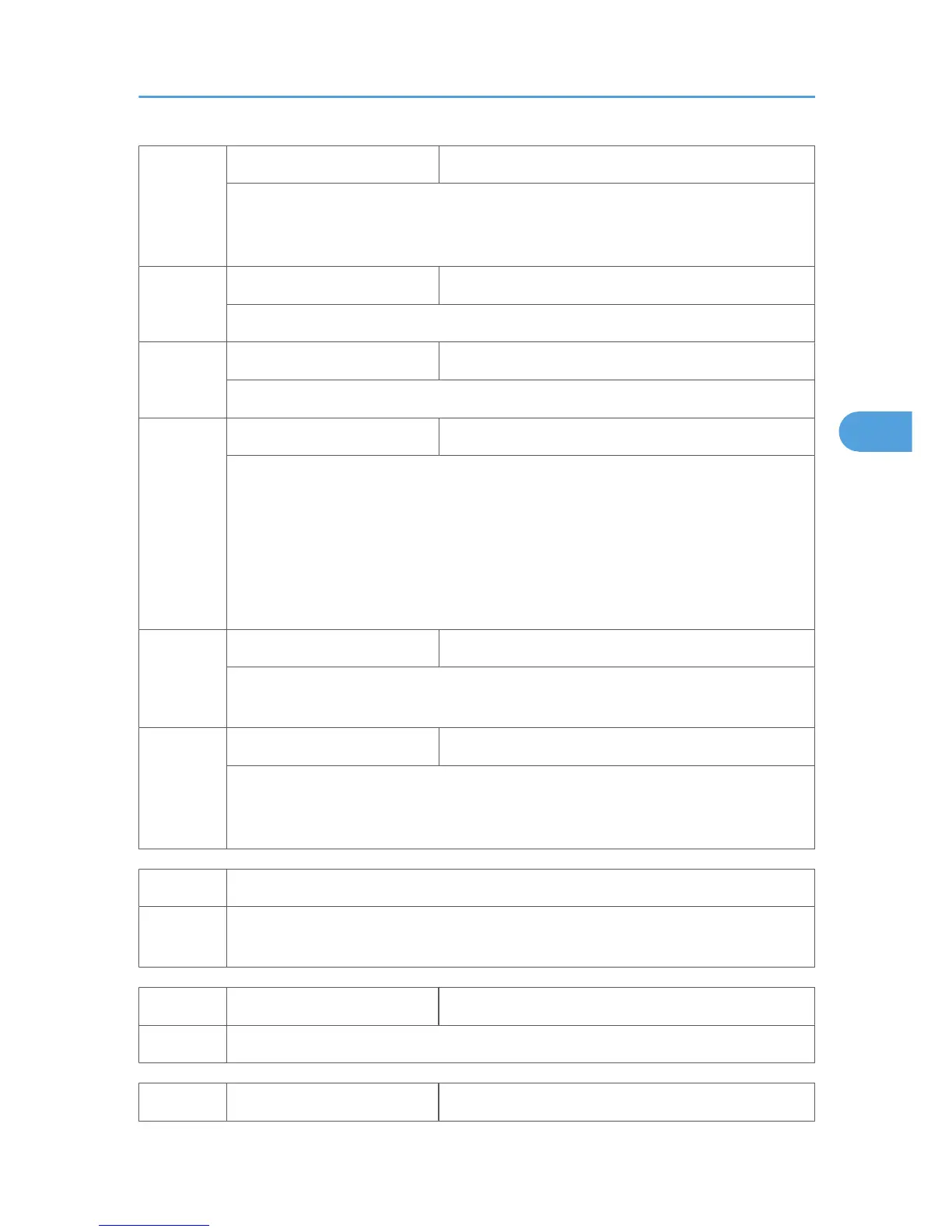
4901 4
Black Display-Target [0 to 63 / 10 /step]
Displays the target value for the black-level adjustment executed during machine
initialization. Normally, the value is 10. Other values indicate that the adjustment has ended
unsuccessfully.
4901 5*
White Target [0 to 511 / 511 / 1/step]
Displays the target value for the white-level adjustment.
4901 6
White Result [0 to 511 / 0 / 1/step]
Displays the result of the white-level adjustment.
4901 10
White Number of Attempt [0 to 20 / 0 / 1/step]
Displays how many times the white-level adjustment is retried. The value does not include
the first execution of the white adjustment. For example, if the value is "2", this indicates
that the white-level adjustment has been executed three times. The white-level adjustment
can be
executed 20 times or less. Therefore, if the value is "20," this indicates that the white-
level adjustment has ended abnormally (as described, the value "20" does not include the
first execution). If the white-level adjustment is unsuccessful, the machine uses the result of
the latest, successful white-level adjustment.
4901 11
Auto Adjustment Setting [222 to 281 / 256 / 1/step]
Displays the parameter of the white-level adjustment. The value is based on the result of
SP 4901 12.
4901 12
Auto Adjustment-Result [0 to 600 / 0 / 1/step]
Displays the result of the white-level adjustment. Normally, the value is between 228 and
281 (including the both values). When the value is normal, it is stored as the value of SP
4901 11.
4902* Exposure Lamp ON
4902 1
Turns the exposure lamp on or off. To turn off the exposure lamp, select "OFF". (The
exposure lamp shuts off automatically after 180 seconds.)
4903* ADS Level [0 to 255 / 252 / 1/step]
4903 1 Adjusts the ADS level.
4904* ADS Lower Limit [0 to 255 / 80 / 1/step]
SP Mode Tables
41



 To Next Page