EasyManua.ls Logo

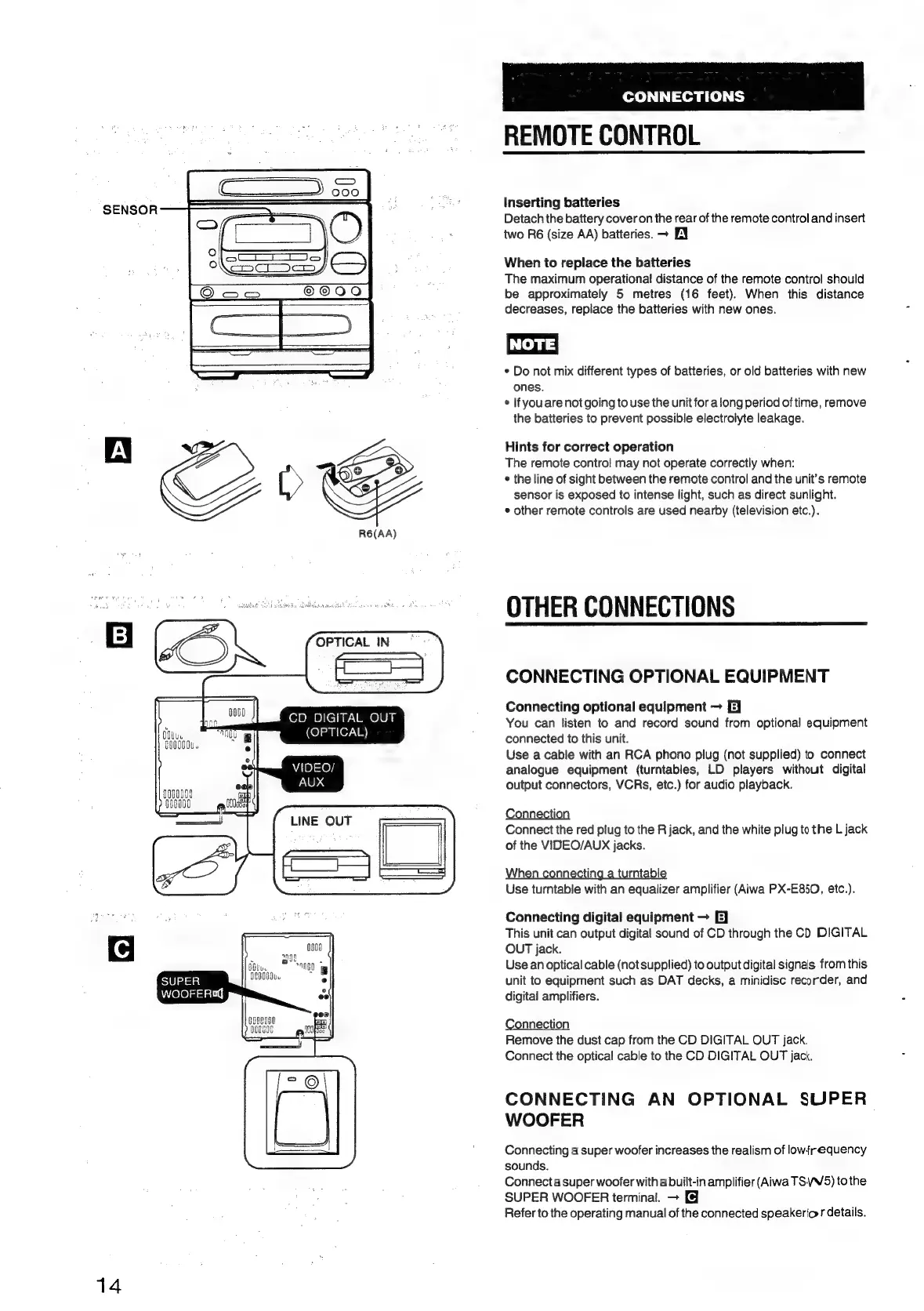
Aiwa NSX-430 - REMOTE CONTROL; Inserting batteries; When to replace the batteries; Hints for correct operation

Aiwa NSX-430
84 pages
Print Icon
To Next Page IconTo Next Page
To Previous Page IconTo Previous Page
Loading...
14
SUPER
WOOFER®«q
itu.
O0080u.
CD
DIGITAL
OUT
((o]sanley.\
8)
VIDEO/
AUX
LINE
OUT
CONNECTIONS
REMOTE
CONTROL
Inserting
batteries
Detach
the
battery
cover
on
the
rear
of
the
remote
control
and
insert
two
R6
(size
AA)
batteries.
~
EY
When
to
replace
the
batteries
The
maximum
operational
distance
of
the
remote
control
should
be
approximately
5
metres
(16
feet).
When
this
distance
decreases,
replace
the
batteries
with
new
ones.
NOTE
*
Do
not
mix
different
types
of
batteries,
or
old
batteries
with
new
ones.
¢
If
you
are
not
going
to
use
the
unit
for
along
period
of
time,
remove
the
batteries
to
prevent
possible
electroiyte
leakage.
Hints
for
correct
operation
The
remote
contro!
may
not
operate
correctly
when:
*
the
line
of
sight
between
the
remote
control
and
the
unit’s
remote
sensor
is
exposed
to
intense
light,
such
as
direct
sunlight.
¢
other
remote
controls
are
used
nearby
(television
etc.).
OTHER
CONNECTIONS
CONNECTING
OPTIONAL
EQUIPMENT
Connecting
optional
equipment
E}
You
can
listen
to
and
record
sound
from
optional
equipment
connected
to
this
unit.
Use
a
cable
with
an
RCA
phono
plug
(not
supplied)
to
connect
analogue
equipment
(turntables,
LD
players
without
digital
output
connectors,
VCRs,
etc.)
for
audio
playback.
Connection
Connect
the
red
plug
to
the
R
jack,
and
the
white
plug
to
the
L
jack
of
the
VIDEO/AUX
jacks.
When
connecting
a
turntable
Use
turntable
with
an
equalizer
amplifier
(Aiwa
PX-E850,
etc.).
Connecting
digital
equipment
E]
This
unit
can
output
digital
sound
of
CD
through
the
CD
DIGITAL
OUT
jack.
Use
an
optical
cable
(not
supplied)
to
output
digital
signals
from
this
unit
to
equipment
such
as
DAT
decks,
a
minidisc
recorder,
and
digital
amplifiers.
Connection
Remove
the
dust
cap
from
the
CD
DIGITAL
OUT
jack.
Connect
the
optical
cable
to
the
CD
DIGITAL
OUT
jack.
CONNECTING
AN
OPTIONAL
SUPER
WOOFER
Connecting
a
super
woofer
increases
the
realism
of
lowfrequency
sounds.
Connect
a
super
woofer
with
a
built-in
amplifier
(Aiwa
TSVW/5)
to
the
SUPER
WOOFER
terminal.
+
Refer
to
the
operating
manual
of
the
connected
speakerior
details.

Table of Contents

Related product manuals