EasyManua.ls Logo

Aiwa NSX-430 - CD PLAYING; BASIC OPERATION

Aiwa NSX-430
84 pages
Print Icon
To Next Page IconTo Next Page
To Previous Page IconTo Previous Page
Loading...
26
4
OPEN/CLOSE
4
OPEN/CLOSE
DIRECTION/PRESET
CD
PLAYING
BASIC
OPERATION
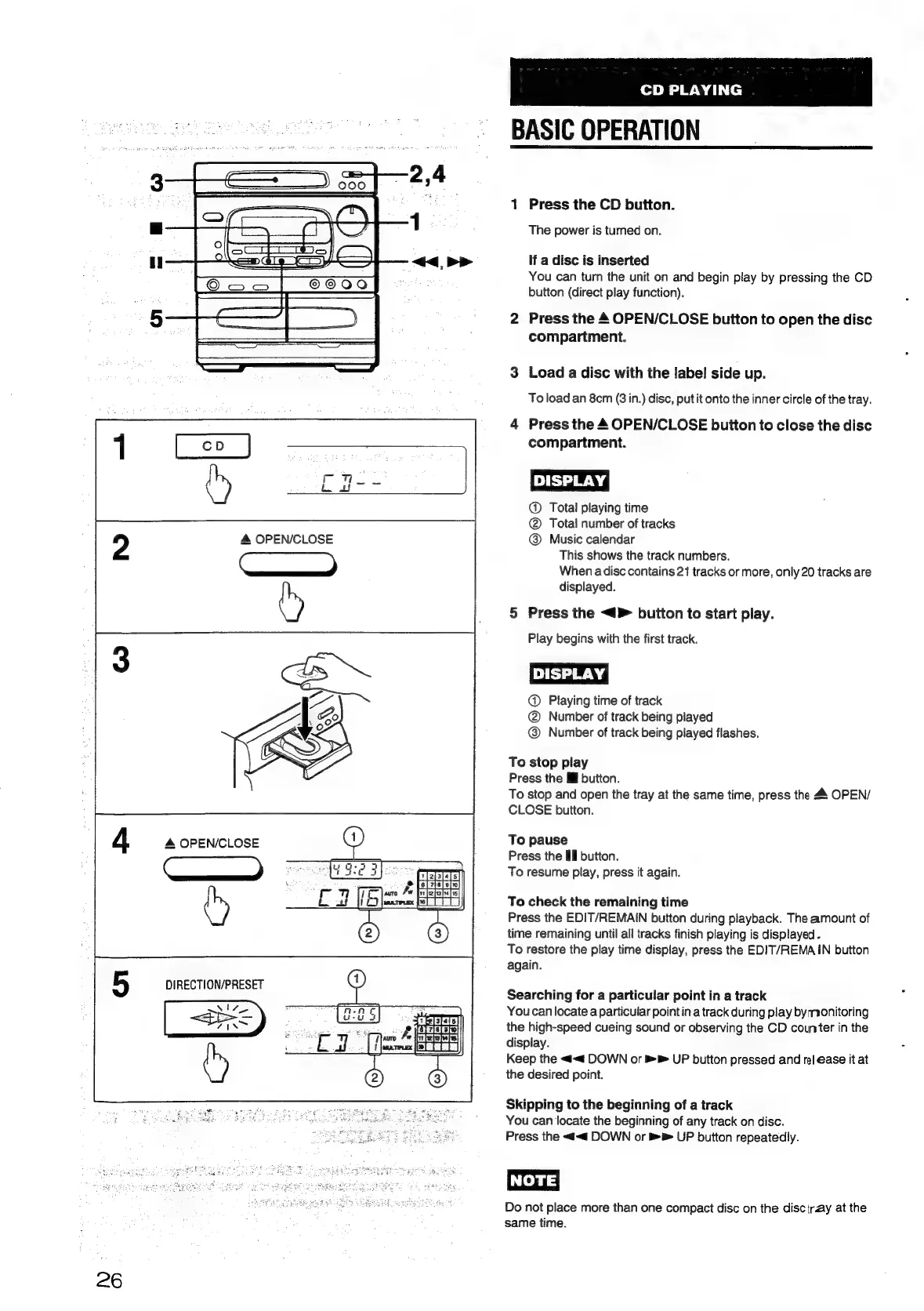
Press
the
CD
button.
The
power
is
turned
on.
ad
If
a
disc
is
inserted
You
can
turn
the
unit
on
and
begin
play
by
pressing
the
CD
button
(direct
play
function).
Press
the
4
OPEN/CLOSE
button
to
open
the
disc
compartment.
Ls)
o
Load
a
disc
with
the
label
side
up.
To
load
an
8cm
(3
in.)
disc,
put
it
onto
the
inner
circle
of
the
tray.
Press
the
4
OPEN/CLOSE
button
to
close
the
disc
compartment.
DISPLAY!
@
Total
playing
time
@
Tota!
number
of
tracks
@
Music
calendar
This
shows
the
track
numbers.
When
adisc
contains
21
tracks
or
more,
only
20
tracks
are
displayed.
Press
the
<4
button
to
start
play.
Play
begins
with
the
first
track.
@
Playing
time
of
track
@
Number
of
track
being
played
@
Number
of
track
being
played
flashes.
py
a
To
stop
play
Press
the
I
button.
To
stop
and
open
the
tray
at
the
same
time,
press
the
4
OPEN/
CLOSE
button.
To
pause
Press
the
Ill
button.
To
resume
play,
press
it
again.
To
check
the
remaining
time
Press
the
EDIT/REMAIN
button
during
playback.
The
amount
of
time
remaining
until
all
tracks
finish
playing
is
displayed
-
To
restore
the
play
time
display,
press
the
EDIT/REMAIN
button
again.
Searching
for
a
particular
point
in
a
track
You
can
locate
a
particular
pointin
a
track
during
play
bymonitoring
the
high-speed
cueing
sound
or
observing
the
CD
counter
in
the
display.
Keep
the
<<
DOWN
or
>
UP
button
pressed
and
rel
ease
it
at
the
desired
point.
Skipping
to
the
beginning
of
a
track
You
can
locate
the
beginning
of
any
track
on
disc.
Press
the
<<
DOWN
or
>
UP
button
repeatedly.
INOTE
Do
not
place
more
than
one
compact
disc
on
the
disctray
at
the
same
time.

Table of Contents

Related product manuals