EasyManua.ls Logo

Aiwa NSX-430 - RECORDING; RECORDING FROM THE RADIO OR CONNECTED EQUIPMENT

Aiwa NSX-430
84 pages
Print Icon
To Next Page IconTo Next Page
To Previous Page IconTo Previous Page
Loading...
REV
MODE
(DECK
2)
TASS
SBE
Ce
ee
MN
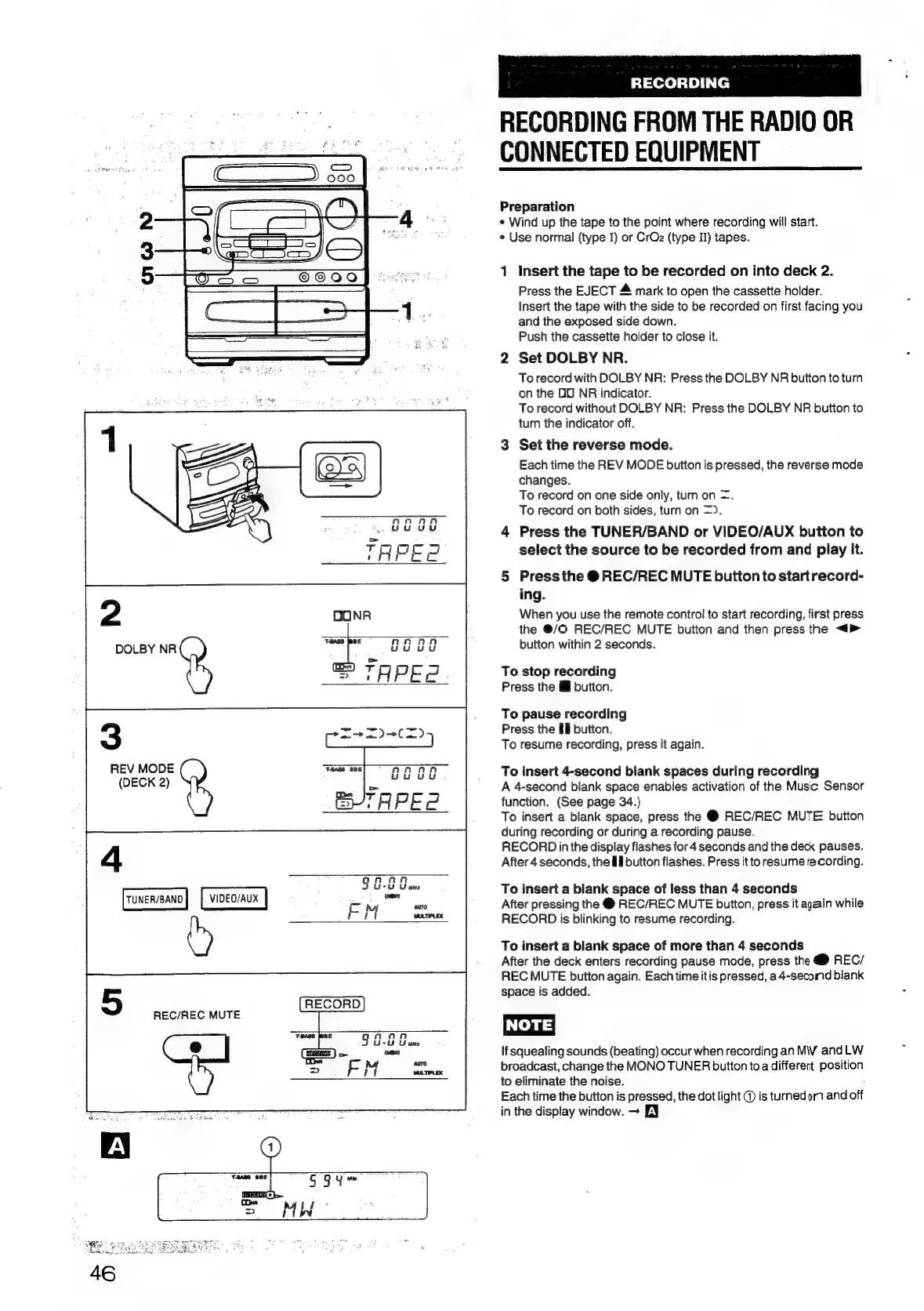
RECORDING
RECORDING
FROM
THE
RADIO
OR
CONNECTED
EQUIPMENT
Preparation
*
Wind
up
the
tape
to
the
point
where
recording
will
start.
¢
Use
normal
(type
I)
or
CrOz
(type
II)
tapes.
1
Insert
the
tape
to
be
recorded
on
into
deck
2.
Press
the
EJECT
&
mark
to
open
the
cassette
holder.
Insert
the
tape
with
the
side
to
be
recorded
on
first
facing
you
and
the
exposed
side
down.
Push
the
cassette
hoider
to
close
it.
2
Set
DOLBY
NR.
To
record
with
DOLBY
NR:
Press
the
DOLBY
NR
button
to
turn
on
the
DO
NR
indicator.
To
record
without
DOLBY
NR:
Press
the
DOLBY
NR
button
to
turn
the
indicator
off.
3
Set
the
reverse
mode.
Each
time
the
REV
MODE
button
is
pressed,
the
reverse
mode
changes.
To
record
on
one
side
only,
turn
on
=.
To
record
on
both
sides,
turn
on
=).
4
Press
the
TUNER/BAND
or
VIDEO/AUX
button
to
select
the
source
to
be
recorded
from
and
play
it.
5
Press
the
@
REC/REC
MUTE
buiton
to
start
record-
ing.
When
you
use
the
remote
contro!
to
start
recording,
first
press
the
@/O
REC/REC
MUTE
button
and
then
press
the
<>
button
within
2
seconds.
To
stop
recording
Press
the
I
button.
To
pause
recording
Press
the
Bll
button.
To
resume
recording,
press
it
again.
To
insert
4-second
blank
spaces
during
recording
A
4-second
blank
space
enables
activation
of
the
Music
Sensor
function.
(See
page
34.)
To
insert
a
blank
space,
press
the
@
REC/REC
MUTE
button
during
recording
or
during
a
recording
pause.
RECORD
in
the
display
flashes
for
4
seconds
and
the
deck
pauses.
After
4
seconds,
the
Hl
button
flashes.
Press
it
to
resume
recording.
To
insert
a
blank
space
of
less
than
4
seconds
After
pressing
the
@
REC/REC
MUTE
button,
press
it
again
while
RECORD
is
blinking
to
resume
recording.
To
insert
a
blank
space
of
more
than
4
seconds
After
the
deck
enters
recording
pause
mode,
press
the
@
REC/
REC
MUTE
button
again.
Each
time
itis
pressed,
a4-secomd
blank
space
is
added.
INOTE
If
squealing
sounds
(beating)
occur
when
recording
an
MW
and
LW
broadcast,
change
the
MONO
TUNER
button
toa
different
position
to
eliminate
the
noise.
Each
time
the
button
is
pressed,
the
dot
light
@
is
turned
om
and
off
in
the
display
window.
Eq

Table of Contents

Related product manuals