EasyManua.ls Logo

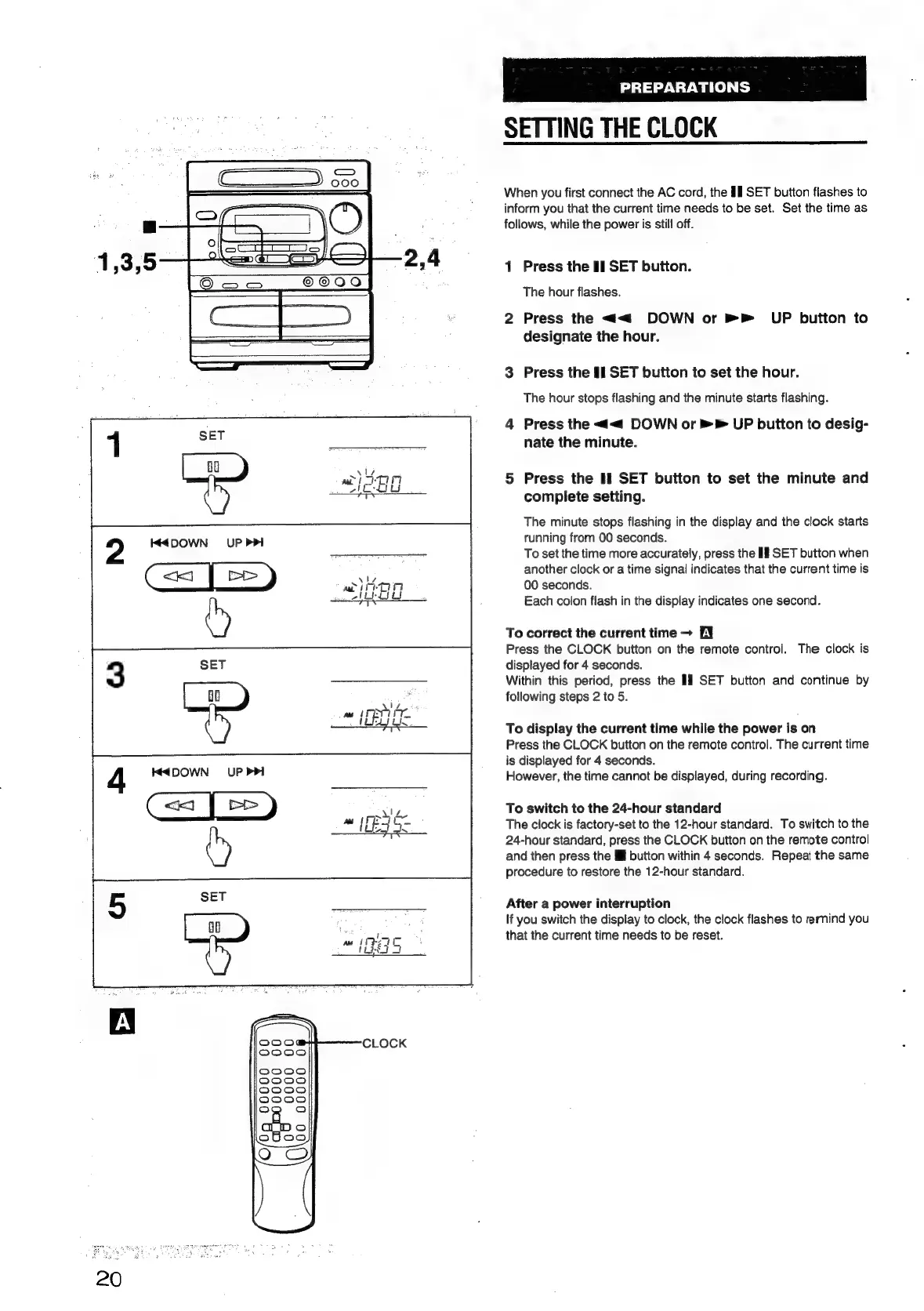
Aiwa NSX-430 - SETTING THE CLOCK; To correct the current time; To display the current time while the power is on; To switch to the 24-hour standard

Aiwa NSX-430
84 pages
Print Icon
To Next Page IconTo Next Page
To Previous Page IconTo Previous Page
Loading...
SET
3
PREPARATIONS
SETTING
THE
CLOCK
When
you
first
connect
the
AC
cord,
the
Il
SET
button
flashes
to
inform
you
that
the
current
time
needs
to
be
set.
Set
the
time
as
follows,
while
the
power
is
still
off.
1
Press
the
II
SET
button.
The
hour
flashes.
2
Press
the
<<
DOWN
or
»P
UP
button
to
designate
the
hour.
3
Press
the
II
SET
button
to
set
the
hour.
The
hour
stops
flashing
and
the
minute
starts
flashing.
4
Press
the
<<
DOWN
or
»
>
UP
buiton
to
desig-
nate
the
minute.
5
Press
the
If
SET
button
to
set
the
minute
and
complete
setting.
The
minute
stops
flashing
in
the
display
and
the
clock
starts
running
from
00
seconds.
To
set
the
time
more
accurately,
press
the
If
SET
button
when
another
clock
or
a
time
signal
indicates
that
the
current
time
is
00
seconds.
Each
colon
flash
in
the
display
indicates
one
second.
To
correct
the
current
time
EY
Press
the
CLOCK
button
on
the
remote
control.
The
clock
is
displayed
for
4
seconds.
Within
this
period,
press
the
I]
SET
button
and
continue
by
following
steps
2
to 5.
To
display
the
current
time
while
the
power
is
on
Press
the
CLOCK
button
on
the
remote
control.
The
current
time
is
displayed
for
4
seconds.
However,
the
time
cannot
be
displayed,
during
recording.
To
switch
to
the
24-hour
standard
The
clock
is
factory-set
to
the
12-hour
standard.
To
switch
to
the
24-hour
standard,
press
the
CLOCK
button
on
the
remote
control
and
then
press
the
il
button
within
4
seconds.
Repeat
the
same
procedure
to
restore
the
12-hour
standard.
After
a
power
interruption
If
you
switch
the
display
to
clock,
the
clock
flashes
to
rernind
you
that
the
current
time
needs
to
be
reset.

Table of Contents

Related product manuals