EasyManua.ls Logo

Aiwa NSX-430 - SOUND; ADJUSTING THE SOUND

Aiwa NSX-430
84 pages
Print Icon
To Next Page IconTo Next Page
To Previous Page IconTo Previous Page
Loading...
DOWN
UP
VOLUME
C)
VOLUME
8.
FE
BBE
BBE BBE BBE
BBE
(OFF)
Cc.
brow
>
ul
>uill
5
.
eeemeatgy
te
2
“IS
RNC
I
|
ERR
PTR
TORO
REE
T-BASS
T-BASS
T-BASS
T-BASS
T-BASS
(eo)
(OFF)
ut
all
>
wl
si
a
=
—GEQ—
oe
‘eae
MIN
@
@
MAX
Be
obs
=
h.
eye
POP
om
por
asec
THARS
BBE
bono.
egoee
c.
GEQ
22
ADJUSTING
THE
SOUND
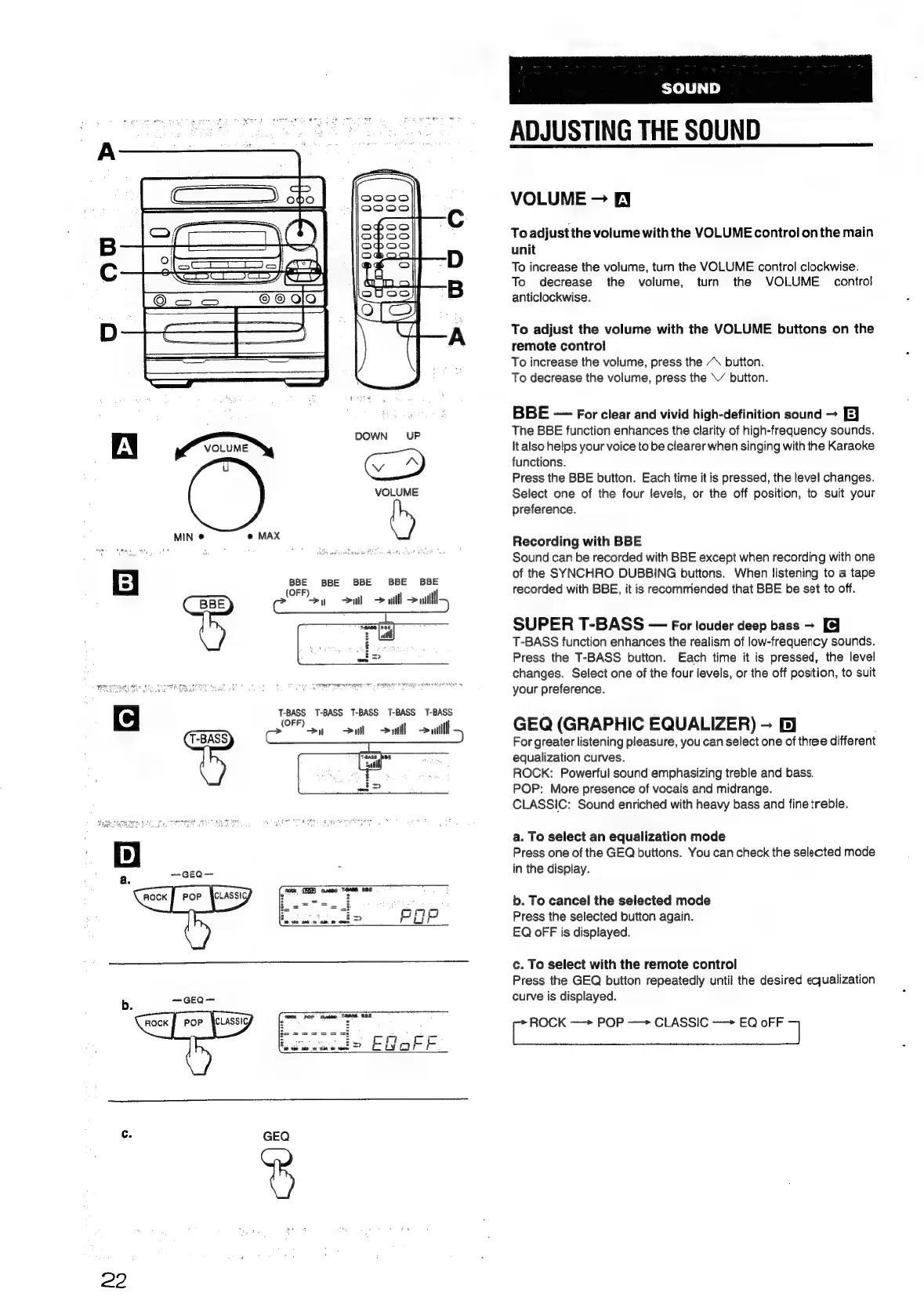
VOLUME
EY
To
adjust
the
volume
with
the
VOLUME
control
onthe
main
unit
To
increase
the
volume,
turn
the
VOLUME
control
clockwise.
To
decrease
the
volume,
turn
the
VOLUME
control
anticlockwise.
To
adjust
the
volume
with
the
VOLUME
buttons
on
the
remote
control
To
increase
the
volume,
press
the
“\
button.
To
decrease
the
volume,
press
the
\’
button.
BBE
For
clear
and
vivid
high-definition
sound
~
EJ
The
BBE
function
enhances
the
clarity
of
high-frequency
sounds.
It
also
helps
your
voice
to
be
clearer
when
singing
with
the
Karaoke
functions.
Press
the
BBE
button.
Each
time
it
is
pressed,
the
level
changes.
Select
one
of
the
four
levels,
or
the
off
position,
to
suit
your
preference.
Recording
with
BBE
Sound
can
be
recorded
with
BBE
except
when
recording
with
one
of
the
SYNCHRO
DUBBING
buttons.
When
listening
to
a
tape
recorded
with
BBE,
it
is
recommended
that
BBE
be
set
to
off.
SUPER
T-BASS
For
louder
deep
bass
>
T-BASS
function
enhances
the
realism
of
low-frequency
sounds.
Press
the
T-BASS
button.
Each
time
it
is
pressed,
the
level
changes.
Select
one
of
the
four
levels,
or
the
off
position,
to
suit
your
preference.
GEQ
(GRAPHIC
EQUALIZER)
-
B}
For
greater
listening
pleasure,
you
can
select
one
of
three
different
equalization
curves.
ROCK:
Powerful
sound
emphasizing
treble
and
bass.
POP:
More
presence
of
vocals
and
midrange.
CLASSIC:
Sound
enriched
with
heavy
bass
and
fine
treble.
a.
To
select
an
equalization
mode
Press
one
of
the
GEQ
buttons.
You
can
check
the
selected
mode
in
the
display.
b.
To
cancel
the
selected
mode
Press
the
selected
button
again.
EQ
oF
F
is
displayed.
c.
To
select
with
the
remote
control
Press
the
GEQ
button
repeatedly
until
the
desired
equalization
curve
is
displayed.
ir
ROCK
—>
POP
CLASSIC
—>
EQ
oFF
71

Table of Contents

Related product manuals