EasyManua.ls Logo

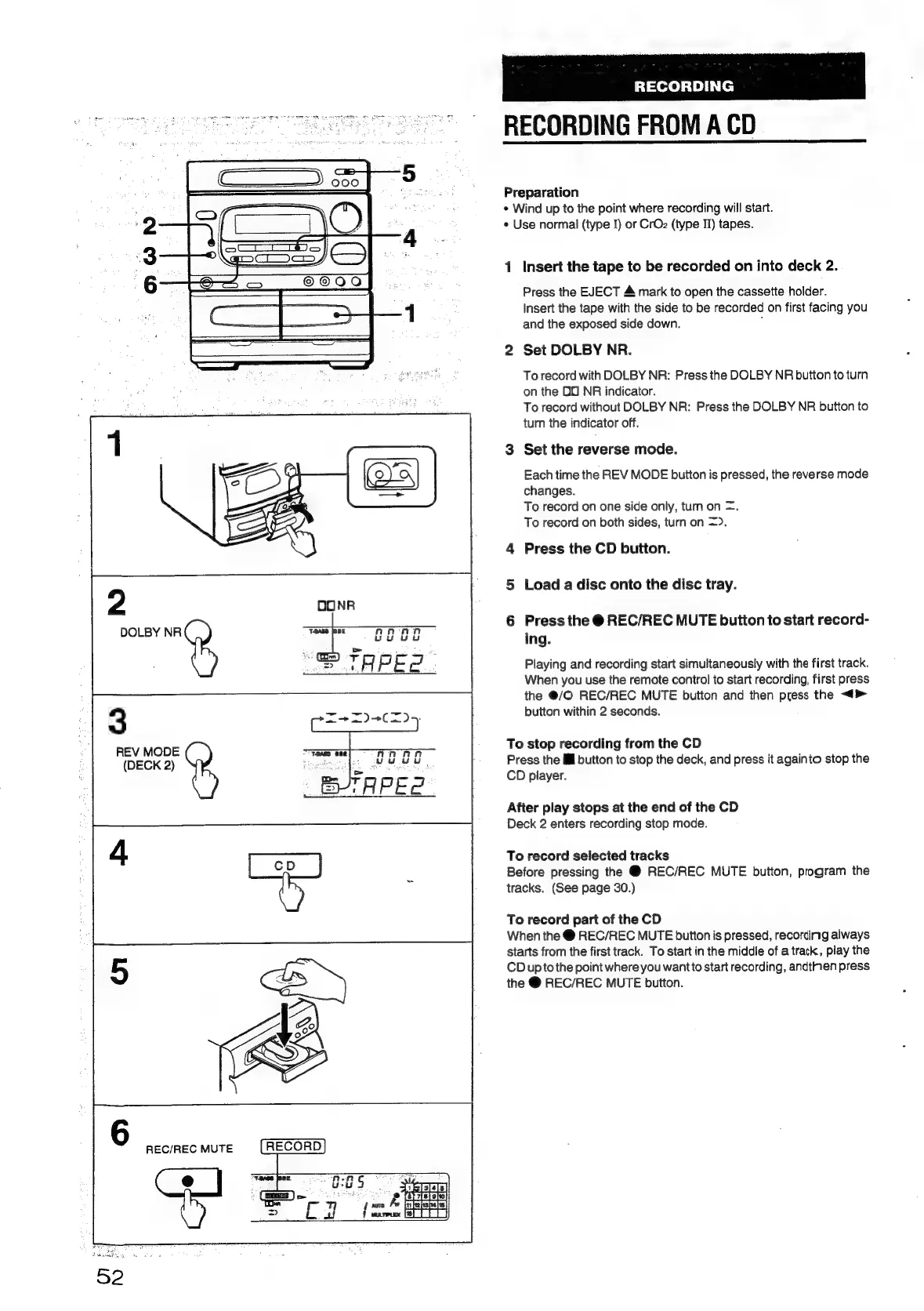
Aiwa NSX-430 - RECORDING FROM A CD

Aiwa NSX-430
84 pages
Print Icon
To Next Page IconTo Next Page
To Previous Page IconTo Previous Page
Loading...
RECORDING
RECORDING
FROM
A
CD
Preparation
*
Wind
up
to
the
point
where
recording
will
start.
*
Use
normal
(type
I)
or
CrOz
(type
II)
tapes.
1
Insert
the
tape
to
be
recorded
on
into
deck
2.
Press
the
EJECT
&
mark
to
open
the
cassette
holder.
Insert
the
tape
with
the
side
to
be
recorded
on
first
facing
you
and
the
exposed
side
down.
;
2
Set
DOLBY
NR.
To
record
with
DOLBY
NR:
Press
the
DOLBY
NR
button
to
turn
on
the
OO
NR
indicator.
To
record
without
DOLBY
NR:
Press
the
DOLBY
NR
button
to
turn
the
indicator
off.
3
Set
the
reverse
mode.
Each
time
the
REV
MODE
button
is
pressed,
the
reverse
mode
changes.
To
record
on
one
side
only,
turn
on
=.
To
record
on
both
sides,
turn
on
=).
4
Press
the
CD
button.
y)
5
Load
a
disc
onto
the
disc
tray.
6
Press
the
@
REC/REC
MUTE
button
to
start
record-
DOLBY
NR
ing.
Playing
and
recording
start
simultaneously
with
the
first
track.
When
you
use
the
remote
control
to
start
recording,
first
press
the
@/O
REC/REC
MUTE
button
and
then
press
the
<>
3
button
within
2
seconds.
REV
MODE
To
stop
recording
from
the
CD
(DECK
2)
cote
de
UU
UU
Press
the
ll
button
to
stop
the
deck,
and
press
it
againto
stop
the
CD
piayer.
After
play
stops
at
the
end
of
the
CD
Deck
2
enters
recording
stop
mode.
To
record
selected
tracks
Before
pressing
the
@
REC/REC
MUTE
button,
program
the
tracks.
(See
page
30.)
To
record
part
of
the
CD
When
the
@
REC/REC
MUTE
button
is
pressed,
recording
always
starts
from
the
first
track.
To
start
in
the
middle
of
a
track,
play
the
CD
upto
the
point
where
you
wantto
start
recording,
andtinen
press
the
@
REC/REC
MUTE
button.
REC/REC
MUTE
ft.
ie
;
Penta
Bishi]
cea
R
OBO
{aura
/w
inifelshe)ss}
f
wareux
[ef
TTT]

Table of Contents

Related product manuals