EasyManua.ls Logo

Aiwa NSX-430 - PROGRAMMED PLAY

Aiwa NSX-430
84 pages
Print Icon
To Next Page IconTo Next Page
To Previous Page IconTo Previous Page
Loading...
CD
PLAYING
~.
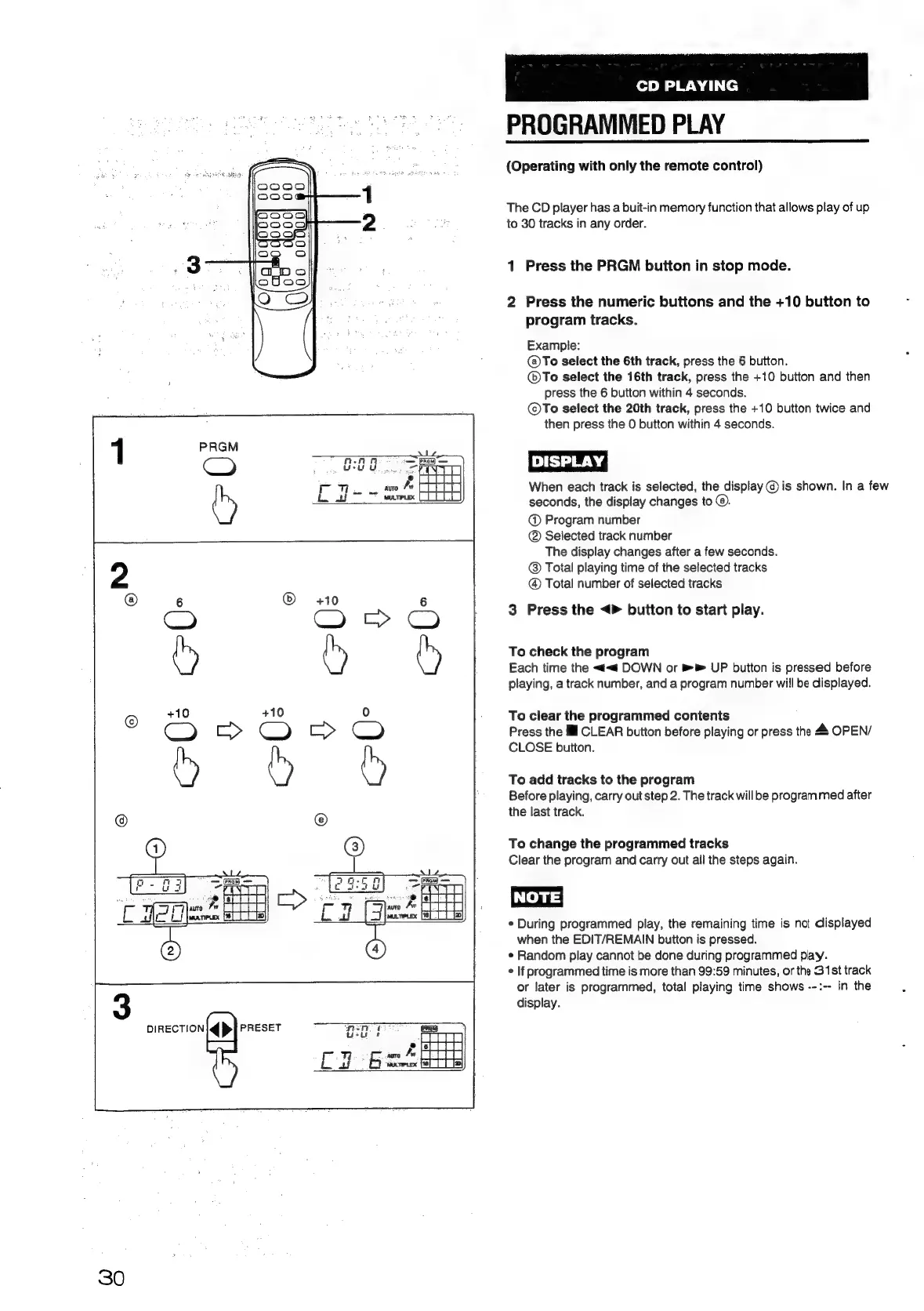
PROGRAMMED
PLAY
(Operating
with
only
the
remote
control)
The
CD
player
has
a
buit-in
memory
function
that
allows
play
of
up
to
30
tracks
in
any
order.
1
Press
the
PRGM
button
in
stop
mode.
2
Press
the
numeric
buttons
and
the
+10
button
to
program
tracks.
Example:
@)To
select
the
6th
track,
press
the
6
button.
@®To
select
the
16th
track,
press
the
+10
button
and
then
press
the
6
button
within
4
seconds.
©To
select
the
20th
track,
press
the
+10
button
twice
and
then
press
the
0
button
within
4
seconds.
DISPLAY
When
each
track
is
selected,
the
display
@
is
shown.
In
a
few
seconds,
the
display
changes
to
©.
@
Program
number
@
Selected
track
number
The
display
changes
after
a
few
seconds.
@
Total
playing
time
of
the
selected
tracks
@
Total
number
of
selected
tracks
3
Press
the
<>
button
to
start
play.
To
check
the
program
Each
time
the
<<«
DOWN
or
®®
UP
button
is
pressed
before
playing,
a
track
number,
and
a
program
number
will
be
displayed.
To
clear
the
programmed
contents
Press
the
Ill
CLEAR
button
before
playing
or
press
the
&
OPEN/
CLOSE
button.
To
add
tracks
to
the
program
Before
playing,
carry
out
step
2.
The
track
will
be
programmed
after
the
last
track.
To
change
the
programmed
tracks
Clear
the
program
and
carry
out
all
the
steps
again.
NOTE)
¢
During
programmed
play,
the
remaining
time
is
net
displayed
when
the
EDIT/REMAIN
button
is
pressed.
e
Random
play
cannot
be
done
during
programmed
play.
*
If
programmed
time
is
more
than
99:59
minutes,
or
the
31st
track
or
later
is
programmed,
total
playing
time
shows
--:--
in
the
display.
DIRECTION
PRESET
30

Table of Contents

Related product manuals